PIM Manager documentation · Verified against PIM Manager 3.0.23.3 on Nov 3, 2026
Reference
The lookup page for PIM Manager: the settings catalog, every published setup script, the error codes the engine reports, and the Microsoft Graph permissions of the engine identity.
Editions
Which capability is in Community, Pro Business, Pro Enterprise and Pro MSP is in the table on Platform and editions. Prices are on invardia.com/pricing.
Settings catalog
Every setting PIM Manager reads is described on the Settings page. Each setting also has its own page at https://invardia.com/docs/pim/settings/<Setting>/, for example IntakeEnabled. In PIM Manager, the information button next to a setting shows the same text.
Setup scripts
Every script you run to install, configure or support PIM Manager has a page with its purpose, the rights it needs, every change it makes, its -WhatIf output and how to undo it. The scripts have no PowerShell module dependencies.
A script marked Download is a single file you fetch and run in two lines:
iwr https://invardia.com/support/pim/<Script>.ps1 -OutFile .\<Script>.ps1
.\<Script>.ps1 -WhatIf
A script marked Release package runs from the PIM Manager release package folder that the guided install downloaded and verified. The guided install itself is started by Invardia’s installer, and a Community installation updates from the folder of the Community release it was installed from.
Network and database
| Script |
Purpose |
Runs from |
| Convert-PimToPrivate |
Convert a public PIM Manager environment to private: runs every step of the conversion in order, with resume. Start here. |
Release package |
| Rebuild-PimEnvInternal |
One step of that conversion: rebuild the Container Apps part as private. Convert-PimToPrivate runs it for you. |
Release package |
| Rebuild-PimEnvExternal |
Rebuild the Container Apps part of an environment built private as public. |
Release package |
| Set-PimSqlPublicAccess |
Turn the PIM SQL server’s public network access off or on. |
Release package |
| Set-PimSqlTier |
Set the PIM Manager SQL database tier and its maximum size. |
Download |
| Remove-PimContainerStack |
Remove the Container Apps part of an environment and keep the data. |
Release package |
PIM Activator
Integrations
Support
Invardia has no access to your installation by default. These scripts are used only when you ask for help with a troubleshooting case and create a Support app yourself; the steps are on Remote support.
| Script |
Purpose |
Runs from |
| Grant-PimSupportAccess |
Give the Support app you created its access for a case, or take it back. |
Release package |
| Grant-PimSupportSqlAccess |
Give the Support app you created its database access, on an installation with a reachable database. |
Download |
| Invoke-PimSupportSqlAccessJob |
Give the Support app you created its database user, on an installation with a private database, from inside. |
Download |
Error codes
When an engine job cannot apply something, PIM Manager reports a stable code of the form pim-<area>-<number>. A released code never changes and is never reused. Open Jobs > Engine logs & errors to see the failing item, the cause and, where the fix is clear from the row, a button that stages the fix in Pending changes. A fix is not written by itself: you commit it.
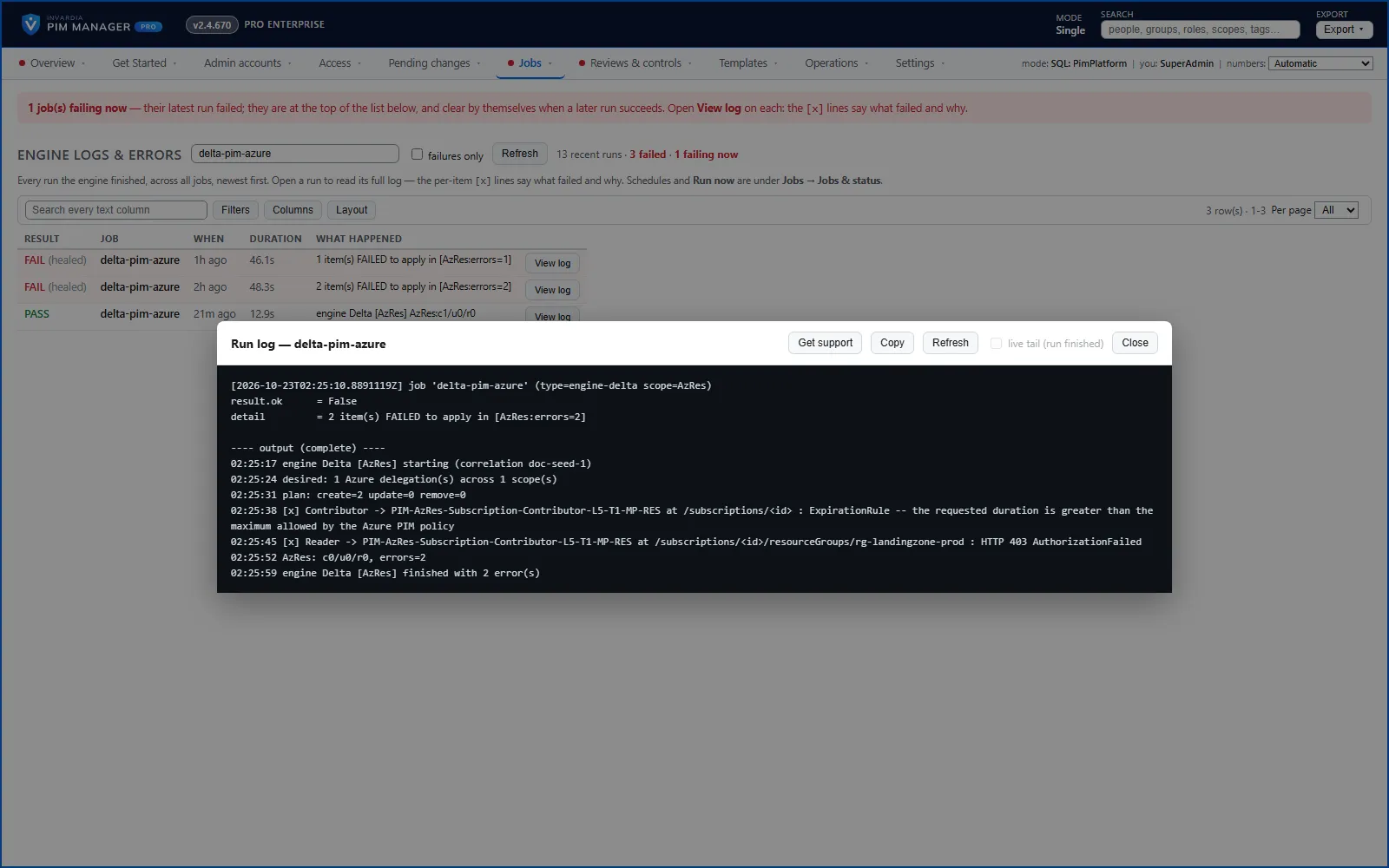
Most failures clear by themselves: the status turns OK on the next run that succeeds, and nothing has to be acknowledged. Where the fix says “Nothing to do”, the cause is on Microsoft’s side or clears on a later run; if the same code keeps recurring, contact support.
The engine job
| Code |
Meaning |
What to do |
| pim-eng-0101 |
The engine job ran out of memory; committed changes wait. |
Nothing when updates are on: the next update gives the job more memory. To do it at once, raise the engine job’s CPU and memory with your Azure administrator or support. |
| pim-eng-0102 |
A run ended without saving its result. |
Nothing to do. |
| pim-eng-0103 |
Microsoft refused a change because the engine identity lacks a permission. |
Open Get Started > Engine permissions and run the shown command as a Privileged Role Administrator (a Global Administrator also can). A new permission can take about 30 minutes to work. |
| pim-eng-0104 |
Microsoft throttled PIM Manager. |
Nothing to do. |
| pim-eng-0105 |
A Microsoft service answered with an error. |
Nothing to do. |
| pim-eng-0106 |
The scheduled run was stopped while running. |
Nothing to do. |
| pim-eng-0201 |
A committed change is not in place in the tenant. |
Nothing to do if it clears on the next run; if it stays, contact support. |
Safety guards
| Code |
Meaning |
What to do |
| pim-grd-0101 |
A change to Azure role policies is held for approval. Every policy change set is held, whatever its size. Nothing changed. |
If intended, a SuperAdmin approves the held change set on Reviews & controls > Approvals (it also shows on Guards, Get Started and Overview); the approval is valid for 24 hours. If not, correct the choice on Templates > Policy settings or the policy template, and commit. See Guards. |
| pim-grd-0102 |
A change to PIM for Groups policies is held for approval, whatever its size. Nothing changed. |
As for pim-grd-0101. |
| pim-grd-0103 |
A change to Entra role policies is held for approval, whatever its size. Nothing changed. |
As for pim-grd-0101. |
| pim-grd-0104 |
More removals than the per-run limit were held. The access is still there. |
If intended, a SuperAdmin releases the held run on Guards, or commit the removals in smaller batches. If not, undo the Remove rows and commit. |
Azure
| Code |
Meaning |
What to do |
| pim-az-0101 |
Azure refused one or more settings of a PIM policy; the others were applied. |
Read Azure’s answer on the item. If it is a permission, run the command on Get Started > Engine permissions. |
| pim-az-0102 |
An assignment still points at the template’s example subscription. |
Press Remove this row on the item, or enter the real subscription in the grid, and commit. |
| pim-az-0103 |
The subscription does not exist in this tenant. |
Correct the subscription in the grid, or remove the row, and commit. |
| pim-az-0104 |
The policy template needs approval, but no approver was found. |
Set owners on the department of the assigned group in Departments & owners, or use a template without approval. |
| pim-az-0105 |
An Azure role has approval switched on and its policy template does not declare it. The engine does not remove an approval because a template lacks it, so it is kept. An approval changes only through a choice a SuperAdmin saves on Templates > Policy settings and approves as a policy change set. |
Nothing to do if the approval is intended. To record it, link the assignment to a template with approval. See How to approve a held policy change. |
| pim-az-0106 |
Azure refuses the length of an active assignment. |
Press Make it Eligible, shorten the assignment, or allow a longer active assignment in the policy template. |
| pim-az-0107 |
The Azure role policy requires MFA for an active assignment, which the engine can never give. |
Press Make it Eligible, or remove that MFA requirement from the policy template. |
| pim-az-0108 |
The Azure role name does not exist at that scope. |
Correct the role name (Role Lookup shows the real names) or remove the row, and commit. |
| pim-az-0109 |
PIM Manager cannot see your management groups and subscriptions; discovery shows no Azure. |
Run the command on Get Started > Engine permissions: it gives the engine identity Reader at the tenant root management group. |
| pim-az-0110 |
Azure did not answer the role lookup. |
Nothing to do. |
Entra ID
| Code |
Meaning |
What to do |
| pim-entra-0101 |
The row names an Entra role this tenant does not have under that name. |
Change the role name to the one your tenant uses (the item shows the closest match), or remove the row. |
| pim-entra-0102 |
An Entra role is given to a group that is not role-assignable. |
Set the group’s definition to role-assignable so the group is created again that way, or give the role to a role-assignable group. |
| pim-entra-0103 |
Two administrative units carry the same name; PIM Manager touches neither. |
Rename or delete the wrong one in the Microsoft Entra admin center. |
| pim-entra-0104 |
The group, role or administrative unit of a role assignment cannot be resolved. |
Remove the assignment, or correct the name or take the group out of Retire, and commit. |
| pim-entra-0105 |
A group is made an active member of a role-assignable group, which Entra does not support. |
Press Make it Eligible or Remove this row and commit. |
| pim-entra-0106 |
An account or group was created moments ago and is not visible yet. |
Nothing to do. |
| pim-entra-0107 |
An object this run created is not visible to Entra ID yet. |
Nothing to do. |
| pim-entra-0108 |
A role scoped to an administrative unit was put among the tenant-wide roles and was refused. |
Move the row to the administrative unit role assignments and commit. |
Groups
| Code |
Meaning |
What to do |
| pim-grp-0101 |
Two groups carry the same name; PIM Manager touches neither. |
Rename or delete the wrong one in the Microsoft Entra admin center. |
| pim-grp-0102 |
A new group’s PIM policy is not ready yet. |
Nothing to do. |
| pim-grp-0103 |
The group this item needs does not exist yet. |
Nothing to do. |
| pim-grp-0104 |
The group’s PIM policy could not be read, so nothing was written. |
Nothing to do if it clears on the next run; if it stays, contact support. |
Defender XDR
| Code |
Meaning |
What to do |
| pim-def-0101 |
A Defender XDR role was created and is not listed yet. |
Nothing to do. |
| pim-def-0102 |
Defender XDR refused a permission whose prerequisite is missing. |
Onboard a Microsoft Sentinel workspace to Defender XDR, or take that permission out of the role in Workload templates. |
| pim-def-0103 |
Two Defender XDR roles share the name. |
Rename or delete the extra role in the Defender portal. |
| pim-def-0104 |
A Defender XDR role of that name exists and was not created by PIM Manager; it is not changed. |
Rename or delete it in the Defender portal, or match the template to it. |
| pim-def-0105 |
The Defender XDR assignment is shared with other principals; it is not changed. |
Give the group its own assignment in the Defender portal. |
Power BI
| Code |
Meaning |
What to do |
| pim-pbi-0101 |
PIM Manager is not in this Power BI workspace yet: its identity is not a member or admin of the workspace, so nothing was given in Power BI for this row. |
A Fabric administrator runs Initialize-PimWorkloadPrereqs with -Workload PowerBI -AddEngineToWorkspaces, the two lines PIM Manager shows next to the Power BI rows, signed in as a person. It adds PIM Manager’s identity as Admin of each workspace. Run it again when a new workspace gets a row. |
| pim-pbi-0102 |
PIM Manager cannot use the Power BI admin API yet. |
A Fabric administrator runs Initialize-PimWorkloadPrereqs as shown, and the Fabric admin API settings allow service principals. |
| pim-pbi-0103 |
The Power BI workspace was not found. |
Correct the workspace on the row, or remove the row, and commit. |
Workload connectors
| Code |
Meaning |
What to do |
| pim-wl-0101 |
Removing a workload access needs data the row does not have. |
Fill in what the item names and commit, or remove the access in the workload and stop managing the row. |
| pim-wl-0102 |
The row names a workload connector that does not exist. |
Correct the Workload column (Workload templates lists them) or stop managing the row. |
| pim-wl-0103 |
The row names a role the workload does not have. |
Correct the role name, or create the role in the workload. |
| pim-wl-0104 |
The row names a group that does not exist. |
Check the group tag on the row; a group defined moments ago is created on the next run. |
| pim-wl-0105 |
The row does not say which resource it is for. |
Fill in the Resource column and commit. |
| pim-wl-0106 |
The group is not set up in the workload yet. |
Set the group up in the workload once (Workload templates shows the prerequisites). |
| pim-wl-0107 |
The row cannot be applied as written. |
Set Action to Assign or Remove, or correct the custom workload’s sign-in in Custom workloads. |
Accounts and Temporary Access Pass
| Code |
Meaning |
What to do |
| pim-tap-0101 |
The admin account is not created yet, so its Temporary Access Pass waits. |
Nothing to do. |
| pim-tap-0102 |
The tenant’s Temporary Access Pass policy refused the pass. |
In Authentication methods, allow a one-time pass and a lifetime range that covers the admin’s pass lifetime. If Get Started > Engine permissions lists Policy.Read.All as missing, grant it: the engine then reads the policy first and asks for a pass that fits. |
| pim-tap-0103 |
Nobody to send the Temporary Access Pass to. |
Set an owner on the admin’s department, or set the admin’s office email address in Accounts & TAP. |
Hybrid Active Directory
| Code |
Meaning |
What to do |
| pim-ad-0101 |
The hybrid worker may not delete groups in the OU for new AD groups, so the approved clean-up did nothing. |
A domain administrator runs Initialize-PimHybridWorkerAd with -AllowGroupCleanup, as Settings > Hybrid Active Directory shows. |
Updates
| Code |
Meaning |
What to do |
| pim-upd-0101 |
An update did not reach every part of PIM Manager. |
Nothing to do. |
| pim-upd-0102 |
No Pro license is stored, so the Pro update was not fetched. PIM Manager keeps running. |
Register the Pro license under Settings > Licence. If it stays, contact support. |
Generic codes
A failure without its own code gets the generic code of its cause.
| Code |
Meaning |
What to do |
| pim-gen-0001 |
A problem PIM Manager does not recognize yet. Nothing was changed wrongly. |
Nothing to do if it clears on the next run; if it stays, contact support. |
| pim-gen-0002 |
A row or setting cannot be applied as written. |
The item in Jobs > Engine logs & errors shows what to change. |
| pim-gen-0003 |
A row names something that does not exist in the tenant. |
The item shows what to correct or remove. |
| pim-gen-0004 |
An object is not visible at Microsoft yet. |
Nothing to do. |
| pim-gen-0005 |
Microsoft asked PIM Manager to slow down. |
Nothing to do. |
| pim-gen-0006 |
A Microsoft service error. |
Nothing to do. |
| pim-gen-0007 |
A large change is held for approval. |
Review the held change and approve it, or correct its cause. |
| pim-gen-0008 |
A committed change is not in place in the tenant. |
Nothing to do if it clears on the next run; if it stays, contact support. |
| pim-gen-0009 |
A permission is missing. |
Run the command on Get Started > Engine permissions as a Privileged Role Administrator (a Global Administrator also can). |
| pim-gen-0010 |
A run was stopped while it was still running. |
Nothing to do. |
| pim-gen-0011 |
The engine job needs more resources. |
Nothing when updates are on; support can do it with you. |
| pim-gen-0012 |
The tenant lacks the Microsoft service a step needs. Nothing is wrong. |
Nothing to do; the step starts when you add the service. |
| pim-gen-0013 |
The tenant lacks the data a step reads. Nothing is wrong. |
Nothing to do. |
| pim-gen-0014 |
A run result could not be saved. |
Nothing to do if it clears on the next run; if it stays, contact support. |
Engine permissions
The one list of the engine identity’s Microsoft Graph permissions and Azure roles, with the reason for each and who grants it, is on Engine permissions. Get Started > Engine permissions in PIM Manager compares that list with what the identity really holds and shows the command that grants what is missing; a Privileged Role Administrator runs it for Graph permissions, and an Owner or User Access Administrator for Azure roles. Grant-PimEnginePermissions runs the command.
The engine holds no tenant-wide Mail.Send. PIM Manager sends mail as one shared mailbox, through an Exchange role assignment scoped to that mailbox (Initialize-PimMailSender).
Verified against PIM Manager 3.0.23.3 on Nov 3, 2026Download PDF

