

PIM Manager documentation · Verified against PIM Manager 3.0.23.3 on Nov 3, 2026
Security design
PIM Manager governs the most powerful access in your Microsoft tenant, so it has to be held to a higher standard than the access it governs. This chapter names each identity, the right it holds, its scope and the control around it.
The principles
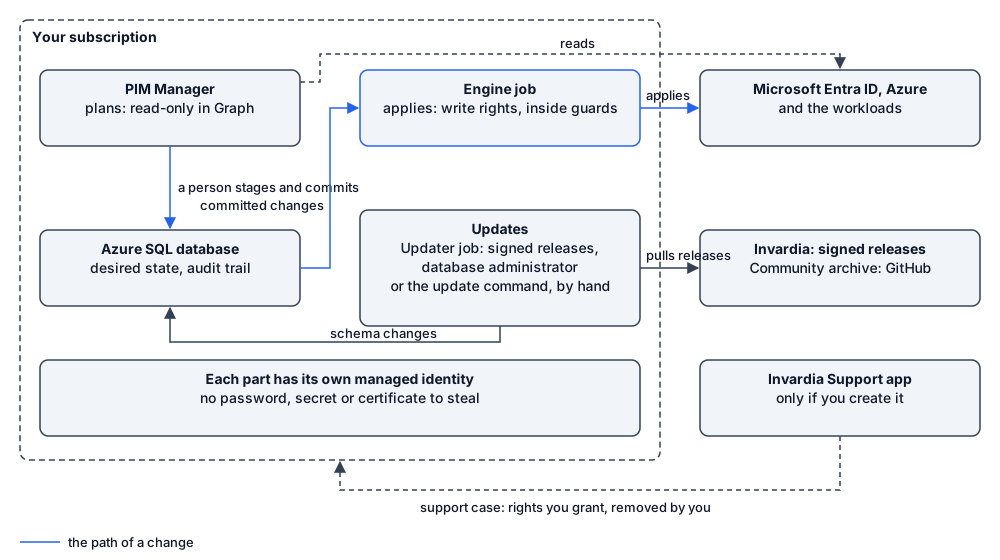
- It runs in your subscription. PIM Manager, the engine and the database are installed in your own Azure subscription. Invardia does not host your directory data or your database.
- One identity per component. PIM Manager, the engine and the updater each sign in as their own managed identity, with the rights their job needs.
- The engine applies, PIM Manager plans. The engine’s identity holds the write rights in Microsoft Entra ID and Azure. PIM Manager’s own identity holds read-only Microsoft Graph permissions. A few optional components write in their own area; Approval and audit holds the one list of the paths that write to your tenant and who authorizes each.
- Changes wait for review. A change you make to the desired state in PIM Manager waits under Pending changes until someone commits it, and the stored model is backed up first. The engine applies what was committed, inside the safety guards, plus the automatic paths you control in Settings, which the same list names.
- Only what you defined. The engine changes only objects your data defines. The engine does not remove, disable or revoke your listed break-glass accounts. An object PIM Manager does not own is reported and not removed automatically; a SuperAdmin can delete it from the Drift page, as a commit.
- No vendor access by default. The connections to Invardia are made by your installation, outbound, and each one can be switched off. Invardia has no access to your installation unless you create the Invardia Support app for a troubleshooting case.
- The updater is a database administrator. The updater applies releases without a person, so it holds full database rights and Contributor on the PIM resource group. If you update by hand instead, the person who runs the update command signs in and is made a database administrator for it. The updater says what that allows and how to remove it.
Topics
| Page | What it covers |
|---|---|
| Identities | Every identity the product creates or uses, its right and its scope |
| Engine permissions | Each Microsoft Graph permission and Azure role of the engine, and why |
| Database | One database user and one role per component, the signed grant procedure, the admin group |
| Sign-in | The sign-in front, Manager roles and the access layers |
| Approval and audit | Staged commits, approvals, guards, automatic write paths and the audit trail |
| Support access | The Invardia Support app you can create for a troubleshooting case, and how you end it |
| Updates and license | Signed releases, your update controls, the signed license |
| Data | What is read, stored and sent, retention and data location |
| Database access | The least-privilege database model in detail |
Hardening you add
The product cannot do these for you, because they are your tenant’s decisions:
- List your break-glass accounts in Settings; the list is empty until you do.
- Require MFA and a compliant device for the Manager’s sign-in app with Conditional Access. PIM Manager does not enforce MFA itself.
- Name the people and groups who may sign in to PIM Manager, rather than letting every member account in.
- Set Second approver to Sensitive on Pending changes, so that a different administrator commits each sensitive change. On Pro, you can also switch on maker/checker (Second-approver on sensitive changes under Settings > Features & edition), so that a different administrator approves a sensitive change before it commits; Community has no maker/checker. Switch on Require a second person on the Guards page for guard releases.
- Keep the SuperAdmin role to a few named people. A SuperAdmin can save PIM policy choices and approve the resulting change set alone; see Policy changes and self-approval.
- Restrict who may create security groups in Microsoft Entra ID. The engine finds a group by its display name, so a group someone creates in advance with the name of a future permission group can be taken over by the engine and given that group’s role; see Naming.
- Use the private network mode for production, or at least add IP allow-rules.
- Treat the engine’s and the Manager’s managed identities, the updater and anyone with Contributor on the PIM resource group as tier-0, and monitor them.
- Switch on Azure SQL auditing to your Log Analytics workspace; the installer does not.
- Create the Invardia Support app only for a support case, at the lowest level that helps, and remove it when the case is closed.
- Set the audit retention and the Log Analytics retention to your policy.
Verified against PIM Manager 3.0.23.3 on Nov 3, 2026Download PDF