

PIM Manager documentation · Verified against PIM Manager 3.0.23.3 on Nov 3, 2026
MSP: managing and managed tenants
An MSP defines its admins and delegations once in its own PIM Manager, the managing tenant. Each customer’s PIM Manager, a managed tenant, pulls a signed baseline, verifies it and applies it with its own identity. The managing tenant holds no credential in a customer tenant; each customer’s own engine writes there, and the managed tenant’s trust settings limit what it accepts.
Available in the Pro MSP edition; not in Community.
The problem
An MSP’s engineers need privileged access in many customer tenants. Creating the same admin accounts and delegations by hand in each tenant drifts within weeks, and leavers stay active somewhere. The common fix, one central identity with write rights in every customer tenant, is the identity attackers look for: one compromise reaches every customer.
How it works
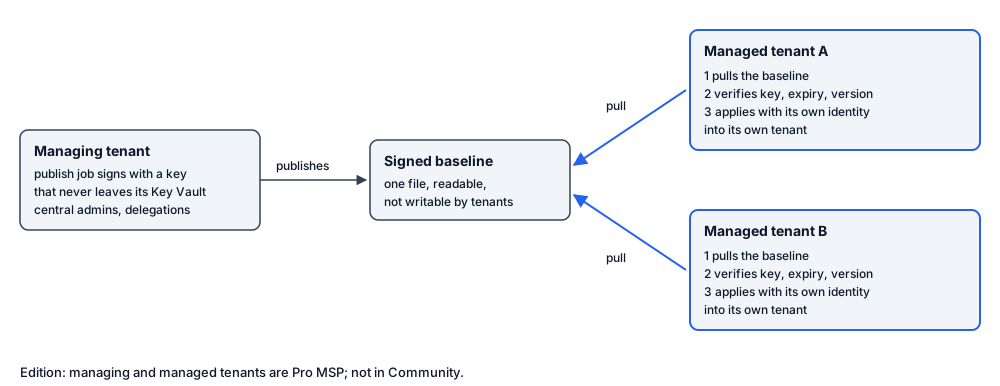
- The managing tenant publishes. A job in the managing tenant’s own Azure environment builds the baseline every day and on demand, and signs it with an RSA key that never leaves the managing tenant’s Key Vault (the key is non-exportable). The job runs as its own managed identity, with no certificate, secret or storage key. It checks the signature and reads the published baseline back the way a managed tenant reads it, and only then reports success.
- Each managed tenant pulls. The managed tenant reads the one baseline file over the network: through a private endpoint when the two networks are connected, or as a read of that one file from the networks the managing tenant names. No link expires and no credential is shared. The signature, not the network, is what the managed tenant relies on.
- It verifies. The managed tenant refuses the baseline unless all of these hold: the signature is valid; the signing key is one this tenant trusts (you configure the key identifiers once, and several can be trusted at the same time, so the MSP can change keys without interruption); the baseline has not expired; the signer is not on this tenant’s revoked list; and the version is not older than the last one applied, so an old baseline cannot be replayed.
- It applies with its own identity. The managed tenant’s own job applies the baseline into its own tenant, with its own managed identity and its own Microsoft Graph permissions, through the same guards as any other change. Its data stays in its own database; the managing tenant does not read it.
The baseline is signed, not encrypted: the customer can read exactly what the MSP sends.
Central admins
On the managing tenant, an admin reaches managed tenants only when its own record says so. For each admin you choose:
- Managing tenant only. The admin stays local.
- Replicate to managed tenants. The admin is sent to every managed tenant its rollout wave and tags admit.
- Follow the delegations. The admin is sent only where a replicated delegation names that person.
A replicated admin is governed by the managing tenant, including its status and its auto-disable date, which flow down with it. Managed tenants keep their own local admins separately. On a managed tenant, every record carries a Source column (from the managing tenant, or local), so nobody confuses the two.
Decide what reaches which tenant
- Rollout waves. Every managed tenant is in a wave, and every replicated row can carry one. By default there are three, numbered 0, 1 and 2: wave 0 for a few early tenants, wave 1 for more, wave 2 for every managed tenant. You can rename them and add more, up to ten. A row reaches the tenants whose wave is at or below its own, so a new admin starts on the first wave and is promoted wave by wave.
- A row with no wave. A replicated admin with no wave reaches no managed tenant. Any other replicated row with no wave (a group, a nesting or a role binding) is not limited by wave and reaches every managed tenant its target and tags admit. To roll a change out wave by wave, set a wave on every row.
- Two copies of a tenant’s wave. A managed tenant declares its own wave when it is built, and that wave decides what its pull accepts. The managing tenant keeps a copy in its registry for its previews. PIM Manager does not keep the two in step: when they differ, the preview is wrong for that tenant, and the tenant’s own wave decides. Change both when you move a tenant to another wave.
- Tags. The managing tenant can narrow a wave with a tag rule, for example “only tenants tagged region-eu”. Tenant tags live in the managing tenant’s record and travel inside the signed baseline, so a tenant cannot tag itself into scope.
- Preview. The managing tenant’s Replication overview shows, per row, which managed tenants it reaches, and per role which tenants it is withheld from and why (the wave, the target, the relationship policy, a capability the customer switched off, or something unresolved). The preview runs the same plan every managed tenant runs.
A row the wave does not admit is withheld, not retracted: the tenant does not receive it, and what it already holds stays untouched.
Removals and leavers
- Remove in all, some or none. When you remove a replicated admin or record on the managing tenant, PIM Manager asks whether the managed tenants should remove it too, in all of them or only the ones you pick. The chosen tenants remove it on their next pull; the others keep it and report it.
- Withdrawing what a tenant already holds is a separate, deliberate act. It is off by default, reported first, and stopped rather than exceeding a safety limit.
- Revoke sessions everywhere. When you revoke an admin’s sign-in sessions on the managing tenant, you can have every managed tenant revoke that person’s sessions too. Each tenant does it once, on its next pull, and checks that it took effect. Break-glass accounts are not revoked.
- Account deletes. A delete sent by the managing tenant names one admin and carries the managing tenant’s SuperAdmin approval. The managed tenant then deletes that account, at most one central admin per run (a second one waits for the next run and stays disabled meanwhile). A delete without that approval only disables the account. See Guards.
What each side can see
The PIM Manager header shows the tenant’s mode (single tenant, managing tenant or managed tenant), so nobody has to guess whether a change is local or arrives from the managing tenant. The managing tenant sees its managed tenants, their waves and tags, and whether the last publish carried them. It does not see a managed tenant’s own drift or conformance; that stays in the managed tenant’s PIM Manager.
Set it up
- Build the managing tenant with Invoke-PimMspBuild from one configuration file of ids and names. Without
-Applyit prints the plan. The build creates the signing key and prints its key identifier for the managed tenants to trust. - Build each managed tenant with the same script. It prints the managed tenant’s network details for the managing tenant’s configuration.
- Add those details to the managing tenant’s configuration and run the network step again.
- Optionally start a managed tenant from the managing tenant’s settings with Copy-PimSettings, which refuses settings that name the environment itself.
A managing or managed tenant requires a Pro MSP license: without one, its publish and pull jobs refuse to run, and PIM Manager shows a red banner on its MSP pages.
Related pages
Verified against PIM Manager 3.0.23.3 on Nov 3, 2026Download PDF