

PIM Manager documentation · Verified against PIM Manager 3.0.23.3 on Nov 3, 2026
MCP server for AI assistants
PIM Manager has a Model Context Protocol (MCP) endpoint, so an AI assistant can answer questions such as “who can reach Global Administrator?” from your live data and stage changes for you. The assistant acts as the person who signed in, with that person’s PIM Manager role, and every call is audited.
Available in Pro editions; not in Community.
The problem
AI assistants are useful for questions that cross many screens: what one person can reach through nesting, which jobs failed, what is waiting to be committed. Giving an assistant its own service identity with read or write rights in your tenant creates an identity nobody signs in as, with access nobody reviews.
How it works
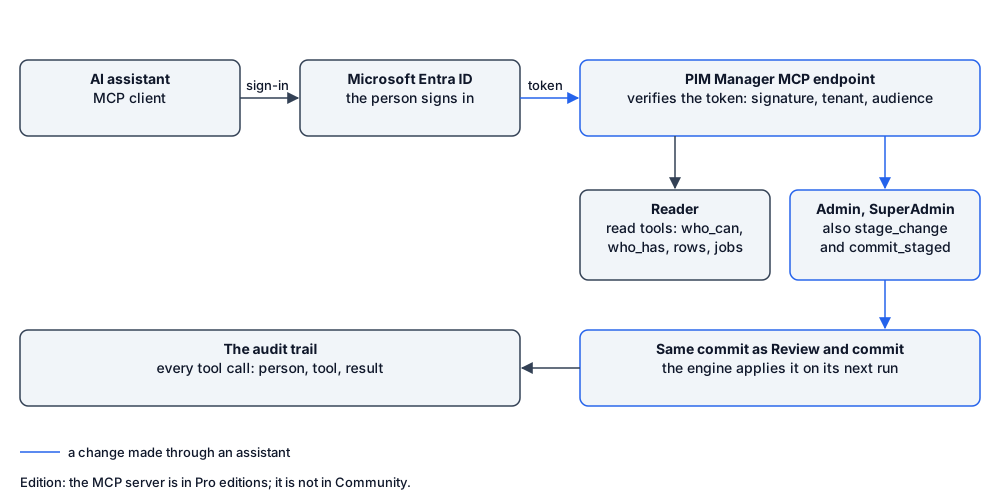
The MCP endpoint is part of PIM Manager itself, at https://<your PIM Manager>/mcp. It speaks MCP over HTTP (one JSON-RPC message per request, JSON answers).
- A person signs in. The assistant sends an Entra access token for the PIM Manager API with the delegated scope
mcp.access. PIM Manager verifies the token itself: the signature against your tenant’s signing keys, the issuer (your tenant only), the audience, the expiry and the scope. An application token without a signed-in person is refused. - Sign-in discovery. A call without a token gets
401with the address of the protected-resource description, so an MCP client finds where to sign in by itself. - The person’s role decides. The person’s PIM Manager role (Reader, Admin or SuperAdmin) decides which tools the assistant sees and may call. Someone without one of these roles is refused, and so is a delegated operator.
- Same checks as the portal. Row lists are scoped to what the person may see in PIM Manager. A commit goes through exactly the same commit as Review & commit.
- Audited. Every tool call, reads included, is written to the audit trail with the person, the tool and the result.
The endpoint never activates a role. Activation stays in Microsoft Entra PIM.
What an assistant can do
| Tool | Kind | Minimum role | What it returns or does |
|---|---|---|---|
whoami |
Read | Reader | The signed-in identity, its PIM Manager role and the PIM Manager version. |
who_can |
Read | Reader | Everything one person can reach: every role, group and resource, directly and through nesting. |
who_has |
Read | Reader | Who can activate a role or reach a target (Entra role, role scoped to an administrative unit, Azure resource role). |
list_rows |
Read | Reader | Rows of one configuration entity, optionally filtered by a text, scoped to what the person may see (at most 500). |
pending_changes |
Read | Reader | Everything staged and waiting to be committed: entity, add / modify / remove, who staged it and when. |
jobs_status |
Read | Reader | Every engine job: enabled, last run, result and next run. |
problems |
Read | Reader | The validation report (Check for problems): errors and warnings with a fix hint. |
access_requests |
Read | Admin | Access requests: account windows and ad-hoc group memberships, their state and who decided. |
audit_search |
Read | Admin | The audit trail of the last month: who did what, when and with what result. |
stage_change |
Propose | Admin | Stages one change (add, modify or remove a row). It waits under Pending changes, locked to that person, and is not applied. |
commit_staged |
Commit | Admin | Commits the changes this person staged on one entity, through the same commit as the portal: validation, the second-approver rule for sensitive changes such as Tier-0 and Tier-1 access (when it is on), the offboarding hold and the concurrency check. A refusal says why. |
On a managing tenant (MSP), two more read tools list the managed tenants and show what one managed tenant receives. They read the managing tenant’s own data only and never reach into a managed tenant.
Read-only or write
- A Reader gets read tools only.
- An Admin or SuperAdmin can also stage and commit. A staged change is locked to the person who staged it, and
commit_stagedcommits only that person’s own staged changes. - Committed changes are applied by the PIM Manager engine on its next run, like any other commit. Follow them in the commit watcher in PIM Manager.
If you want an assistant to read only, give the people who use it the Reader role, or keep the MCP server switched off. An assistant cannot commit anything while the MCP server is off, which is the default.
Where the data goes
PIM Manager answers the assistant from your own installation. What the assistant reads, such as who holds which role, is then sent to the AI provider behind the assistant you use, under that provider’s terms. Choose the assistant and the provider with that in mind.
Set it up
- A SuperAdmin switches on MCP server (AI assistants and agents) under Settings > Features (FeatureGates.mcp.server). It is off by default.
- The MCP sign-in is registered for your PIM Manager once: the PIM Manager API app gets the
mcp.accessscope, and PIM Manager pins your tenant and that audience. Until it is, the endpoint refuses every call and says that MCP sign-in is not configured. You run this step once withSet-PimManagerMcpAuth.ps1from the release package. It takes three values:-SubscriptionId(the subscription PIM Manager runs in),-ResourceGroup(its resource group) and-TenantId(your tenant). Without-Applyit only shows what it would change; run it again with-Applyto make the change. It prints the scope your MCP client asks for,api://<PIM Manager sign-in app id>/mcp.access. - In your MCP client, add the server address
https://<your PIM Manager>/mcpand sign in with your own work account. A client that supports discovery reads the sign-in details from the server itself.
Related pages
Verified against PIM Manager 3.0.23.3 on Nov 3, 2026Download PDF