

PIM Manager documentation · Verified against PIM Manager 3.0.23.3 on Nov 3, 2026
Integrate
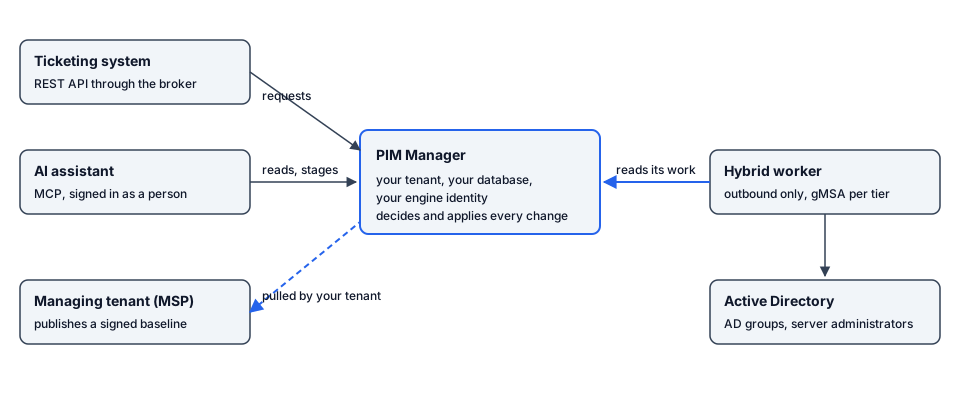
PIM Manager connects to the systems around your privileged access: ticketing systems, AI assistants, on-premises Active Directory and, for an MSP, other tenants. In these integrations an identity in your own tenant applies the change: the PIM Manager engine, a managed tenant’s own engine, or, for Active Directory, your hybrid worker.
The problem
Privileged access rarely lives in one place. A request starts in a ticketing system, an engineer asks an AI assistant who has which role, the domain controllers still hold the server administrators, and an MSP looks after many customers. If each of these systems writes access on its own, nobody can say who changed what, and every system needs broad rights in your tenant.
How PIM Manager solves it
Each integration hands its work to PIM Manager, and the PIM Manager engine applies it with your engine identity, through the same checks, guards and audit trail as a change made in the portal.
| Integration | What it does | Who acts in your tenant | Page |
|---|---|---|---|
| REST API for ticketing systems | A system such as ServiceNow enables a disabled admin account or adds a group membership for a set number of hours, reads the status and cancels early. It can also propose a standing change for an administrator to review. | The PIM Manager engine, after it checks the caller again | REST API and ServiceNow |
| MCP server for AI assistants | An AI assistant, signed in as a person, reads who has what, pending changes, jobs and problems, and stages or commits changes within that person’s PIM Manager role. | The person behind the assistant, through the normal commit | MCP server |
| Hybrid Active Directory | Admin accounts in on-premises AD, PIM groups mirrored to AD groups, time-limited AD membership for activated PIM groups, and server local administrators. | The hybrid worker, as one gMSA per tier | Hybrid Active Directory |
| MSP | A managing tenant defines admins and delegations once; each managed tenant pulls a signed baseline, verifies it and applies it with its own identity. | Each managed tenant’s own engine | MSP: managing and managed tenants |
What every integration shares
- Your tenant applies the change. The broker, the MCP endpoint, the hybrid worker and the managing tenant hold no right to change Entra ID roles or PIM groups in your tenant. The API broker has no PIM rights at all. The hybrid worker reads Entra ID only.
- Whose decision it is. An API request of type
enableorgroupis applied on your ticketing system’s approval, within the limits on REST API and ServiceNow. An AI assistant acts with the PIM Manager role of the person who signed in. A managed tenant applies what the managing tenant signed, within the keys it trusts. - Off until you switch it on. The REST API, the MCP server and the hybrid worker are feature switches under Settings > Features, and each is off by default.
- Recorded. Access requests, every MCP tool call (reads included) and the hybrid worker’s AD account changes, server groups and approved group deletions go to the audit trail. Each baseline pull keeps what it sent and applied with its run, shown on the job schedule.
- Edition. The integrations are Pro capabilities; none is in Community. The MSP integration is part of the Pro MSP edition.
Related pages
- Security design explains the identities and rights each part holds.
- Settings lists every setting the integrations read.
- Reference links every setup script.
Verified against PIM Manager 3.0.23.3 on Nov 3, 2026Download PDF