

PIM Manager documentation · Verified against PIM Manager 3.0.23.3 on Nov 3, 2026
Identities
A shared identity means a compromise of one part is a compromise of all of them. PIM Manager gives each component its own identity, and none of the runtime identities stores a credential.
Runtime identities
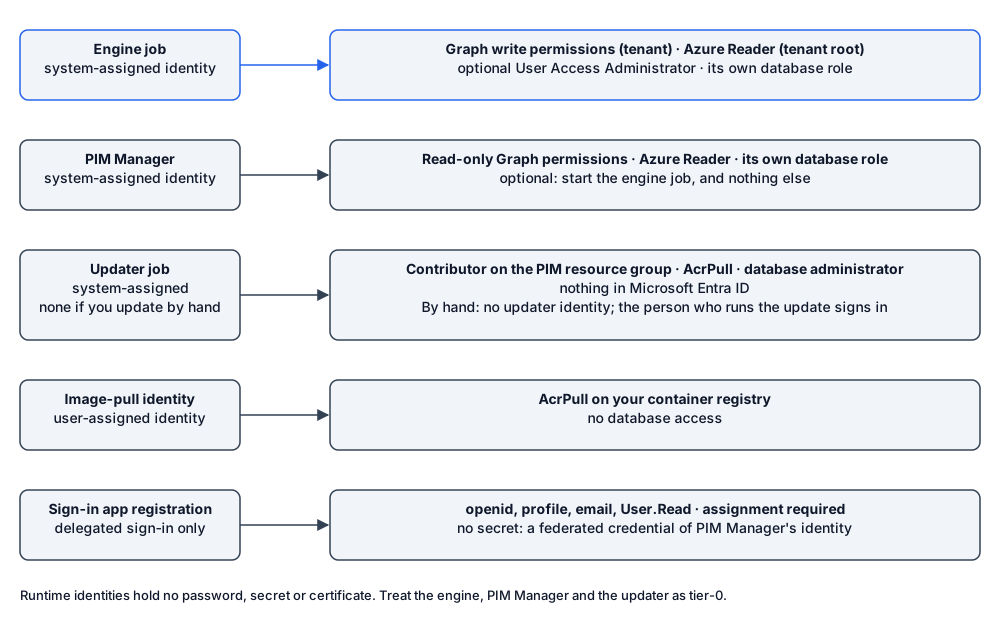
| Identity | Kind | Right | Scope |
|---|---|---|---|
| Engine job | System-assigned managed identity | The engine’s Microsoft Graph application permissions (list); Azure Reader; optionally User Access Administrator; its own database role | Tenant; tenant root management group; the PIM database |
| PIM Manager | System-assigned managed identity | Read-only Microsoft Graph application permissions; Azure Reader; its own database role; Container Apps Jobs Operator, only if you grant it (see below) | Tenant; hosting subscription and the PIM resource group; the PIM database; the engine job only |
| Updater job (none when you update by hand: the person who runs the update signs in) | System-assigned managed identity | Contributor; AcrPull; its own database role plus the schema role; member of the database admin group, which makes it a full database administrator | The PIM resource group; your container registry; the PIM database |
| Image-pull identity | User-assigned managed identity | AcrPull | Your container registry only. No database access |
| Sign-in app registration | App registration | Delegated sign-in only (openid, profile, email, User.Read); assignment required | The signed-in user. Its client credential is a federated credential of the Manager’s managed identity |
The engine and PIM Manager run as managed identities, so there is no password, secret or certificate to steal, expire or rotate. An engine that runs on your own server instead signs in as an application with a certificate from the machine certificate store.
The updater can change every resource in the PIM resource group, including the engine job’s image and settings, and it administers the database. Treat it, and anyone with Contributor or Owner on that resource group, as tier-0. The updater says what it can do in the database, why, and how to remove it.
The standard install does not give PIM Manager the right to start the engine job. Without it, a commit or Run now is picked up by the engine’s next scheduled start, within about five minutes. With the Azure role Container Apps Jobs Operator on the engine job only, PIM Manager can start the engine right after a commit; that role can start, stop and read that one job and nothing else. Setup describes the grant.
Optional identities
| Identity | When | Right | Scope |
|---|---|---|---|
| Database setup identity | Private installation | Member of the database admin group; the in-cloud database setup job runs as it | The PIM database |
| Access request broker | Access request portal (Pro; not in Community) | Storage Table Data Contributor; send right on the sender mailbox | Its own storage account, with shared keys off; one mailbox |
| Managed tenant pull job | Pro MSP, managed tenant; not in Community | The engine permission set, applied to its own tenant | The managed tenant |
| Definition publish job | Pro MSP, managing tenant; not in Community | Storage Blob Data Contributor; Key Vault Crypto User; read on named database objects | The definition container only; the signing key only (sign and verify); the PIM database |
| Hybrid worker | PIM for Active Directory (Pro; not in Community) | Read-only Microsoft Graph (Group.Read.All, User.Read.All, PIM for Groups assignments); Storage Blob Data Reader; a database user without schema rights; in AD, rights on the organizational units you name. Optionally Mail.Send, see below | Tenant; one source container; the PIM database; your OUs |
| Hybrid worker gMSAs | PIM for Active Directory (Pro; not in Community) | One group managed service account per privilege tier, each with only its tier’s rights | The organizational units and server OU you name |
| PIM Activator app | PIM Activator | Delegated permissions, bounded by the signed-in user’s own eligibility | The signed-in user |
| Mail sender | Notification mail | Exchange RBAC for Applications: Application Mail.Send | One shared sender mailbox. The engine and PIM Manager do not get tenant-wide Mail.Send |
| Invardia Support app | Only if you create it for a support case | See Support access | The level you choose |
Hybrid worker mail
The hybrid worker can mail a new AD admin account’s first password. That needs a send right. PIM Manager’s scripts grant one only when you deploy or grant the worker with -GrantMailSend, which is off by default: the Microsoft Graph application permission Mail.Send. Mail.Send granted this way is tenant-wide: it lets the worker’s identity send as any mailbox. This is different from the mail sender, whose send right is scoped to one mailbox.
Without the mail, a new AD admin account is held and reported, not created: the worker does not create an account whose first password nobody receives. If you need the mail, prefer the narrower model the mail sender uses: leave -GrantMailSend off and give the worker’s identity Application Mail.Send through Exchange Online RBAC for Applications, on a management scope that holds only its sender mailbox. Microsoft recommends RBAC for Applications over the older application access policies. See Hybrid Active Directory.
Your own accounts
- Break-glass accounts are yours, not created by the product. Listed in Settings, they are not removed, disabled or revoked by the engine. If the list cannot be read, every account is treated as protected.
- The person who installs is a member of the database admin group only for the length of the install, and is removed at the end.
Identity monitoring
The engine’s Microsoft Graph permissions are tier-0 equivalent: RoleManagement.ReadWrite.Directory can assign any directory role and AppRoleAssignment.ReadWrite.All can grant any application permission. Treat the engine’s managed identity as a tier-0 asset and monitor it with your workload-identity alerts. PIM Manager’s identity can stage and commit changes in the database and, if you grant it, start the engine job, so monitor it too. The controls around the engine are described in Engine permissions.
Verified against PIM Manager 3.0.23.3 on Nov 3, 2026Download PDF