

PIM Manager documentation · Verified against PIM Manager 3.0.23.3 on Nov 3, 2026
Engine permissions
Managing privileged access needs privileged rights: the engine creates admin accounts, groups and role assignments. PIM Manager concentrates those rights in one identity, the engine’s managed identity, and puts controls around everything it does.
Microsoft Graph application permissions
Setup grants the engine’s managed identity exactly this set, tenant-wide. A refused grant stops the installation and names the permission. This page is the one list of the engine’s permissions and roles.
| Permission | Why the engine needs it |
|---|---|
| Directory.Read.All | Read users, groups, roles and directory objects to compare them with your definitions |
| User.ReadWrite.All | Create and maintain the dedicated admin accounts |
| Group.ReadWrite.All | Create and maintain delegation groups and their membership |
| RoleManagement.ReadWrite.Directory | Create role-assignable groups and assign directory roles to them |
| RoleManagement.Read.All | Read role definitions and assignments |
| RoleEligibilitySchedule.ReadWrite.Directory, RoleEligibilitySchedule.Remove.Directory | Create and remove eligible Entra role assignments |
| RoleAssignmentSchedule.ReadWrite.Directory, RoleAssignmentSchedule.Remove.Directory | Create and remove active, time-bound Entra role assignments |
| RoleManagementPolicy.Read.Directory, RoleManagementPolicy.ReadWrite.Directory | Read and apply PIM policies for Entra roles |
| RoleManagementPolicy.Read.AzureADGroup, RoleManagementPolicy.ReadWrite.AzureADGroup | Read and apply PIM for Groups policies |
| PrivilegedAccess.ReadWrite.AzureADGroup | Manage PIM for Groups |
| PrivilegedEligibilitySchedule.ReadWrite.AzureADGroup, PrivilegedEligibilitySchedule.Remove.AzureADGroup | Create and remove eligible group memberships |
| PrivilegedAssignmentSchedule.ReadWrite.AzureADGroup, PrivilegedAssignmentSchedule.Remove.AzureADGroup | Create and remove active group memberships |
| AdministrativeUnit.ReadWrite.All | Create and use Administrative Units as delegation scopes |
| AppRoleAssignment.ReadWrite.All | Manage application role assignments for enterprise-app delegation |
| Application.Read.All | Resolve applications and service principals |
| UserAuthenticationMethod.ReadWrite.All | Issue a Temporary Access Pass to a new admin account |
| AccessReview.Read.All, AccessReview.ReadWrite.All | Read Microsoft Entra access reviews in your tenant and their decisions, and update their reviewers and decisions; no narrower permission exists. PIM Manager’s own department access reviews do not depend on Microsoft Entra access reviews |
| RoleManagement.ReadWrite.Defender | Manage Defender XDR unified RBAC roles |
| DeviceManagementRBAC.ReadWrite.All | Manage Intune roles |
| Domain.Read.All | Read verified domains for admin account names |
| Policy.Read.All | Read the Temporary Access Pass policy (one-time use, lifetime), so a new admin gets a pass that fits. The permission also allows reading Conditional Access policies; the engine does not read them |
Setup’s engine permission set does not contain tenant-wide Mail.Send, and setup refuses a set that does. Mail goes through a send right scoped to one mailbox.
RoleManagement.ReadWrite.Directory can assign any directory role, and AppRoleAssignment.ReadWrite.All can grant any application permission. That makes the engine’s identity tier-0 equivalent, and it is why the controls below exist.
Azure roles
| Role | Scope | Default |
|---|---|---|
| Reader | Tenant root management group, so the engine sees management groups and subscriptions | On; can be skipped |
| Reader | The hosting subscription | On |
| User Access Administrator | Tenant root management group, or the scopes you name | Off. Needed only to assign the Azure roles you delegate; without it, Azure stays read-only |
By default, setup does not give the engine Owner or Contributor on any Azure scope.
Role Based Access Control Administrator is not enough. For an Azure delegation, the engine writes PIM eligibility requests and PIM role management policies at the Azure scope, and that role allows only role assignment writes and deletes. Grant User Access Administrator, or Owner, at the scopes the engine must manage. PIM Manager reports a scope where the engine holds only Role Based Access Control Administrator as not covered. User Access Administrator or Owner at the tenant root reaches every subscription below it.
Other rights
- Its own database role in the PIM database; see security-design-database.
- Exchange RBAC for Applications: Application Mail.Send on a management scope that holds one sender mailbox, when you set up mail.
- Key Vault Secrets User on the one SMTP relay secret, only when you use an SMTP relay.
- Power BI: membership of a Power BI security group and the Fabric tenant setting for read-only admin APIs, only when you delegate Power BI (Pro; not in Community).
Who grants them
PIM Manager does not grant a permission itself: an identity that could, could give itself anything. Setup grants the set at install. If a permission is missing later, PIM Manager shows a command for someone with Privileged Role Administrator (for Graph) or Owner or User Access Administrator (for Azure roles). The command names exactly the permissions PIM Manager found missing. The script grants what the command passes to it, so read the command before you run it, and run it with -WhatIf first: Grant-PimEnginePermissions.
The controls around the engine
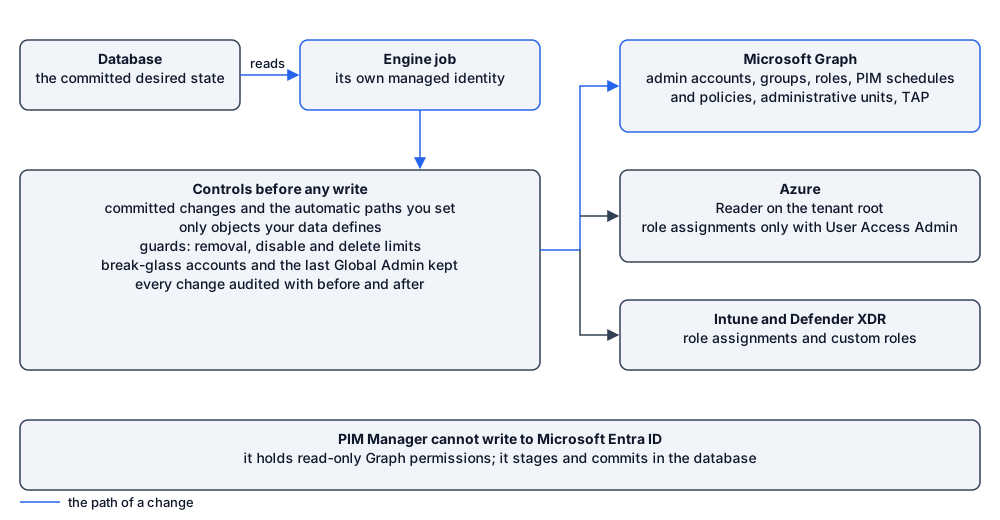
- Managed identity: no credential exists to steal.
- Only defined objects: the engine changes only what your data defines, and records what it owns. An object it does not own is not removed automatically; a SuperAdmin can delete it on the Drift page or revoke it on Delegation overview (Pro; in Community, remove it in the Microsoft Entra admin center or the Azure portal), both as a commit. An empty or unreadable definition set removes nothing.
- Committed changes and named settings: the engine applies what a person committed in PIM Manager, after the commit’s own checks, plus the automatic paths you control in Settings, such as auto-extend and the daily reconcile. Approval and audit holds the one list of them.
- Guards: removal, disable and delete limits per run; a hold on any change that would remove the last Global Administrator; listed break-glass accounts are not removed, disabled or revoked by the engine. Read more in guards.
- Audit: each change the engine makes is written to the audit trail with before and after.
- PIM Manager’s identity cannot write to Entra ID: it holds read-only Graph permissions, so a compromised browser session or web process cannot change Entra ID directly. It can stage and commit changes in the database and, if you grant it Container Apps Jobs Operator, start the engine job, which is why sign-in and Manager roles matter.
Verified against PIM Manager 3.0.23.3 on Nov 3, 2026Download PDF