

PIM Manager documentation · Verified against PIM Manager 3.0.23.3 on Nov 3, 2026
Guards
An engine that manages privileged access can do great harm in one run: weaken every activation policy, disable every admin, or read an empty database as “remove everything”. Guards are the brakes that stop a run from doing that without a person seeing it first.
How a guard works
A guard checks what a run plans to do. When the plan is inside the guard’s rule, it is applied. When it is not, the guard holds it: nothing in the held plan is written, and the rest of the run goes ahead. The held plan has a fingerprint (a hash of its exact items). A SuperAdmin approves or releases that exact plan. If the plan changes, the approval no longer fits and the new plan is held again.
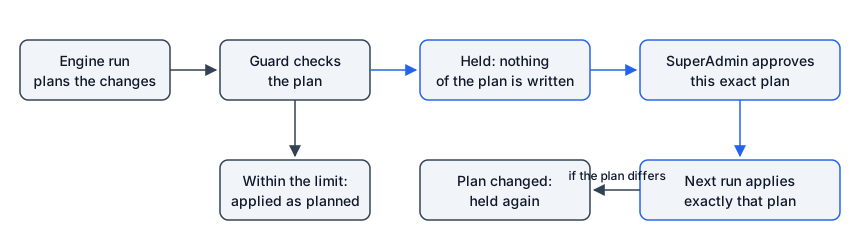
Three rules hold for every guard:
- A guard has no off switch. Some have a limit a SuperAdmin can set inside a fixed range.
- An exemption is always for one exact list. It is given with a reason of at least 10 characters and written to the audit trail.
- A hold clears itself. When the held plan is no longer wanted (the change was taken back or applied), the next run finds nothing to hold and clears it. Nobody has to acknowledge it.
Guards hold only damage that does not heal by itself. Everything else, such as access that is not yet in line with your definitions, is a warning on its own page, not a guard.
The Guards page
Open Operations > Guards. Each row is one guard and shows:
- State: Protecting (green), or Holding back changes (red) with a Review link to where you release it.
- Protects and what it does, in plain words.
- Limit: the number in effect, the range it can be set in and why, and who set it. A SuperAdmin changes it with Set limit, or returns to the default.
- Exemption: how a held plan is released, and how many releases are open.
- What it holds: for a holding guard, the held items, the plan’s short fingerprint and when it was last seen. A SuperAdmin releases it with Release this plan, for One run or Until a time (at most 24 hours), with a reason.
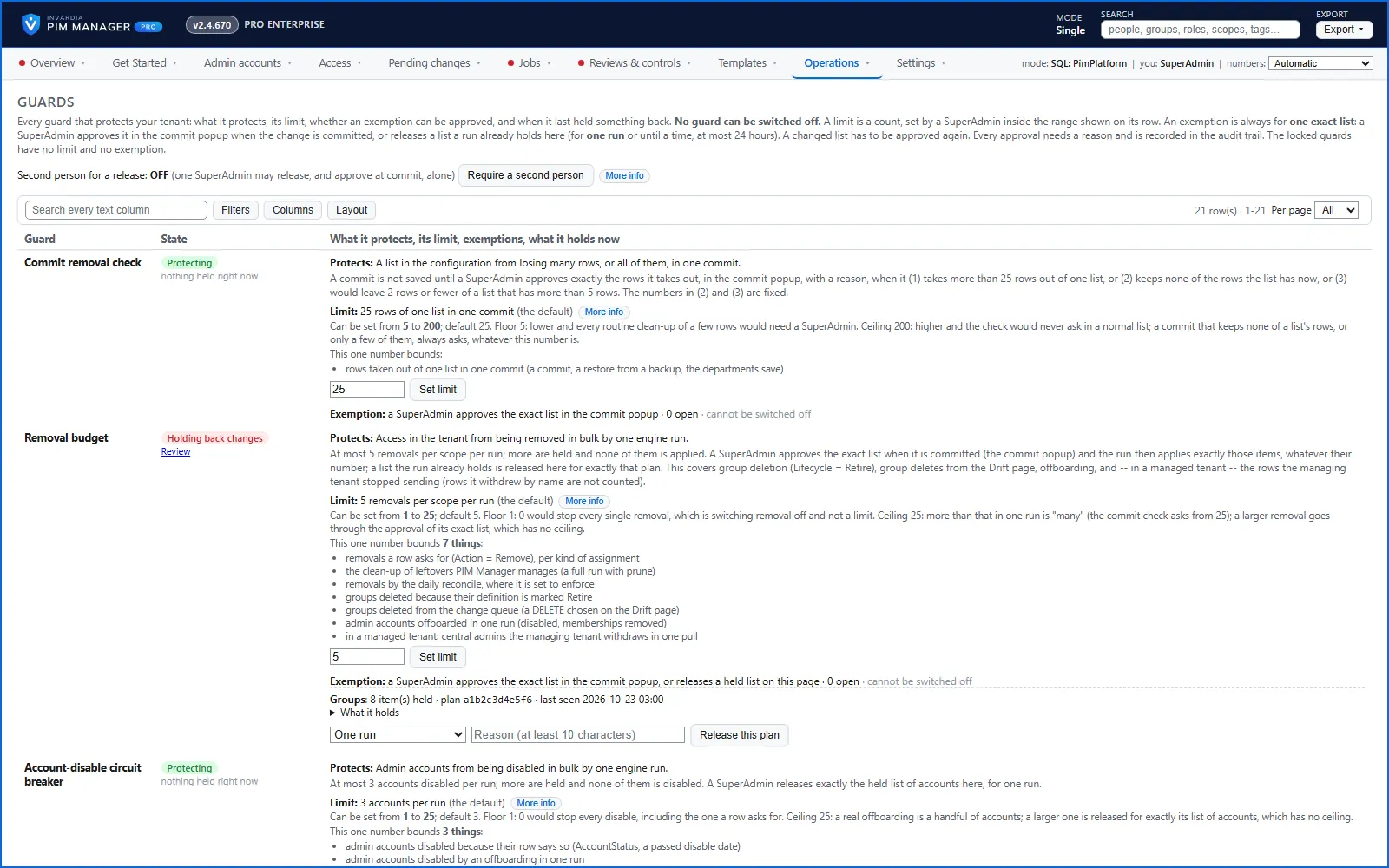
Under the table you find the approvals given at commit, the releases of the last 7 days, and the locked guards that can never be released.
Second person for a release. A SuperAdmin can turn on Require a second person. Then a different SuperAdmin approves every release, and every approval of removals given at commit; only then may a run use it.
Policy changes wait for a SuperAdmin
PIM role and group policies (approval, multifactor authentication, maximum activation and assignment length, notifications) are the security of the whole model. A single weakening, such as approval switched off on Global Administrator, is a silent breach.
PIM Manager changes no policy on its own. On Templates > Policy settings you choose, per setting, Microsoft default, PIM Manager recommendation or Keep current. A setting without a choice is left as it is. After Save choices, the next policy run plans the change and the Policy mass-change breaker holds every policy change set, whatever its size:
- Open Reviews & controls > Approvals. Each held change set lists every setting as current → new, and says how many of them weaken a setting.
- A SuperAdmin presses Approve this change set, or Approve all, which approves each waiting change set separately.
- The approval covers only that exact change set and is valid for 24 hours. The next policy run applies it. A different change set waits for its own approval.
Any SuperAdmin may approve, including the one who saved the choices; Require a second person covers guard releases, not policy change sets. See How to approve a held policy change.
The same held change set shows on Approvals, Guards, Get Started and Overview.
Nothing is touched when nothing is defined
If the database defines nothing at all, or the engine cannot count what it defines, every scope is skipped and the engine reads and writes nothing. The engine log says the engine touches NOTHING. A fresh install, a failed import or a wiped database is never read as an instruction to remove access.
A scope whose own definitions are gone is never pruned either (guard Empty definitions). A SuperAdmin can release one run to prune it; only managed items are removed and the removal budget still applies.
Limits on removals, disables and deletes
| Guard | What it limits | Default | Range |
|---|---|---|---|
| Commit removal check | Rows taken out of one list in one commit without a SuperAdmin’s approval in the commit window | 25 | 5 to 200 |
| Removal budget | Removals per scope in one engine run (row removals, leftover clean-up, group deletion, offboarding) | 5 | 1 to 25 |
| Account-disable circuit breaker | Admin accounts disabled in one engine run | 3 | 1 to 25 |
| Bulk revoke | Assignments revoked in one batch without an approved request | 5 | 1 to 25 |
| Admin account deletes per run | Accounts deleted in one engine run; the rest wait for the next run | 5 | 1 to 25 |
The commit removal check also always asks when a commit keeps none of a list’s rows, whatever the limit. A larger change is never refused outright: you approve its exact list, which has no ceiling.
In an MSP setup, a managed tenant deletes at most one central admin per run, and only with the managing tenant’s SuperAdmin approval for that one admin. This number is fixed. A delete without that approval only disables the account.
Other guards that hold
- Last Global Administrator. A change that would leave the tenant with no Global Administrator is held. Give another person Global Administrator first, or release exactly that plan for one run.
- Offboarding decided by a person. Deleting an admin, removing an admin from PIM, and a disable or offboarding that takes effect at once are started by a person in PIM Manager. For removing from PIM and an immediate disable or offboarding, one administrator decides for a day-to-day admin; a different administrator approves first, on the Approvals page, for a sensitive admin (level L0 or tier T0, the high-privilege naming pattern, Purpose HighPriv, or a break-glass account) or for every admin when maker/checker is switched on (Pro; Community has no maker/checker). Delete account is decided by one person: a SuperAdmin, or an Admin whose delegated scope and level cover the account. An approved request still does not offboard a break-glass account. Deleting an account is always a person’s action; a future auto-disable date disables the account on its date and does not delete it.
- Hybrid Active Directory guards. Members of an AD group are kept when Entra ID cannot be read; an AD group whose Entra group is gone, an AD clean-up and new server groups all wait for a SuperAdmin on Settings > Hybrid Active Directory. See Hybrid Active Directory.
Guards that are locked
These have no limit, no exemption and no switch:
- A break-glass account is never disabled, revoked or offboarded.
- A prune or reconcile never deletes an admin account; only an operator’s Delete account does.
- A Defender XDR or Intune assignment that also holds another principal is never deleted.
- Memberships in groups PIM Manager does not manage are not removed automatically, and an offboarding does not remove them.
- An item PIM Manager did not define, did not make live, or did not remove is not removed automatically. A SuperAdmin can still delete it on the Drift page or revoke it on Delegation overview (Pro; in Community, remove it in the Microsoft Entra admin center or the Azure portal); both go through a commit and the guards.
- The last PIM Manager SuperAdmin cannot be removed. Add another SuperAdmin first.
Strict mode after an update
When the engine code changes with an update, every guard with a number uses half its limit for 24 hours (never below 1). The Guards page shows a yellow Guard mode: Strict line with the end time, and each limit shows the number in effect. Approvals you give still apply. A SuperAdmin can end Strict mode early with a reason, which is recorded. The first run on a new install only records the engine’s fingerprint; it does not start Strict mode.
What you do when a guard holds
- Open the link in the reminder mail, or Operations > Guards, and press Review on the holding guard.
- Read What it holds. Each item is named.
- If the plan is wrong, fix the definitions. The next run finds nothing to hold and the hold clears by itself.
- If the plan is right, release or approve it with a reason. The next run applies exactly that plan.
The Hybrid Active Directory guards apply where the hybrid worker runs, which is available in Pro editions, not in Community.
Verified against PIM Manager 3.0.23.3 on Nov 3, 2026Download PDF