

PIM Manager documentation · Verified against PIM Manager 3.0.23.3 on Nov 3, 2026
Access reviews
Privileged access that nobody re-confirms stays forever: a project ends, a person changes team, and their admin rights live on. Access reviews ask the people who sponsor each admin, on a fixed cycle, whether that admin still needs the access, and PIM Manager carries out the answer.
Available in Pro editions; not in Community.
How a review works
PIM Manager runs the department reviews itself, one review per department. They do not need Microsoft Entra access reviews. The same page also shows the Microsoft Entra access reviews in your tenant, in their own panel; see Microsoft Entra access reviews.
- A department’s review starts when its rule is due and no review of that department is open. Every admin account of the department is listed with the access it holds.
- The reviewers get a mail. On Reviews & controls > My people, under Access reviews waiting for you, they choose Keep or Remove for each person, by the due date.
- Nobody reviews their own account.
- When every person is decided, the review closes.
What Keep and Remove do
- Keep: the person keeps their access. Nothing changes.
- Remove with nothing ticked: removes the whole account. PIM Manager raises an offboarding approval request; a PIM administrator approves it on Reviews & controls > Approvals, and only then does the engine offboard the account.
- Remove with access ticked: removes only the ticked memberships. They are staged as pending changes and carried out when an administrator commits them under Pending changes. The account keeps the rest.
A reviewer’s decision does not remove access directly. It passes through an approval or a commit. The approval of a whole account uses the approval request queue on the Approvals page, which acts only when a SuperAdmin has switched on Approval-gated offboarding + revoke under Settings > Features & edition. It is off by default. While it is off, the offboarding request waits in the queue and nobody can approve it, so the account keeps its access. See The Approvals switch.
Who reviews
- The owners of the department always review. Departments and their owners are set on Reviews & controls > Departments & owners.
- A rule can add reviewers by sign-in name. Tick only these reviewers to let them review instead of the owners.
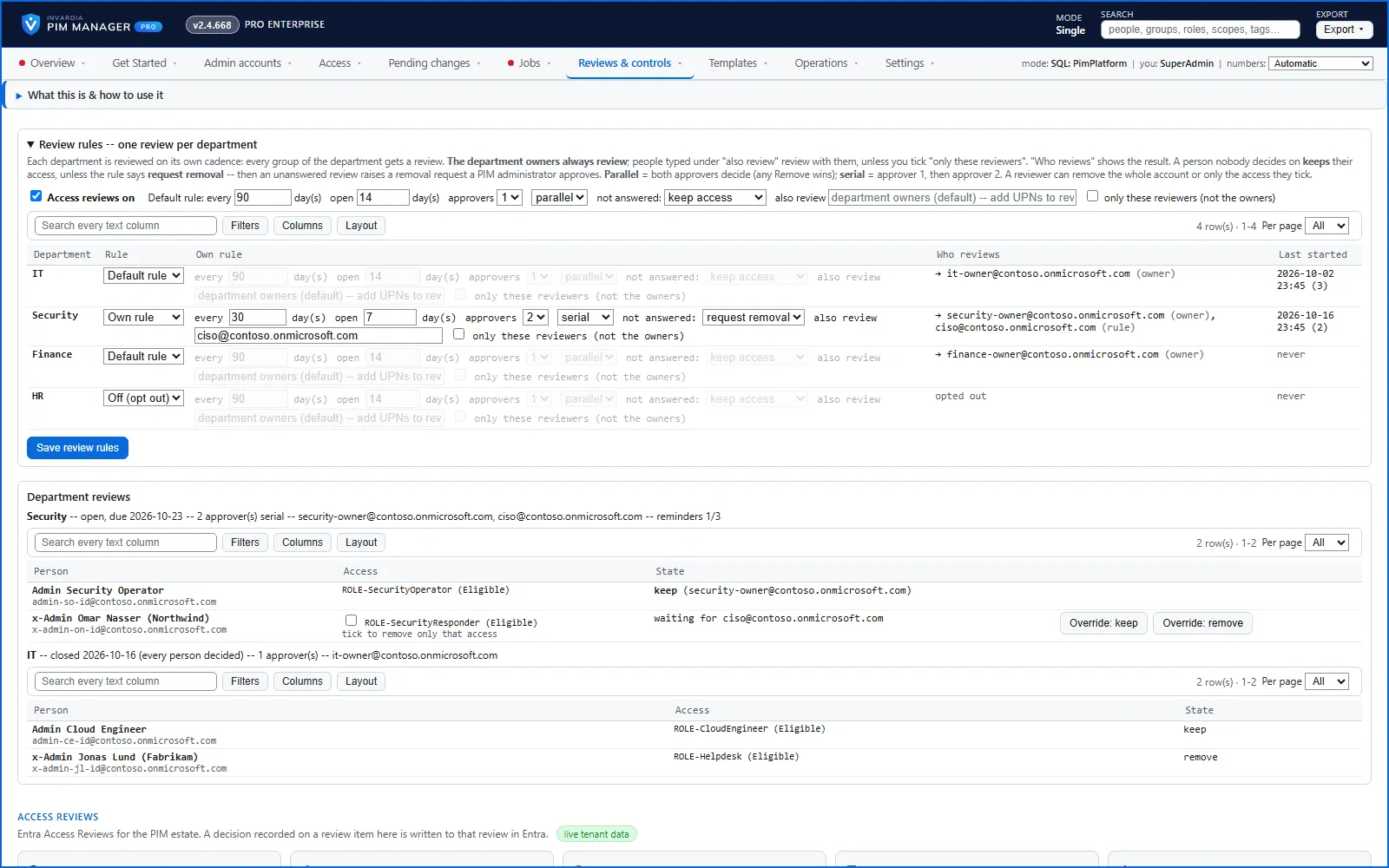
- A rule sets 1 or 2 approvers. With two, parallel means both decide in any order and any Remove wins; serial means approver 1 decides first and approver 2 has the final word.
- The Who reviews column shows the result for each department. A department with no reviewer shows in red, is not started, and is reported to the alert recipients every day.
When nobody answers
An overdue review is chased with a weekly reminder to the reviewers who still owe a decision, three times. Then the alert recipients are told and the review closes. The rule decides what happens to an unanswered person:
- keep access (the default): they keep their access, and a SuperAdmin can still decide.
- request removal: PIM Manager raises an offboarding approval request for each unanswered person, which a PIM administrator approves or denies.
A SuperAdmin can decide any open person at any time with Override: keep or Override: remove on the Access reviews page. Every decision, reminder and override is written to the audit trail.
Review rules
Rules are set on Reviews & controls > Access reviews, under Review rules – one review per department. Changing them needs the SuperAdmin role.
| Field | Meaning | Default |
|---|---|---|
| Access reviews on | Switches the default rule on | Off |
| every … day(s) | How often a department is reviewed, counted from the last start | 90 |
| open … day(s) | How long a review stays open until it is due | 14 |
| approvers | 1 or 2 | 1 |
| parallel / serial | How two approvers decide | parallel |
| not answered | keep access, or request removal | keep access |
| also review | Extra reviewers next to the department owners | none |
Each department uses the Default rule, its Own rule, or Off (opt out). The Last started column shows when its last review began.
The access-review-cycle job starts the reviews that are due and sends reminders and escalations. It is listed on Jobs > Job schedule and does nothing until a rule is switched on.
Under the rules, Department reviews lists each department review that has run, with its status and the SuperAdmin overrides. Until a department review has run, it says No department review has run yet.
Microsoft Entra access reviews
Below the department reviews, the page has a panel headed Access Reviews: Entra Access Reviews for the PIM estate. It is separate from the department reviews and works whether or not you use them.
- What it reads. Every access review defined in Microsoft Entra ID in your tenant, read live with PIM Manager’s own identity, which holds the Microsoft Graph permission AccessReview.Read.All. For each review it shows the name, the scope or target group, the reviewers, the recurrence, the status of the current run, the due date and the pending, approved and denied decisions. Tick PIM-managed only to see only reviews that PIM Manager created in Microsoft Entra ID; it creates no new ones. A banner shows reviews that are overdue or due soon.
- What you can do. An Admin can open Review items on a review, record a decision (approve, deny or don’t know) with a justification, change the reviewers, and press Send reminders. PIM Manager does not write to Microsoft Entra ID itself: the engine writes the decision or the reviewers to that review in Microsoft Entra ID with its own identity, which holds AccessReview.ReadWrite.All, and reads it back. Every decision is in the audit trail. Recording decisions is available in Pro editions, not in Community.
- Live tenant data. A green label next to the heading means the read worked. An empty list then means there are no Microsoft Entra access reviews in your tenant.
- Unavailable. A red label unavailable and the text Access reviews are unavailable mean that the live read failed. It does not mean that nothing is due: nothing could be read. The text after unavailable is the reason Microsoft Graph gave. A permission error means PIM Manager’s identity lacks AccessReview.Read.All. The install grants it; running the deployment again with the same parameters grants it again. A new permission can take about 30 minutes to work. Then press Refresh. If the reason is not a permission, contact support.
- Overdue check. Overdue / due-soon reviews could not be checked means only the overdue banner could not be read; the list itself can still be correct.
Turn reviews on
The full steps are in How to enable access reviews. In short:
- Install a Pro license that covers your tenant.
- Switch on Access Review on Settings > Features & edition > Features (SuperAdmin).
- Make sure each department has owners and each admin has a department.
- Set the review rules and press Save review rules.
Related reviews
- External companies confirm their consultants. Each external company’s contact confirms, on its own cycle, who still works for them. See How to onboard a consultant. Available in Pro editions; not in Community.
- Expiring access. Department owners see on My people when each person’s access ends and can extend it.
Verified against PIM Manager 3.0.23.3 on Nov 3, 2026Download PDF