

PIM Manager documentation · Verified against PIM Manager 3.0.23.3 on Nov 3, 2026
Sizing
A component that is too small fails on a large tenant, and one that is too large costs money every month. PIM Manager sizes its parts by fixed rules, raises a size when the tenant needs it, does not lower one by itself, and lets your own choice win.
What it costs to run
Three separate bills make up the cost of running PIM Manager:
| Part | Who bills it | Where to look |
|---|---|---|
| Microsoft licenses | Microsoft | Microsoft Entra ID P2 or Microsoft Entra ID Governance for the users who use PIM; see setup |
| Azure resources | Microsoft, on your own subscription | The drivers below; price them for your region with the Azure pricing calculator |
| PIM Manager edition | Invardia, for Pro editions; Community is free | Pricing |
Calculate your cost
Invardia’s cost calculator shows the PIM Manager license and the Azure resources for your size and choices in one view.
The Azure parts of a default installation, in order of their share of the bill:
| Part | Default | How it is billed |
|---|---|---|
| Azure SQL database | Standard S3, always on | A fixed monthly price; the largest part of the bill |
| Container registry | Basic (public network mode) or Premium (private network mode) | A fixed price per day |
| PIM Manager | 4 CPU and 8 GiB, scales to zero when idle | Only while it runs, so it follows how often your admins open it |
| Engine job | 0.5 CPU and 1 GiB below 5,000 objects, started every five minutes | For its run time; much of it falls inside Azure Container Apps’ monthly free grant per subscription |
| Log Analytics | Pay as you go | Per GB ingested, and the retention you set |
| Private network mode | Private endpoints and private DNS zones | Per private endpoint per hour, plus data processed |
A larger tenant raises the engine job’s size (see Engine job). Optional parts add their own cost: the hybrid worker’s virtual machine and NAT gateway, the access request broker, and in Pro MSP (not in Community) one installation per managed tenant.
What drives Azure cost
Everything runs in your own subscription, so Azure bills you directly. The main drivers are:
| Driver | Why it matters |
|---|---|
| Database tier | Azure SQL is the one part that is always on, and its tier is the largest fixed cost. |
| PIM Manager size | The web app’s CPU and memory, and whether it is allowed to scale to zero when nobody uses it. |
| Engine run time and cadence | The engine runs as a job that starts, does what is due and stops. You pay for the time it runs. How often it starts is configurable on the Job schedule page. |
| Size of your model | The number of admins, groups, delegations and managed scopes decides how much each run reads from Microsoft Graph and Azure. |
| Network mode | A private installation adds private endpoints and needs the Premium container registry, because the Basic tier has no network controls. |
| Optional parts | The access request broker, the hybrid worker VM and its NAT gateway, Key Vault, and in Pro MSP (not in Community) one engine and database per managed tenant. |
| Logs | Log Analytics ingestion and the retention you set. |
Database
| Setting | Default | Your choice |
|---|---|---|
| Tier | Azure SQL Standard S3 | Any Standard tier, never Basic. A tier below S3 stays only when you pin it. |
| Maximum size | 250 GB, included in the Standard price | Not lowered by the product. |
| Pin | Off | Pin the tier with a tag, and updates never change it. |
Installs and updates apply the same rule: a database below the default is raised; one at or above it is left alone. Basic is refused because it is too small for the product’s store. Use Set-PimSqlTier to change or pin the tier.
PIM Manager
The web app runs with 4 CPU and 8 GiB of memory by default, so it reads a large tenant’s stored snapshot without running out of memory. Automation raises a smaller app to this size and does not lower it. A size you set yourself is kept by every later update. The Manager can scale to zero when nobody uses it; the first visit after an idle period then starts it.
Engine job
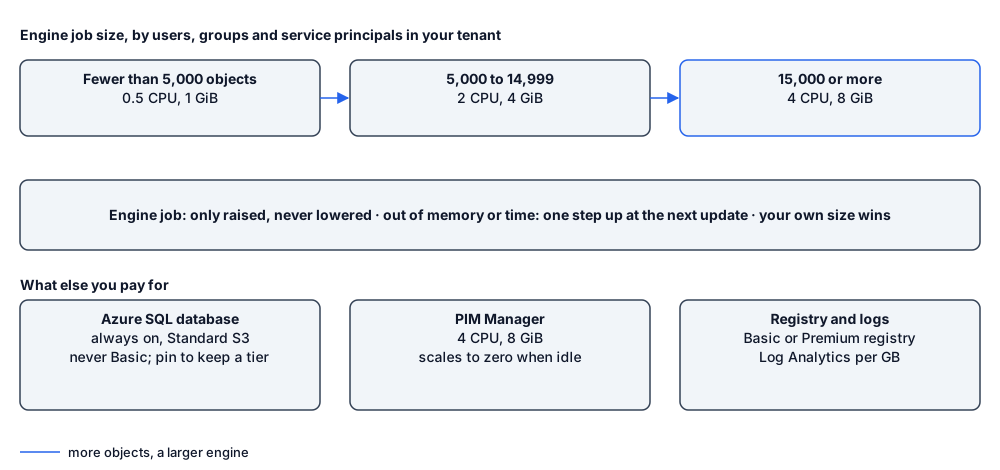
The engine job is sized on the number of users, groups and service principals in your tenant, counted at install and at every update:
| Objects in the tenant | CPU | Memory |
|---|---|---|
| Fewer than 5,000 | 0.5 | 1 GiB |
| 5,000 to 14,999 | 2 | 4 GiB |
| 15,000 or more | 4 | 8 GiB |
- The size is only ever raised, never set below the job’s default or below what the job already runs.
- A run that ran out of memory or time makes the next update raise the job one step.
- A size you set yourself wins.
- Each job may run for up to seven days, so a run on a very large tenant finishes its work.
How the engine stays light
- It does not list all users or groups. It looks users up when needed and reads only the groups PIM Manager manages.
- Routine runs read only the memberships your rows name, and confirm each removal with a read of that group.
- Group memberships and policies are read in batches, Azure role assignments in one query, and when Microsoft Graph asks it to slow down it waits the time Graph asks for.
- A commit starts only the engine work that its change needs.
- A managed tenant ends its pull early when the signed definition set has not changed.
Designed scale
PIM Manager sets no artificial limit on the number of admins, groups or delegations. Its sizing rules cover tenants from fewer than 5,000 to more than 15,000 users, groups and service principals; above that the engine keeps its largest size and runs as long as it needs, up to seven days. For on-premises Active Directory, the hybrid worker syncs critical groups such as Domain Admins in their own continuous process and the per-server groups in parallel batches, so a large number of servers does not delay the critical groups.
Microsoft limits apply on top: a tenant can hold at most 500 role-assignable groups. Read more in design-role-assignable.
Verified against PIM Manager 3.0.23.3 on Nov 3, 2026Download PDF