

Skip to content
InvardiaInvardia
Why InvardiaProductsFeaturesPricingCommunity
Docs
All documentation
Product documentationPIM ManagerSecurityInsight
SettingsPIM Manager settingsSecurityInsight settingsEntra Policy Suite settings
ScriptsPIM Manager scriptsSecurityInsight scriptsEntra Policy Suite scriptsInvardia scripts
Error codesPIM Manager error codesSecurityInsight error codes
API and MCPPIM Manager APIPIM Manager MCP toolsSecurityInsight APISecurityInsight MCP tools
SecurityPIM Manager security packSecurityInsight security packEntra Policy Suite security pack
Network and designPIM Manager network guidesPIM Manager command wizardNetwork egressDesign your installationCalculate your cost
SupportSetup scriptsRemote support access
Search the docs
SupportAboutContactBook a demoCustomer portalDesign your installationFree Pro trial

PIM Manager docs

1 Why

  • Why PIM Manager

2 Features

  • Features
  • Delegation model
  • Change control
  • Admin accounts
  • Visibility and evidence
  • Integrations
  • Platform and editions

3 How to design

  • How to design
  • Nested groups
  • Role-assignable groups
  • Tiers and levels
  • Naming
  • Migration
  • Workload roles

4 Security design

  • Security design
  • Identities
  • Engine permissions
  • Database
  • Sign-in
  • Approval and audit
  • Support access
  • Updates and license
  • Data
  • Database access (least privilege)

5 Architecture, setup and sizing

  • Architecture
  • Setup
  • Sizing

6 Operate

  • Operate
  • Guards
  • Access reviews
  • PIM Activator
  • Settings

7 Integrate

  • Integrate
  • REST API and ServiceNow
  • MCP server for AI assistants
  • Hybrid Active Directory
  • MSP: managing and managed tenants

8 Knowledge base

  • Knowledge base
  • How to onboard a consultant
  • How to onboard an admin
  • How to delegate a Power BI workspace
  • How to delegate an Azure landing zone or subscription
  • How to delegate Intune roles
  • How to delegate Defender XDR to a helpdesk
  • How to use Discovery and gaps
  • How to handle drift
  • How to undo a commit
  • How to enable access reviews
  • How to approve a held policy change
  • How to add a break-glass account
  • How to install the PIM Activator without Intune
  • How to set up PIM for Active Directory
  • How to read the access map and see who can activate a role
  • How to find the least-privileged role for a task
  • MSP: how to roll a change to one wave
  • How to activate with the PIM Activator
  • How to offboard an admin
  • FAQ
  • Lessons learned

9 Reference

  • Reference
  • Glossary

10 Support

  • Support

On this page

  • What PIM Manager does
  • Feature areas
  • Editions
  • Where to go next

PIM Manager documentation · Verified against PIM Manager 3.0.23.3 on Nov 3, 2026

Features

Privileged access in Microsoft Entra ID and Azure drifts: roles are granted by hand, groups pile up, and nobody can say what the access should be. PIM Manager keeps one desired state for your admins, groups, roles and policies, applies it, and shows every difference.
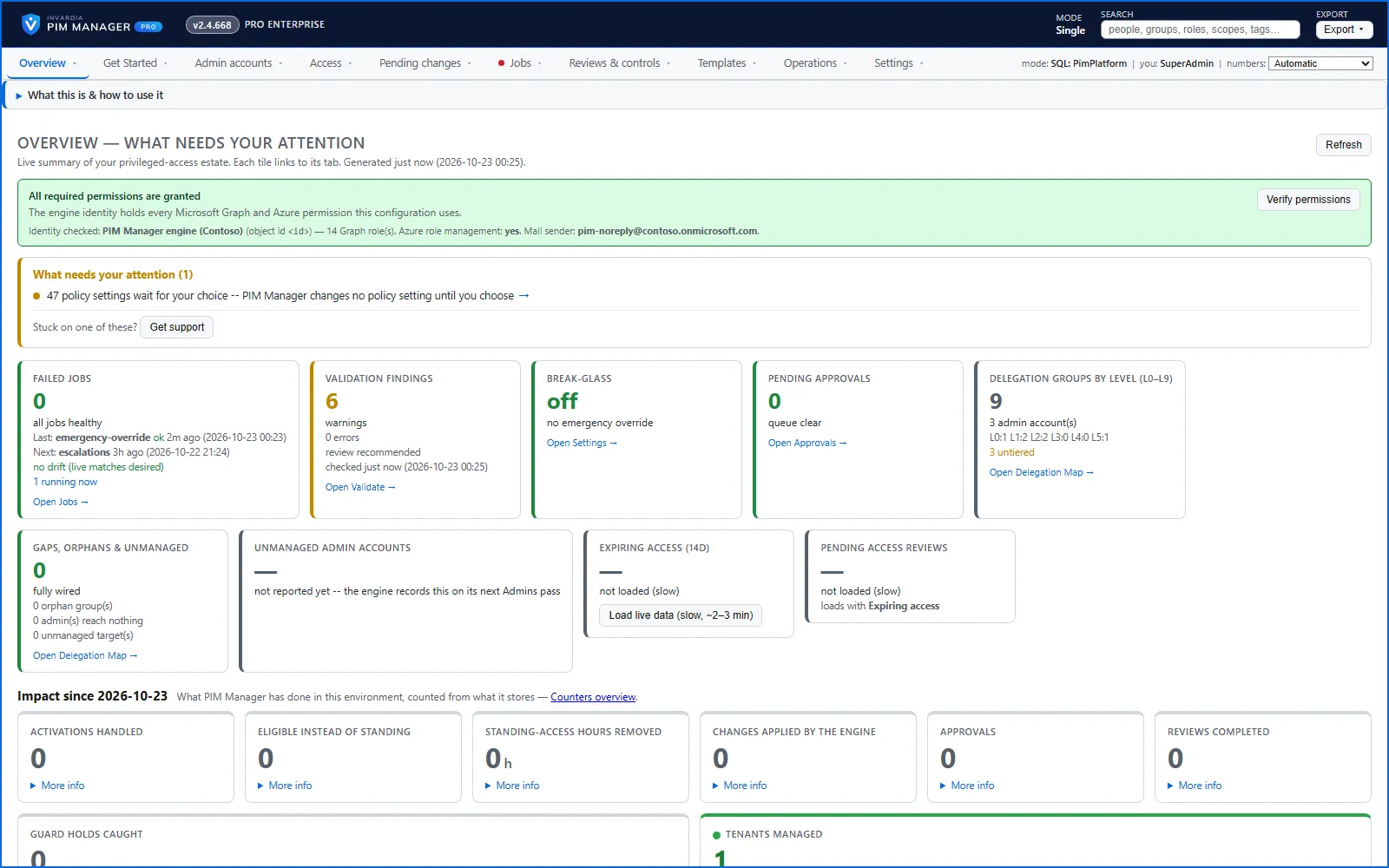
The PIM Manager overview with status tiles for engine health, findings, break-glass, gaps and expiring access

What PIM Manager does

You define admin accounts, delegation groups, role assignments and PIM policies once. The engine compares them with the live tenant and creates, updates or removes exactly what differs. It touches only the objects you defined. Every change you make to the model is staged and reviewed, and the engine applies what you committed. Safety guards hold a run that would remove, disable or weaken too much. The few changes that happen on a schedule are listed in Change control.

Feature areas

Area What you get
Delegation model One desired state, the access map, role lookup, nested groups, workload roles
Change control Pending changes, backups and undo, approvals, policy settings, safety guards
Admin accounts The admin lifecycle, Temporary Access Passes, offboarding, access requests, consultants
Visibility and evidence Drift, standing access, discovery and gaps, reports, audit trail, jobs and alerts
Integrations On-premises Active Directory, the access request API, the MCP server, managing and managed tenants, the PIM Activator
Platform and editions Runs in your own Azure, settings and feature switches, editions and license, updates, support

Editions

The Community edition is free for a single tenant. It covers Entra ID roles, PIM for Groups, administrative units, Azure roles, Intune and Defender XDR roles, staged changes, the admin lifecycle, policy templates, drift, reports, the audit trail, alerts and break-glass protection. Pro Business and Pro Enterprise add governance features and the advanced integrations. Pro MSP adds managing and managed tenants. Each feature page says when a feature is not in every edition, and Platform and editions compares them. In the product, a Pro capability on a Community installation is shown, labeled and explained.

Prices are on invardia.com/pricing.

Where to go next

  • How to design your model: design.
  • How the product protects itself and your tenant: security-design.
  • What runs where: architecture.

Verified against PIM Manager 3.0.23.3 on Nov 3, 2026Download PDF

← Why PIM ManagerDelegation model →

InvardiaInvardia

See the risk. Control the access.

Products

PIM ManagerSecurityInsightEntra Policy SuiteAll featuresPricingFree 60-day Pro trialBook a demoWhy Invardia

Docs

DocumentationSearch the docsPIM Manager settingsSecurityInsight settingsPIM network guidesCommand wizardNetwork egressPIM Manager design configuratorSecurityInsight design configuratorDesign your installationCalculate your cost

Company

AboutContactCustomer portalSupportHow support worksHow updates reach youSupport in numbersSetup scriptsRemote support accessContact: info@invardia.com

Legal

Terms of saleLicence termsData processingPrivacyCookiesCompany information
© 2026 Invardia – a brand of 2LINKIT, founded and owned by Morten Knudsen · Strandvejen 21A, 6000 Kolding, Denmark · VAT DK39208032 · Contact: info@invardia.com