

PIM Manager documentation · Verified against PIM Manager 3.0.23.3 on Nov 3, 2026
Data
A privileged-access tool sees your directory, so you need to know exactly what it reads, what it keeps, where it keeps it, and what leaves your tenant. PIM Manager keeps your data in your own Azure SQL database, in the region you choose, and sends Invardia only status and licensing fields that you can switch off.
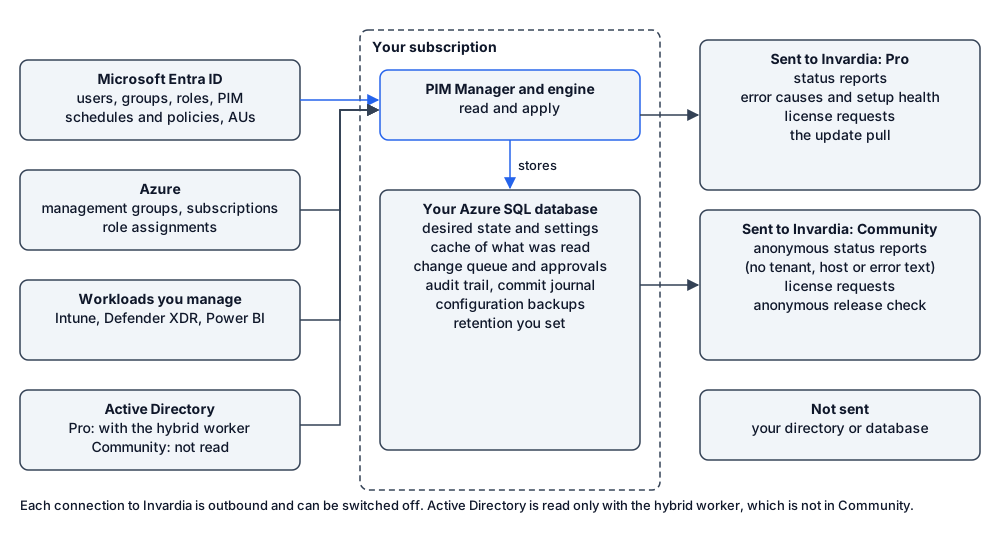
What PIM Manager reads from your tenant
- Users (name, UPN, mail, enabled state), groups with their owners and members, Entra roles, PIM schedules and policies, Administrative Units, domains, subscribed licenses, applications and service principals, access reviews.
- Azure management groups, subscriptions, role definitions, role assignments and PIM for Azure schedules.
- Intune and Defender XDR role definitions and assignments, and Power BI workspaces, when you manage those workloads.
- The authentication methods of the admin accounts it manages, to issue a Temporary Access Pass.
- On-premises AD users and groups, with the hybrid worker only.
It does not read sign-in logs, sign-in activity, audit logs, risky users, mailbox content or files; the engine holds no AuditLog.Read.All. It holds Policy.Read.All, which also allows reading Conditional Access policies, but it reads only the Temporary Access Pass policy.
What it stores
Everything is stored in the Azure SQL database in your subscription:
- the desired state: admins, groups, roles, departments and workloads, including admin names, UPNs and contact mail addresses;
- settings, a cache of what was read from the tenant, and the record of which objects the engine owns;
- the change queue and approvals;
- the audit trail and the commit journal, both append-only for PIM Manager’s and the engine’s identities (see Database);
- configuration backups and pre-commit snapshots.
It does not store Temporary Access Pass codes or generated passwords: they are shown or mailed once and never written. API keys are stored only as SHA-256 hashes. The SMTP relay password and the emergency passphrase hash are kept in Key Vault, not in the database, and secrets are never part of a backup.
How long it is kept
| Data | Kept for |
|---|---|
| Audit trail | Kept by default. A SuperAdmin can set a retention of 13 months or more; a daily job then removes older rows and records its own run |
| Commit journal and change queue | Removed with the audit retention, and the removal is audited |
| Configuration backups | 90 days by default, set by a SuperAdmin; pinned backups longer |
| Pre-commit snapshots | The most recent snapshots per data set |
| Job run history | The most recent runs per job |
| Container logs | Your Log Analytics workspace’s retention |
| Database backups | Azure SQL’s settings, which you control |
Where it is
Every resource is created in your subscription, in the Azure region you choose. Before anything is created, setup checks that the region offers every service PIM Manager needs. Data in the database is encrypted at rest with Azure SQL Transparent Data Encryption, and connections use TLS. Invardia does not host your directory data, your database or your runtime.
What is sent to Invardia
The connections your installation makes to Invardia are outbound, over HTTPS. No user, group or role records are sent: no names, UPNs or object lists. Status reports do carry counts, such as how many role assignments exist, and with an install key the error text after redaction, as the table says. Each item has a switch under Settings > Features & edition, card Feature customization. Invardia has no connection into your installation unless you create the Invardia Support app for a support case; see Support access.
| What | When | Fields |
|---|---|---|
| Status reports | On by default | Which jobs ran and whether they succeeded, the version, edition and license state, counts such as role assignments, when a safety guard steps in, and whether the Invardia Support app holds database access. Without a Pro install key the reports are anonymous: a random installation id, rounded counts and a failure class; no tenant, no host name, no error text. With an install key they add the tenant id, the host name, exact counts and error text, with secrets, mail addresses, UPNs and object names removed by pattern before sending. Pattern-based redaction can miss an unusual value, so switch status reports off if error text must not leave your tenant |
| Error causes and setup health | On by default, only with a Pro install key; Community sends none | The stable error code and cause of each problem, and whether critical settings such as the updater, the mail sender and the engine permissions are in place. No names and no tenant data |
| License requests | On by default | When no Pro license is valid or yours ends soon: the product, the tenant id, the version and an installation id, and the id and end date of the installed license. No contact details |
| Updates | On by default; off when you deploy without the updater job and update by hand | Pro: the installation claims its install key and pulls the signed release for its tenant. Community: an anonymous request for the signed release of its ring, with no install key, licence or tenant id |
Switching status reports off sends one final opt-out record, and then nothing more. The license check itself works offline.
The install has no option to start with status reports off. The first report is sent within about an hour of the install, so a SuperAdmin who wants them off switches Send status telemetry to Invardia off under Settings > Features & edition > Feature customization right after the first sign-in.
Leaving
To remove PIM Manager and its data, follow Remove it.
Verified against PIM Manager 3.0.23.3 on Nov 3, 2026Download PDF