

PIM Manager documentation · Verified against PIM Manager 3.0.23.3 on Nov 3, 2026
Database access (least privilege)
PIM Manager’s database is designed to run for years without anyone administering it. Each runtime component holds only the rights its own job needs; the updater is the exception, and this page says exactly what it holds.
The principles
- Entra sign-in only. The SQL server accepts Microsoft Entra tokens only. There are no SQL logins and no database passwords.
- One database user per component. Each component signs in with its own managed identity, and its database user is created from that identity’s client id. An identity that only pulls images has no database user at all.
- One role per component. Each user is a member of its own custom role. Two components hold more than one: the updater (its own role plus the schema role db_ddladmin) and the managed tenant’s pull job (its own role plus the engine’s role, because it applies what it pulls the way the engine does).
- Grants through one signed procedure. No component’s own database role can grant database rights. The product’s own grants change through one signed procedure under fixed rules. This does not limit a database administrator, and the updater is one; see The updater.
- A small admin group. The SQL server’s Entra administrator is a group. Its members are full database administrators, so the list is kept short and named below.
Who reaches the database, with which rights
| Identity | Database role | What it may do |
|---|---|---|
| PIM Manager | pim_web | Read the store; write staged changes, settings and audit rows; no schema changes |
| Engine | pim_engine | Read and write the store it applies; read-only on the tenant registry |
| Updater (none when you update by hand) | pim_updater + db_ddladmin, and member of the SQL admin group | Everything a database administrator may do; see The updater |
| As-built job | pim_asbuilt | Read one view (the installation’s configuration, without people or secrets) |
| Publish job (managing tenant) | pim_publish | Read named objects; write its own last-run row |
| Pull job (managed tenant) | pim_downlink + pim_engine | Read and write the settings it applies, and apply them as the engine does |
| Hybrid worker | pim_hybrid | Read settings and definitions; write its own results |
| Image pull identity | none | No database access |
| SQL admin group | server administrator | See below |
The admin group
Every member of the SQL admin group is a full database administrator. On a standard installation the members are:
- the person who installs, for the length of the install only;
- the updater’s identity, which stays a member; when you update by hand, the person who runs an update is made a member;
- on a private installation, the database setup identity that the in-cloud setup job runs as;
- the Invardia Support app, only if you create it for a support case and grant it access;
- anyone you add yourself.
PIM Manager’s and the engine’s identities are not members. The group is role-assignable, so only a Global Administrator, a Privileged Role Administrator, an owner of the group, or an application holding the Microsoft Graph permission RoleManagement.ReadWrite.Directory can change its members. Check the group’s owners after the install.
The updater
On a Pro installation the updater’s managed identity is a full database administrator, because it stays a member of the SQL admin group after the install.
What it can do in the PIM database:
- read and change every table, including the desired state, the settings, the audit trail and the commit journal;
- disable the trigger that keeps the audit trail append-only;
- create database users and grant any database right, directly, without the signed procedure.
Why it has it: the updater applies each release’s schema changes and grants on its own, at night, without a person, for years. In Azure it also holds Contributor on the PIM resource group, so it can change the engine job, including the image the engine runs. Treat it as tier-0.
The updater also has its own database user, with its own role, the schema role db_ddladmin and the right to run the signed procedure.
How to remove it:
- Take away the admin rights. A Privileged Role Administrator removes the updater’s identity from the SQL admin group in Microsoft Entra ID. Updates then reach the database through the updater’s own database user: the schema role db_ddladmin can still change tables and views, and grants still go through the signed procedure. Check the result of the next update on the Jobs page.
- Take away the updater. Delete the updater job, or deploy with
-SkipUpdater. Deleting the job deletes its managed identity, and with it the group membership and its Azure role assignments; drop its database user withDROP USER. You then update by hand; see Updates and license.
Auditing records what the updater runs only if you switch on Azure SQL auditing; see Auditing.
The signed grant procedure
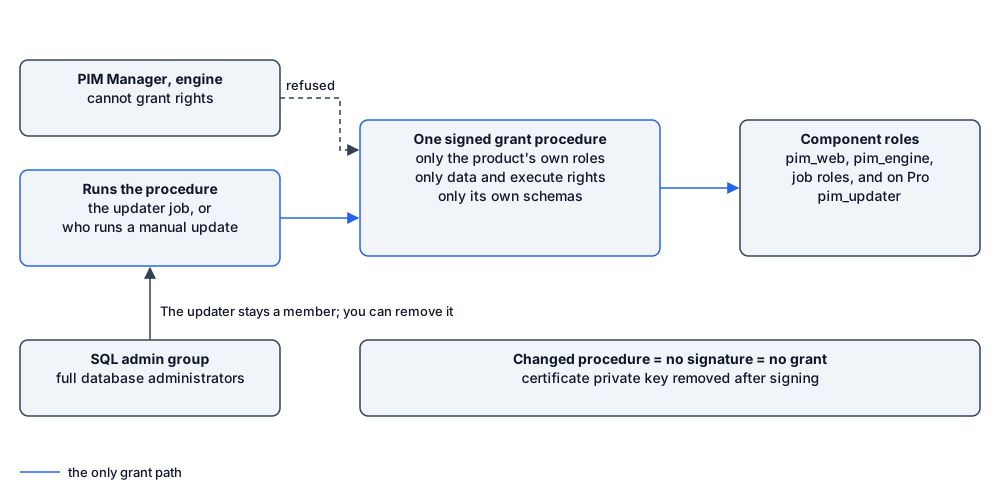
A new version sometimes needs a new grant, for example “the engine may read a new table”. The updater’s own database role cannot grant anything itself. It runs one procedure that applies a release’s grants, and only those, under fixed rules. (Its membership of the admin group is a separate, wider right; see The updater.) The rules:
- the grantee must be one of PIM Manager’s own roles (a
pim_role), never a built-in role such as db_owner; - the permission must be SELECT, INSERT, UPDATE, DELETE or EXECUTE;
- the object must be in PIM Manager’s own schemas, never dbo, never another database;
- the procedure can also create the database user for a component, and only into that component’s role;
- the procedure reports the access state itself (its signer and every grant a
pim_role holds), so the updater can bring access in line without reading the security catalog directly.
Every product role is created by the install, owned by the database owner.
The procedure is signed with a certificate that lives inside the database. The signature gives the procedure, and only the procedure, the right to grant. The certificate:
- is created once, by the install;
- expires on 31 December 2099, so it never needs renewing;
- has its private key removed right after signing, so it cannot sign anything else;
- has a password that is generated inside the database and never shown or stored outside it.
If anyone changes the procedure, SQL Server drops the signature and the procedure loses its rights. The updater’s own role may only run the procedure; the engine’s role may not run it. The procedure’s rules are general enough for future releases, so it does not need to be changed or re-signed.
Auditing
The installer does not switch on Azure SQL auditing. Switch it on, with your Log Analytics workspace as the target, so that statements run by a member of the admin group, including the updater and the Support app, are recorded outside the database.
Years without contact
Many installations have no contact with Invardia for years. The design holds for that:
- An update applies its own schema and grants with the updater’s identity and the signed procedure, and needs no Support app. A release that asks for a manual step is held until a person does it; see Updates. An installation you update by hand is updated with the update command.
- Nothing in the database model expires: no password, no secret, no certificate that needs renewing.
- If you want help with a support case, you can create the Invardia Support app and grant it access with
Grant-PimSupportAccess; see
Support access. You remove it again with
-Remove. - If the admin group itself is gone, an Owner of the SQL server points the server’s Entra administrator at a new group, so the database is not locked out for good.
Verified against PIM Manager 3.0.23.3 on Nov 3, 2026Download PDF