

PIM Manager documentation · Verified against PIM Manager 3.0.23.3 on Nov 3, 2026
Naming
PIM Manager names every admin account and group it creates from your naming convention. The convention is yours: PIM Manager ships a default, and you change any part of it in Settings.
The problem
Names do real work in a privileged-access model. They tell a reviewer what a group grants and how sensitive it is, without opening it. They also link your model to the tenant. A convention that changes by accident, or a name typed by hand, leads to duplicates and to accounts nobody recognizes.
How names link the model to the tenant
- Groups and administrative units are found by name. Each definition stores the name of its group or administrative unit. The engine finds the live object by that display name, not by an object id.
- A matching name is adopted. A group that already has the name a definition holds is adopted by that definition; PIM Manager does not create a second one. The name is the only check; read Before you adopt a group.
- Two objects with one name are left alone. When two groups or two administrative units carry the same name, PIM Manager changes neither and reports both, so you can rename or delete the wrong one.
- Changing a name on a definition is not a rename. The engine looks for a group with the new name and creates one if none exists; the group with the old name stays as it is. To keep the existing group, rename it in Microsoft Entra ID to the new name first.
- Renamed Azure scopes and workspaces are followed. When a subscription, a management group or a Power BI workspace is renamed or moved, Discovery matches it by its stable id and proposes renaming its access group in place.
- Admin accounts are matched by sign-in name. An admin account is matched by its user principal name (UPN).
- A group that no definition names is not changed by the engine, even when its name follows your convention. It shows as an extra on the Drift page, where an Admin can import it and a SuperAdmin can delete it.
A group’s mail nickname is its name without spaces or special characters, cut at 64 characters.
Before you adopt a group
Adoption trusts the name. Know what it checks before a definition names a group that already exists.
What adoption checks. The engine adopts a live group when its display name equals the name on the definition, and that name is unique in the tenant. It does not check who created the group, its owners, its members, its description or whether it is role-assignable. Import into PIM on the Drift page checks only that no definition already uses the name.
What that allows. Anyone who may create groups in your tenant can create a group with the name of a permission group you plan, before the engine creates it. The engine then adopts that group and gives it the role, and the group’s owner may manage its members. A group a person creates is not role-assignable unless that person holds a role that may create role-assignable groups. An Entra role on such a group fails with The group is not role-assignable, but an Azure or workload role does not need the flag.
What to check before you commit:
- Search the Microsoft Entra admin center for each group name the change introduces. If a group with that name already exists and nobody in your team created it on purpose, rename or delete it first.
- For a group you adopt on purpose, open its Owners and Members, and its entry in the Entra audit log, and remove anyone who should not be there.
- For a role-assignable definition, check that the existing group is role-assignable; if it is not, delete it and let the engine create it again.
What to set in your tenant. Limit who can create security groups (in the Microsoft Entra admin center, Groups > All groups > Settings > General, set Users can create security groups in Azure portals, API or PowerShell to No), so only administrators can create a group with a name a definition uses.
Where you set it
- Get Started > Naming convention asks for the convention when you install. A SuperAdmin sets it.
- Settings > Naming & accounts holds the same settings afterward: the admin word, admin name prefixes per admin type, environment suffixes, the group naming values and every name pattern.
Each pattern field has a legend of the tokens you can use, with a one-line meaning and an example, and a click inserts the token where your cursor is.
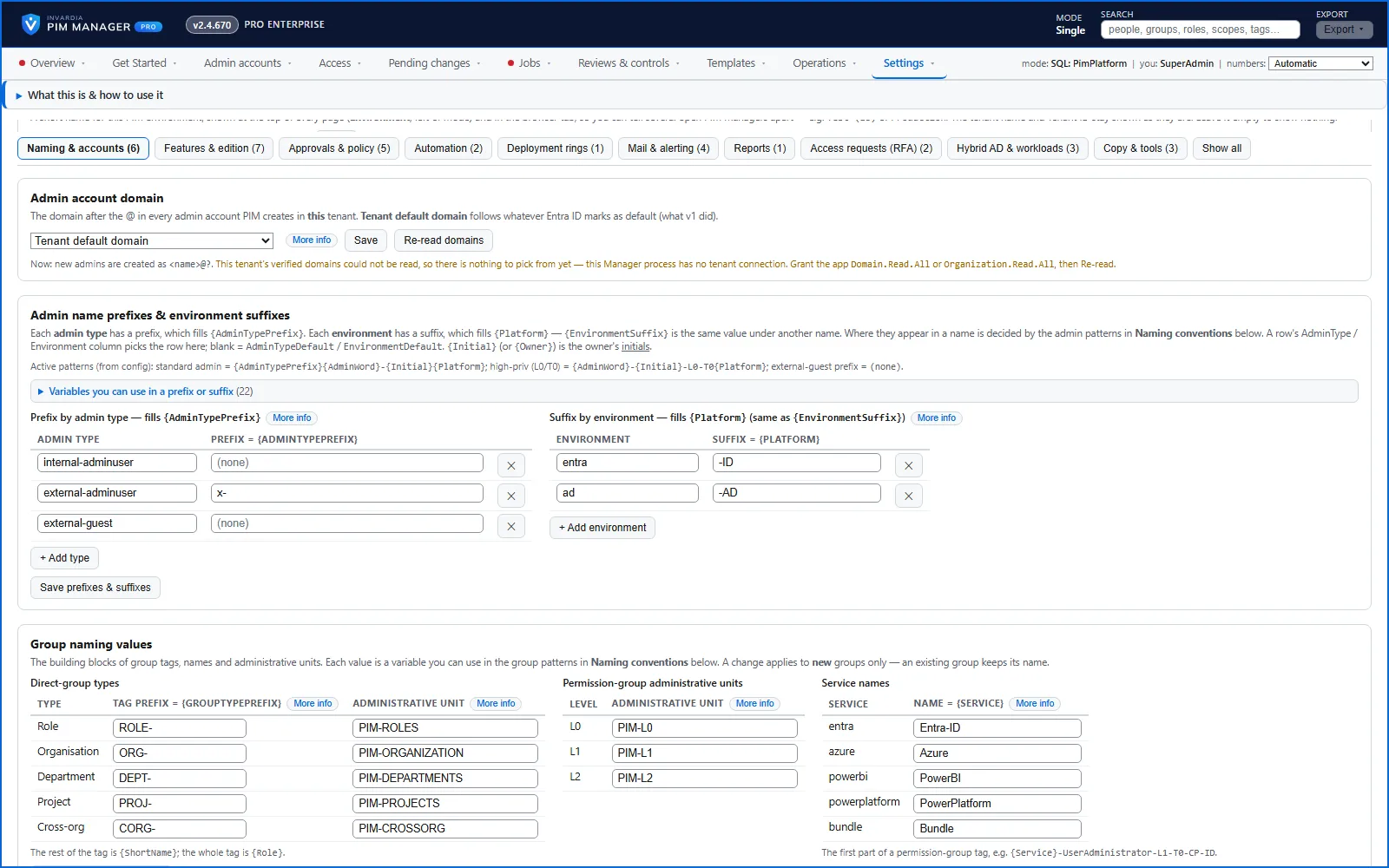
Three rules keep names stable:
- The convention is stored per tenant in PIM Manager’s database. The engine refuses to run when the database holds no naming convention, rather than guess a name.
- A name pattern cannot be saved empty.
- A change applies to new names only. An existing group keeps its name.
Decide the convention during setup, and change it later only on purpose.
The default convention
| Kind | Default pattern | Example |
|---|---|---|
| Admin account | {AdminTypePrefix}{AdminWord}-{Initial}{Platform} |
admin-jd-id |
| External admin account | the same, with the prefix x- for the external admin type |
x-admin-jd-id |
| Admin account in on-premises AD | the same, with the AD suffix | admin-jd-ad |
| High-privilege admin account (L0 / T0) | {AdminWord}-{Initial}-L0-T0{Platform} |
admin-jd-l0-t0-id |
| Admin display name | the person’s name + (Admin) |
Jane Doe (Admin) |
| PIM group | PIM-{Role}-{Department}, where {Role} is the group’s tag |
see the next table |
| Administrative unit a wizard creates | PIM-Groups-{AdminUnit}, where {AdminUnit} is the unit’s tag without PIM- |
PIM-Groups-ROLES |
Admin account names are always lower case. Group names keep their case. The separator is always a hyphen, and a token without a value disappears together with its separator.
Group tags and names
Every group has a tag, its stable identifier in the model. The group’s name is your PIM group pattern wrapped around the tag.
Direct groups (the groups people are assigned to) have a tag made of a type prefix and a short name:
| Type | Tag prefix | Tag | Group name |
|---|---|---|---|
| Job role | ROLE- |
ROLE-CloudEngineer |
PIM-ROLE-CloudEngineer |
| Department | DEPT- |
DEPT-Finance |
PIM-DEPT-Finance |
| Organization | ORG- |
ORG-Contoso |
PIM-ORG-Contoso |
| Project | PROJ- |
PROJ-Migration |
PIM-PROJ-Migration |
| Cross-organization | CORG- |
CORG-SecOps |
PIM-CORG-SecOps |
Permission groups have a tag that carries the classification:
{Service}-{Name}-L{Level}-T{Tier}-{Plane}-{Domain}
For a role scoped to an administrative unit, -AU-{AdminUnit} follows the name. {Plane} is CP, MP, WDP, APP or USER, and {Domain} is ID, RES or DAT (see Tiers and levels).
| Permission | Tag | Group name |
|---|---|---|
| Entra role, tenant-wide | Entra-ID-UserAdministrator-L1-T0-CP-ID |
PIM-Entra-ID-UserAdministrator-L1-T0-CP-ID |
| Entra role in one administrative unit | Entra-ID-UserAdministrator-AU-Sales-L2-T0-CP-ID |
PIM-Entra-ID-UserAdministrator-AU-Sales-L2-T0-CP-ID |
| Azure role at a landing-zone management group | Azure-LandingZones-Contributor-L5-T1-WDP-RES |
PIM-Azure-LandingZones-Contributor-L5-T1-WDP-RES |
The service word at the start of a tag comes from the Service names setting (by default Entra-ID, Azure, PowerBI, PowerPlatform).
New groups are placed in administrative units by type (by default PIM-ROLES, PIM-DEPARTMENTS, PIM-ORGANIZATION, PIM-PROJECTS, PIM-CROSSORG) and, for permission groups on L0-L2, by level (PIM-L0, PIM-L1, PIM-L2). Both maps are settings.
Tokens
| Token | Used in | Meaning |
|---|---|---|
{AdminWord} |
admin accounts | The word that marks an admin account. Default Admin; some organizations use adm. |
{AdminTypePrefix} |
admin accounts | The prefix of the admin type: none for internal admins and guests, x- for external admins. |
{Initial} |
admin accounts | The person’s initials or short identifier. |
{Platform}, {EnvironmentSuffix} |
admin accounts, groups | The environment suffix: -ID for Entra ID, -AD for on-premises AD. |
{TenantCommonName} |
admin accounts, groups | A short name for this tenant. Blank removes it. It lets one template serve many tenants. |
{Role} |
groups | The group’s tag. |
{Department} |
groups | The owning department. |
{AdminUnit} |
groups | The administrative unit. |
{GroupTypePrefix}, {ShortName} |
groups | The two parts of a direct group’s tag. |
{Service} / {Workload}, {Name}, {Scope}, {Permission}, {Level}, {Tier}, {Plane}, {Domain} |
permission groups | The parts of a permission group. |
Examples of your own convention
| You want | Change | Result |
|---|---|---|
Admin accounts named adm-… |
Admin word = adm |
adm-jd-id, adm-jd-l0-t0-id |
| The tenant’s short name in admin accounts | Admin account pattern = {AdminTypePrefix}{AdminWord}-{TenantCommonName}-{Initial}{Platform}, tenant common name = tnt |
admin-tnt-jd-id |
Groups that start with GRP- |
PIM group pattern = GRP-{Role} |
GRP-ROLE-CloudEngineer, GRP-Entra-ID-UserAdministrator-L1-T0-CP-ID |
| A different prefix for job-role groups | Group tag prefix for role = JOB- |
tag JOB-CloudEngineer, name PIM-JOB-CloudEngineer |
You can also give permission groups and AU-scoped groups their own patterns. While those patterns keep their defaults, permission groups use the PIM group pattern around their tag, as shown above.
Verified against PIM Manager 3.0.23.3 on Nov 3, 2026Download PDF