

PIM Manager documentation · Verified against PIM Manager 3.0.23.3 on Nov 3, 2026
Database
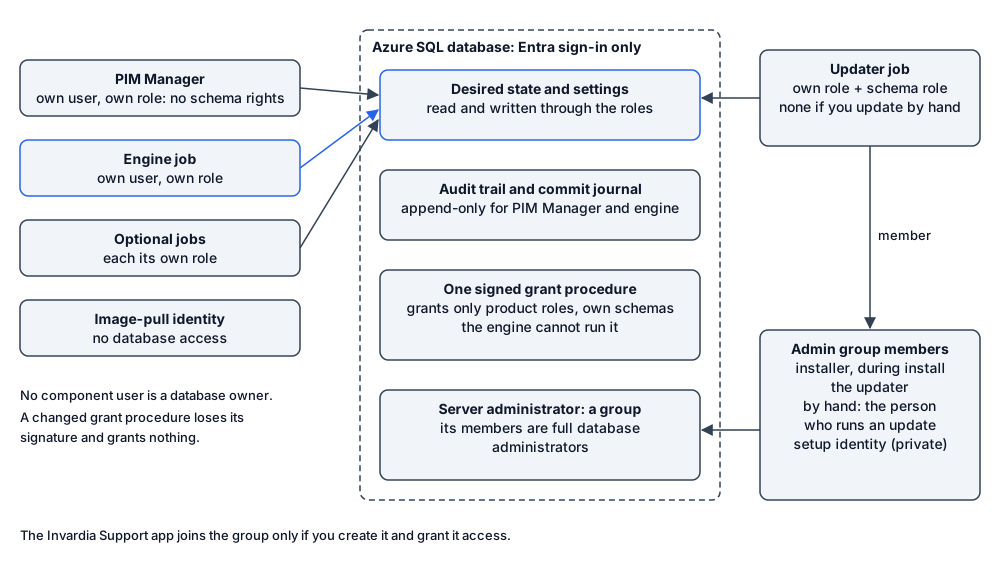
The database holds your whole privileged-access model, so a component with too many database rights could rewrite it, or rewrite the record of what happened. PIM Manager gives each component its own database user with its own role, and lets the product’s grants change only through one signed procedure.
Sign-in to the database
- Azure SQL uses Microsoft Entra ID authentication only. There are no SQL logins and no stored database passwords.
- Setup creates the SQL server with a minimum TLS version of 1.2. Connections are encrypted and the server certificate is validated.
- Each component that uses the database has its own contained database user, created from its own managed identity.
- The image-pull identity has no database access at all.
One role per component
| Component | What its role allows |
|---|---|
| PIM Manager | Read; write staged changes, settings and audit. No right to change the schema |
| Engine job | Read and write the desired state, results, journal and audit |
| Updater job (none when you update by hand) | Its own role plus the schema role and the signed grant procedure, and, as a member of the admin group below, full database administrator |
| Optional jobs (as-built report, definition publish, managed tenant pull, hybrid worker) | Each its own role with only the objects its job reads or writes; the managed tenant pull job also holds the engine’s role |
| Sign-in front | Owner of its own schema, where it keeps sessions and its session keys. No role on the product’s data |
No component’s database user is in the database owner role. The database administrators are the members of the admin group below, and the updater is one of them.
The database admin group
The SQL server’s Microsoft Entra administrator is a role-assignable security group. Microsoft Entra lets only a Global Administrator, a Privileged Role Administrator, an owner of the group, or an application holding the Microsoft Graph permission RoleManagement.ReadWrite.Directory change who is in it. Check the group’s owners after the install, because an owner can add members too. Every member is a database administrator. Its members are:
- the person who installs, only for the length of the install, removed at the end;
- the updater’s identity (when you update by hand, the person who runs an update is made a member instead), which stays a member after the install, so the updater can change anything in the database. The updater says what that allows, why, and how to remove it;
- on a private installation, the database setup identity, which the in-cloud database setup job runs as, because nothing outside the network reaches the database;
- the Invardia Support app, only if you create it for a support case and grant it access, until you remove it; see Support access;
- your own people, if you add them, best just-in-time through PIM for Groups.
PIM Manager’s and the engine’s runtime identities are not members.
Grants change through one signed procedure
After the install, the product’s database grants change only through one certificate-signed procedure, under fixed rules: it grants only the product’s own component roles, only data and execute rights, only on the product’s own schemas, and never a fixed database role.
- Its certificate lives in the database, is valid until 2099, and has its private key removed after signing, so the certificate cannot sign a new version.
- Altering the procedure drops its signature, so a changed procedure grants nothing.
- The updater may run it; the engine cannot.
A member of the admin group can still grant rights directly, outside the procedure. That is why the membership above matters.
A record that resists rewriting
- The audit trail and the commit journal are append-only for PIM Manager’s and the engine’s identities, enforced by a database trigger. Through the product, rows are removed only by the retention job, and only rows older than the retention you set (13 months or more).
- The commit journal row is written in the same transaction as the change: if the journal row fails, the change fails.
- A database administrator can disable a trigger. Switch on Azure SQL auditing to your Log Analytics workspace to keep a record outside the database; the installer does not switch it on.
Network and encryption
- Public mode: the server firewall admits Azure services. That rule admits connections from any Azure resource, in any tenant, to the server’s network endpoint; each connection still needs an Entra token for one of the database’s users. Use private mode for production.
- Private mode: the database gets a private endpoint and its public network access is off.
- At rest: Azure SQL Transparent Data Encryption.
Read the full model, role by role, in Database access.
Verified against PIM Manager 3.0.23.3 on Nov 3, 2026Download PDF