

SecurityInsight documentation · Verified against SecurityInsight 3.0.79 on Nov 9, 2026
Updates and upgrades
This page explains how a SecurityInsight 3 install keeps itself up to date, what is checked before anything changes, and how you stay in control.
How an install updates itself
Every install has one updater: a Container Apps job (caj-si-updater) that runs once a day, at 18:30 in the local time
of the install’s Azure region (Danish time when the region is not known), before the daily pipeline (19:00 in the same
time zone). It reads the release of its own update ring and applies it. Nothing is pushed into your environment: the
install pulls, checks and applies, with its own identity. See Releases, rings and waves for how a release
travels from ring to ring.
| Community | Pro | |
|---|---|---|
| Where the updater reads the release | Invardia’s public SecurityInsight Community channel, without sign-in | Invardia’s Pro channel, with the install’s own key |
| Update rings | 2 (early) or 3 (broad, the default) | 0 to 3 |
| What a release holds | The code, with its templates | The code, and template packs on their own channel |
| Licence | None | Requested and renewed by the updater |
The checks below and the update steps are the same for both editions.
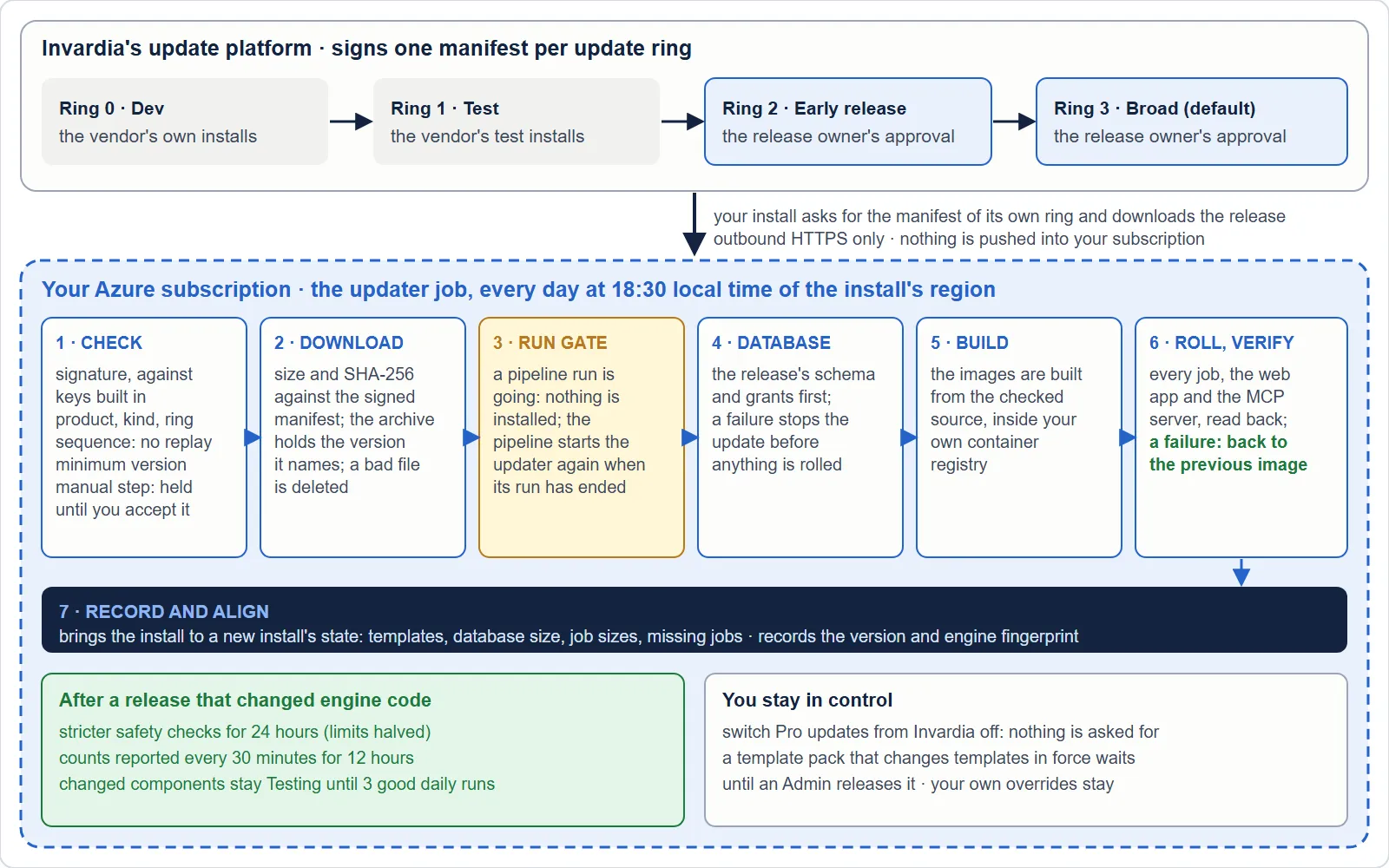
What one update does, in order:
- Signs in with the updater’s own identity and reads the install’s switches from the database.
- Licence (Pro). Requests or renews the Pro licence when there is none, when it ends within 30 days, or when it is in its grace period. A licence is installed only after it verifies offline.
- Asks for the manifest of its ring and checks it (below).
- Downloads the release and checks its size and SHA-256 against the signed manifest.
- Applies the database changes first: the release’s schema, then its grants through the certificate-signed grant procedure. See SQL access.
- Builds the new image inside your own container registry from the signed source. No prebuilt image is ever shipped to you.
- Rolls the jobs, the web app and the MCP server to the new image, verifies them, and rolls back to the previous image when the verification fails.
- Brings the install up to the current defaults: job sizes, run limits, database size, the install’s recorded names. A default that changed in a release reaches existing installs this way, never by hand.
- Records what it did: the version, the ring, the engine fingerprint and the components the release changed.
An update never changes a security right on its own initiative: it applies only the release’s shipped grant list, through the signed procedure, and checks the rest for drift (a warning, never a change).
What is checked before anything changes
| Check | What it protects against |
|---|---|
| The manifest’s RS256 signature, against Invardia’s update-signing public keys that ship inside SecurityInsight | A manifest someone else made, or one changed on the way. A key list fetched over the network is never trusted on its own. |
| The manifest is for SecurityInsight, for the kind asked for and for this install’s ring | A valid manifest of another product, kind or ring |
| Its sequence is not lower than the one already applied | An old, validly signed manifest replayed to move you back |
| The minimum starting version | A jump the release was not built for: it waits, with the reason |
| The download’s size and SHA-256 | A file swapped or damaged on the way: it is deleted and nothing is applied |
| The archive holds SecurityInsight with exactly the version the manifest names | A release in the wrong place |
Staying in control
| You want to … | How |
|---|---|
| See what the install runs and waits for | Settings > Updates in the web app: the last manifest per kind, the last check, anything on hold, the last problem and the components still in testing after a release. The header shows the update ring. |
| Hold a release that needs a manual step | It is held by itself and shown. It is applied only after you accept it on the updater job (SI_UPDATER_ACCEPT_MANUAL_STEP). |
| Review template changes first | A template pack that would change templates in force is staged and waits until an Admin releases it on Template releases, per detection method. Your own overrides are never changed. |
| Stop updates (Pro) | Switch Pro updates from Invardia off (SI_InvardiaUpdate_Enabled). The updater then asks for nothing and applies nothing. |
| Stop the automatic licence request (Pro) | Switch Automatic licence request off (SI_LicenseRequest_Auto). |
| Choose how early you get releases | Your install’s ring (Settings > Update ring, or Set-SIInstallRing). Community: ring 2 or 3. Most installs are on ring 3 (Broad). |
| Update by hand instead | Available from SecurityInsight 3.0.2, for both editions: one published script that you run yourself. It reads the same signed manifest, makes the same checks and applies the same steps as the updater. You can then leave the updater job switched off. |
An unreadable database never overrules your choice: when the updater cannot read the switches, it skips every Invardia step for that run.
After an update that changed engine code
When a release changed engine code (not only templates, texts or the web app), two things happen for a limited time:
- Stricter safety checks for 24 hours. Every numbered safety check is halved from the value you configured. See Guards and guard modes.
- Release mode for 12 hours (Pro). The install reports counts to Invardia every 30 minutes instead of once a day, so a problem in a new release is seen early. See Releases, rings and waves.
Coming from SecurityInsight 2.2
There is no upgrade from 2.2. The updater on this page keeps a SecurityInsight 3 install up to date; it never touches a 2.2 install. You install SecurityInsight 3 beside 2.2, compare the two, and switch 2.2 off when you are ready. See SecurityInsight 3 beside 2.2 for why, and for every step.
Verified against SecurityInsight 3.0.79 on Nov 9, 2026Download PDF