

SecurityInsight documentation · Verified against SecurityInsight 3.0.79 on Nov 9, 2026
Guards and guard modes
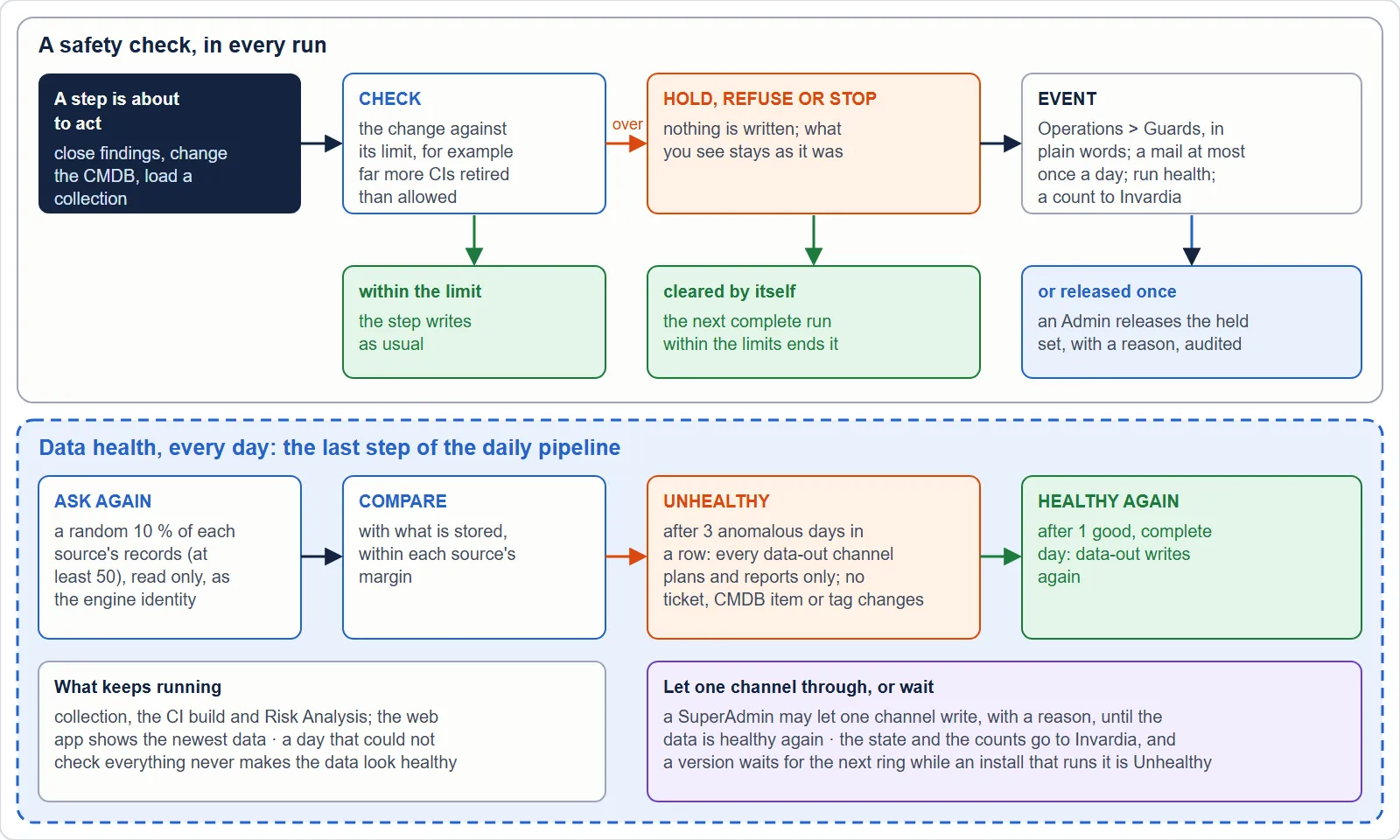
SecurityInsight checks its own results before it acts on them. When a check finds something that could do damage that does not heal by itself, it holds, refuses or stops that step, so incomplete or suspicious data never closes tickets, retires CMDB items or replaces what you see. Each time that happens is a guard event. Everything else is reported as a warning and never blocks your work.
You see every event on Operations > Guards (safety checks).
Which checks are on
Only the checks that stop damage which does not heal by itself are on by default:
| Check | What it protects |
|---|---|
| CI retire brake (the SQL CMDB and the CMDB hand-off) | Holds a run or a hand-off batch when far more configuration items would disappear than allowed. A CI retires only after its asset has been unseen for 7 days. |
| Duplicates brake (a target read only in part) | When a connector could read its target (for example ServiceNow) only in part, it writes nothing in that run, so no duplicate records are created. |
| Far fewer assets from one source | A collection that completes with far fewer assets than the last good one (30 % or more) is not taken as the truth at once. See Operations. |
| A Risk Analysis query that suddenly returns far more rows | Reported for review. |
| A second CI build started while one runs | Reported; the second build waits. |
Every other check is off by default and can be switched on in Settings > Guards, with or without its mail. Switching a check off never switches off an integrity stop: a database change that could remove data, a failed database update or a collection that could not be read in full still stops the step; the switch only stops the event and its mail.
While your data is not healthy, every data-out channel is held as well. See Data health.
What each event tells you
Every event is written in plain words, in four parts:
| Part | What it says |
|---|---|
| What happened | The step that was held, refused or stopped. |
| Why | The cause of this event. |
| Consequence | What you see or miss because of it. Where nothing is lost, it says so. |
| What to do | Numbered steps. |
The table shows When, What happened, a Severity chip (Critical, Warning or Info), the Status and the Action. Open a row for the four parts, the measured value against its limit, and links to the run health and the Jobs page.
The same words go into the safety-check mail, at most once a day per check while it keeps tripping. Recipients are set in Configuration > Settings > Mail & notifications > Safety-check mails (by default the report recipients).
The Action column: what you can do
| Action | Meaning |
|---|---|
| Release (Admin, once) | An Admin releases the set the guard held (held vulnerability closes, a held asset-properties collection, or a held CMDB hand-off batch) for that run only. |
| Release: load this collection anyway | An Admin loads a held Risk Analysis collection once, with a reason. It is marked partial wherever it is shown. |
| Can’t be released: fix the source | The data itself is wrong. Fix the cause. |
| Resolved by the next successful run | Nothing to release. The next good run clears it. |
| Re-run the job | Start the job again on Operations > Jobs. |
| Change the setting | A setting or the licence needs attention. |
| Review the result | Check the result before you trust it. |
| Nothing to do | Information only. |
Every event can be acknowledged once you have read it. An acknowledgement also covers later repeats of exactly the same event. Acknowledging does not release anything.
Guard modes: Normal and Strict
A defect in new engine code is most likely to do mass damage in the first day after it is installed. So for 24 hours after a release that changed engine code, every numbered safety check is stricter. A release that changed only templates, texts or the web app changes nothing.
| Normal | Strict | |
|---|---|---|
| When | Always, except the period below | 24 hours from the moment the updater installed a release whose engine fingerprint differs from the one it recorded before |
| Limits | As you configured them | Halved from the value you configured: max(1, floor(configured x 0.5)). A limit of 1 stays 1; 0 (no limit) stays 0; never below a limit a SuperAdmin approved for one run. |
| What a trip does | Holds, refuses or stops | Exactly the same; the event and mail add one calm sentence that the check is in its stricter period, until when, and why |
The engine fingerprint is a SHA-256 over the engine’s code folders, computed by the updater after a successful roll. The first fingerprint an install records starts nothing.
Which limits are halved:
| Safety check | Limit | Default -> strict |
|---|---|---|
| Vulnerability close limit | Close at most this share of the open vulnerability records in one run (and, when set, at most this many) | 10 % -> 5 % |
| Asset-properties change limit | Change at most this share of a source’s records | 10 % -> 5 % |
| CMDB hand-off change limit | Change at most this share of the handed-over CIs | 10 % -> 5 % |
| Far fewer assets from one source | Asset drop of a source | 30 % -> 15 % |
| Bulk exemption | Most findings in one bulk exemption request | 500 -> 250 |
Floors (the share of records that must still be seen) are not halved: halving a floor would loosen it. Warnings that hold nothing are unchanged.
Where you see it. Operations > Guards shows the period, its end, the release that started it, and each limit as “configured -> effective while strict”. The header shows Guard mode: Strict to SuperAdmins. The heartbeat to Invardia carries the guard mode, so Invardia knows which installs are in their stricter period.
Ending it early. A SuperAdmin may end the stricter period early on Operations > Guards, with a reason. It is recorded on the audit trail, and the header shows who ended it (by role) and when. Ending it never ends a later period.
Verified against SecurityInsight 3.0.79 on Nov 9, 2026Download PDF