

SecurityInsight documentation · Verified against SecurityInsight 3.0.79 on Nov 9, 2026
Identities and permissions
Every identity SecurityInsight creates or uses, every permission it holds, and why. There is one identity per role, and no identity is shared between components with different jobs. No identity holds a secret or a certificate: each runtime component signs in with its own managed identity.
The engines check their own permissions at the start of every run. A missing permission is shown in Get Started > Permissions and on the run’s health record with the command that fixes it; the rest of the run goes on.
The identities
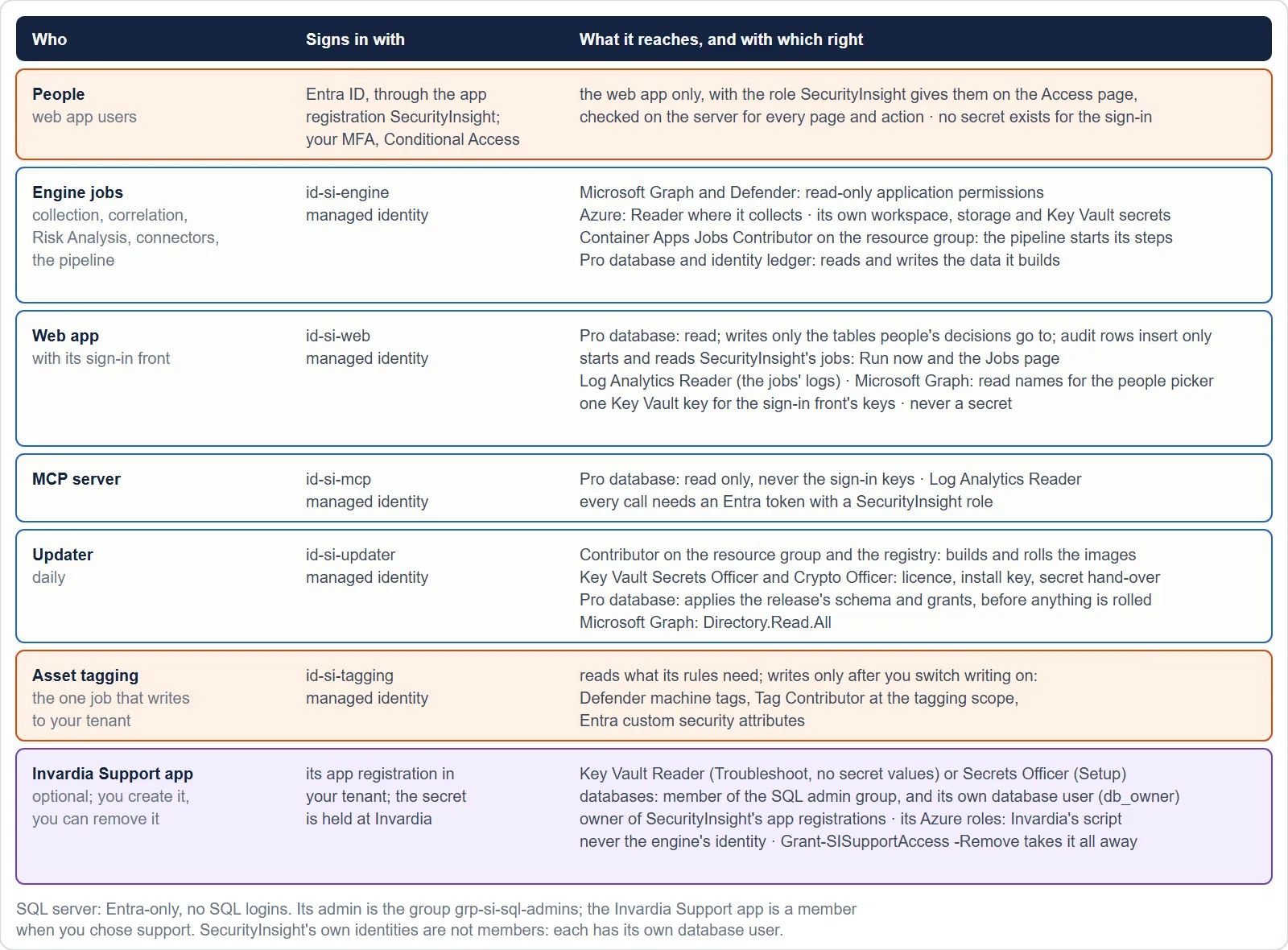
| Identity (name on a new install) | Kind | What it is for | Lifetime |
|---|---|---|---|
id-si-engine |
User-assigned managed identity | Every engine job: collection, correlation, Risk Analysis, data sync, connectors, verification, data health, the pipeline | As long as the install |
id-si-web |
User-assigned managed identity | The web app: reads the database, writes the decisions people make, starts named jobs | As long as the install |
id-si-mcp |
User-assigned managed identity | The MCP server: read-only answers to MCP clients | As long as the install |
id-si-updater |
User-assigned managed identity | The updater: licence, signed releases, image build, database schema, rolling the jobs | As long as the install |
id-si-tagging |
User-assigned managed identity | Asset tagging, only when you opt in | Until you remove asset tagging |
| SecurityInsight | Entra app registration (sign-in) | Users’ sign-in to the web app and bearer tokens for the MCP server. No secret, no certificate: the web app’s identity is its federated credential. No assignment required: SecurityInsight decides who has access, on its Access page. | As long as the install |
grp-si-sql-admins, shown as SecurityInsight SQL admins (an existing install may still show grp-si-sql-admins until its update renames it) |
Role-assignable Entra security group | The SQL server’s Entra administrator. Holds the Invardia Support app only, when you chose support; otherwise empty. | As long as the install |
| Invardia Support | Entra app registration in your tenant | Optional. Created by you, at a level you choose. See Support access. | Until you remove it |
| The person who installs | Your own account | Runs the guided install; a member of the SQL admin group only for the length of the install | The install |
Installs made before this naming keep their names (Azure cannot rename a managed identity); see Naming for the names an existing install shows.
The engine identity
Microsoft Graph (application permissions, all read only)
| Permission | Why it is needed |
|---|---|
| User.Read.All | Every user, its account state and attributes, for identity profiling |
| Group.Read.All | Groups and their transitive members, for privilege tiers and ownership |
| Directory.Read.All | Directory objects, deleted objects and the tenant’s own name for the header |
| Device.Read.All | Entra-registered and joined devices |
| Application.Read.All | Applications, service principals, their app role assignments and consent grants |
| AuditLog.Read.All | Last sign-in and the authentication-method registration reports |
| Policy.Read.All | The policies that protect an identity, as risk factors |
| RoleManagement.Read.All, RoleManagement.Read.Directory | Directory role assignments, for the privilege tier of an identity |
| RoleManagementPolicy.Read.Directory, RoleEligibilitySchedule.Read.Directory, RoleAssignmentSchedule.Read.Directory | Eligible and active PIM roles and their policies |
| PrivilegedAccess.Read.AzureADGroup | PIM for Groups eligibility and assignments |
| IdentityRiskyUser.Read.All, IdentityRiskEvent.Read.All, IdentityRiskyServicePrincipal.Read.All | Identity risk, as risk factors |
| ThreatHunting.Read.All | Advanced hunting through Microsoft Graph: Defender device tables and the Exposure Graph |
| UserAuthenticationMethod.Read.All | Which accounts are passwordless-only |
| DeviceManagementManagedDevices.Read.All | Intune serial numbers and MAC addresses for the asset details |
| DeviceManagementConfiguration.Read.All | Which compliance policies a device does not meet, and its update ring |
| AccessReview.Read.All | The last access review of a privileged role, group or application |
| SecurityAlert.Read.All | Open alerts per device: how many, the highest severity, the newest |
| SecurityEvents.Read.All | The Microsoft Secure Score of the tenant, sent with the hourly status report |
Microsoft Defender (application permissions, all read only)
| API | Permission | Why it is needed |
|---|---|---|
| Microsoft Threat Protection | AdvancedHunting.Read.All | Advanced hunting queries for Risk Analysis |
| Microsoft Defender for Endpoint | Machine.Read.All | The device list. Never Machine.ReadWrite.All: collection never writes. |
| Microsoft Defender for Endpoint | Vulnerability.Read.All | Exploit details of a CVE for vulnerability findings |
| Microsoft Defender for Endpoint | SecurityRecommendation.Read.All | The exposure impact and active alerts of a recommendation |
| Microsoft Defender for Endpoint | Score.Read.All | The Defender exposure score of the tenant, sent with the hourly status report |
Azure roles
| Role | Scope | Why it is needed |
|---|---|---|
| Reader | Where SecurityInsight collects: one subscription (default), a management group or the tenant root group | Enumerate Azure resources through Resource Graph |
| Log Analytics Reader | SecurityInsight’s workspace, and your Sentinel / Defender workspace when named | Risk Analysis, trend and correlation query the tables |
| Monitoring Metrics Publisher | The resource group of SecurityInsight’s data collection rules | Send rows to Log Analytics |
| Storage Blob, Queue and Table Data Contributor | SecurityInsight’s own storage account | Run logs, staging, the work queue of collections in parts |
| AcrPull | SecurityInsight’s container registry | Pull its image (no registry password) |
| Key Vault Secrets User | SecurityInsight’s Key Vault | Read the licence and the keys of the features you switched on |
| Container Apps Jobs Contributor | The install’s resource group | The pipeline starts its steps and gives a job the longest run limit when it was stopped at its limit |
Other
| Where | Right | Why |
|---|---|---|
| SecurityInsight database | The role si_engine |
See SQL access |
| Exchange Online | Application Mail.Send, scoped to the one shared mailbox | Send SecurityInsight’s mail as that mailbox and no other |
The web app’s identity
| Where | Right | Why |
|---|---|---|
| Container registry | AcrPull | Pull its image |
| Log Analytics workspace | Log Analytics Reader | The Jobs page reads the jobs’ console logs |
| The named SecurityInsight jobs | Container Apps Jobs Operator | Start a job (Run now). It cannot change a job, its image or its schedule. |
| SecurityInsight database | The role si_web |
Read the views; write only the tables people’s decisions go to. See SQL access. |
| Azure OpenAI resource (optional) | Cognitive Services OpenAI User | The chat, when AI is switched on |
| Key Vault (optional) | Key Vault Secrets User | The magic-link signing key, only when magic links are on |
| Microsoft Graph (granted by the guided install) | User.ReadBasic.All, GroupMember.Read.All, Application.Read.All, all read only | The names of people and groups on the Access page; finding a person or group by name when you add access; a person’s groups when their sign-in token lists too many; who holds a role on the SecurityInsight application. When the person installing may not grant them, the install says so and finding people by name stays off until an Entra administrator runs Grant-SIIdentity -WebApp. |
The web app holds no secret, is not a member of the SQL admin group, has no DDL right and never writes a secret: a secret you paste is handed encrypted to the updater, which stores it in the Key Vault.
The MCP server’s identity
| Where | Right | Why |
|---|---|---|
| Container registry | AcrPull | Pull its image |
| Log Analytics workspace | Log Analytics Reader | Answer questions about the reports |
| SecurityInsight database | The role si_mcp: read over what it serves, never the web app’s sign-in keys |
Its tools are read only |
The updater’s identity
| Where | Right | Why |
|---|---|---|
| The install’s resource group and registry | Contributor | Build the image in your registry, roll the jobs and apps, bring job and database sizes up to the defaults, turn the Key Vault’s purge protection on (it cannot be turned off again) |
| Key Vault | Key Vault Secrets Officer | Keep the licence, the install key and the update state |
| Key Vault | Key Vault Crypto Officer | The key the web app’s secret hand-over is encrypted with (it never leaves the vault) |
| SecurityInsight database | The role si_updater: DDL to apply a release’s schema, and EXECUTE on the signed grant procedure |
Apply the release’s database changes without any admin. See SQL access. |
| Microsoft Graph (application permissions, granted by setup) | PrivilegedAssignmentSchedule.ReadWrite.AzureADGroup, PrivilegedAssignmentSchedule.Read.AzureADGroup, RoleManagementPolicy.Read.AzureADGroup, GroupMember.Read.All, Application.Read.All | Keep the database setup job a member of SecurityInsight’s SQL admin group (role-assignable): make and renew its active PIM-for-Groups membership, read the group’s PIM policy and read the membership back. Never RoleManagement.ReadWrite.Directory. |
Asset tagging’s identity (opt-in)
Asset tagging is the one SecurityInsight job that writes to your tenant, so it never runs as the engine identity.
| Where | Right | When | Why |
|---|---|---|---|
| Microsoft Graph | ThreatHunting.Read.All, User.Read.All, Application.Read.All | Always | Evaluate the tagging rules |
| Microsoft Graph | CustomSecAttributeAssignment.ReadWrite.All | Only when writing is on | Set Entra custom security attributes |
| Microsoft Defender for Endpoint | Machine.ReadWrite.All | Only when writing is on | Set machine tags |
| Azure | Reader at the tagging scope; Tag Contributor there only when writing is on | Evaluate the Resource Graph rules; set Azure resource tags | |
| Azure | Log Analytics Reader, Monitoring Metrics Publisher, Storage Blob Data Contributor, AcrPull, Key Vault Secrets User | Always | Its rules, its activity rows (what it planned and wrote), its run log, its image, the licence |
| SecurityInsight database | Read of its settings | Always | Read its settings at run start |
Until writing is switched on in the web app, asset tagging only reports what it would tag.
The sign-in app registration
Delegated permissions openid, profile, offline_access and User.Read (sign-in only), app roles SuperAdmin,
Admin, Reader, Wallboard and Department, one delegated scope for user-delegated MCP clients, security-group ids in the
token so groups can be mapped to roles. No assignment is required: anyone in your directory can sign in, and sees nothing until a SuperAdmin gives them a role on the Access page: SecurityInsight decides who has access. Its only credential is the web app’s managed identity as a
federated credential.
What breaks without a permission
Nothing stops. A missing permission makes the part that reads with it report a permission gap, with the command for the person who can grant it, and every other part of the run goes on. The exceptions are deliberate: asset tagging never writes without its write permissions, and the updater stops before rolling anything when it cannot apply the release’s database changes.
Verified against SecurityInsight 3.0.79 on Nov 9, 2026Download PDF