

SecurityInsight documentation · Verified against SecurityInsight 3.0.79 on Nov 9, 2026
SecurityInsight 3 beside 2.2
You run SecurityInsight 2.2 and want SecurityInsight 3. There is no supported upgrade from 2.2 to 3. You install 3 as a separate installation beside 2.2, run both for a while, compare the results, and then switch 2.2 off.
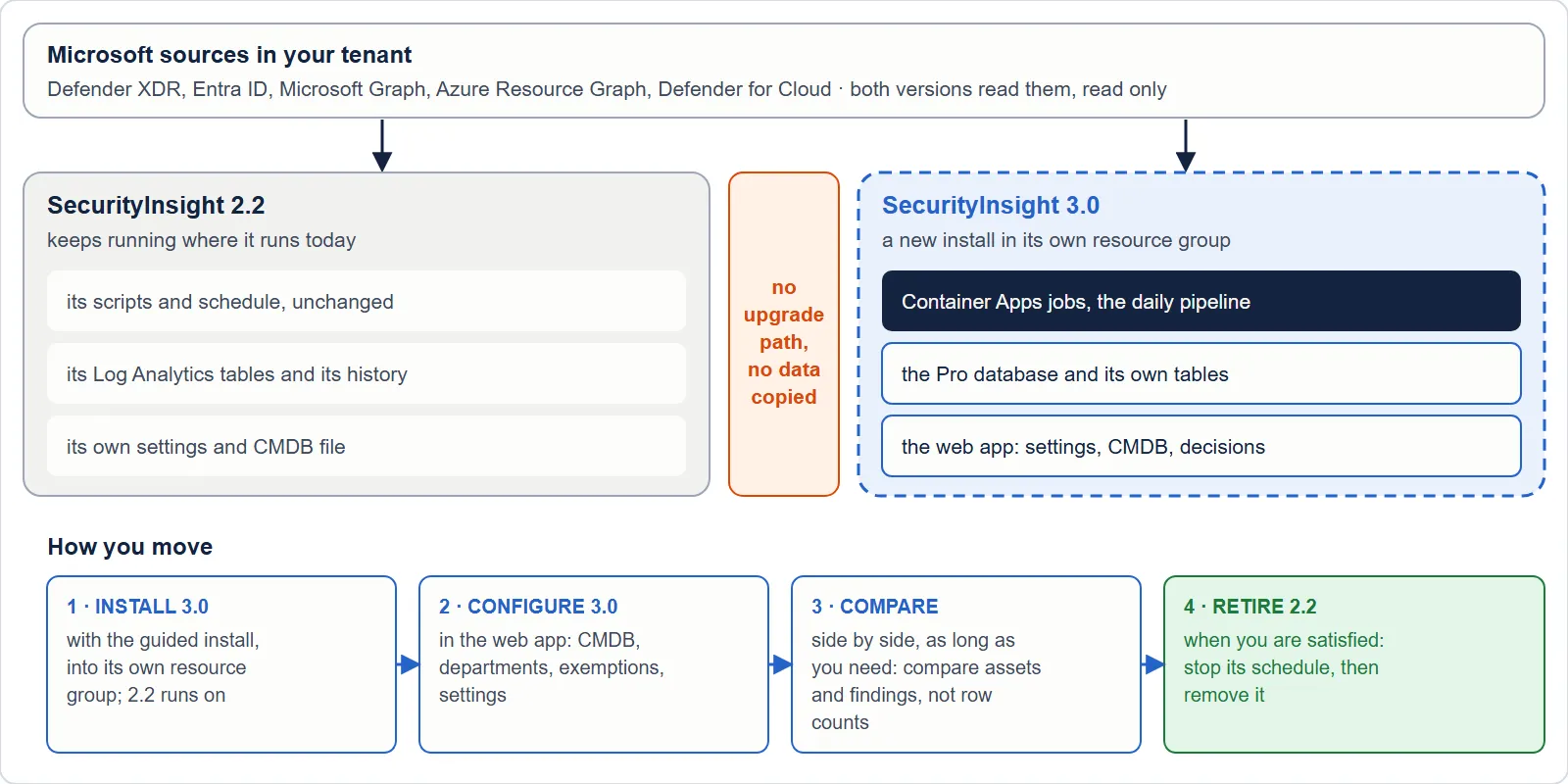
This page explains why, and how to set it up. It applies to both editions: Community (free) and Pro (Pro Business and Pro Enterprise).
Why there is no upgrade
SecurityInsight 3 is a different product on the inside. Almost nothing of a 2.2 install can be reused as it is.
| SecurityInsight 2.2 | SecurityInsight 3 | |
|---|---|---|
| Where it runs | A Windows server with scheduled tasks, or container jobs you set up yourself | Azure Container Apps jobs, created by the guided install |
| Where your settings live | Configuration files in the install folder | A SQL database in your subscription |
| How you work with it | Files, Excel workbooks and mail | A web app behind Microsoft Entra sign-in, plus the reports and mail |
| How it signs in | An app registration with a certificate or a client secret | Managed identities, one per role, with read-only rights |
| How it is updated | git pull of the public repository |
Its own update path, separate from 2.2 |
| The data model | Rows per source in Log Analytics | One asset per configuration item, records from several sources merged |
An in-place upgrade would have to move files into a database, replace the sign-in, rebuild the hosting and convert the data at the same time, on a system that produces your security reports every night. A separate install avoids that risk: 2.2 keeps running unchanged until you decide that 3 gives you what you need.
What you need
- An Azure subscription where you may create a resource group. It can be the subscription 2.2 uses.
- The rights the guided install asks for. See Install SecurityInsight Pro. The same rights apply to Community, except the Pro licence.
- For Pro: your SecurityInsight Pro licence. Without a licence, the install sets up Community.
- Azure Cloud Shell (PowerShell).
You do not need anything from your 2.2 install to start.
Set up SecurityInsight 3
- Answer the install wizard on invardia.com. It gives you the command for Azure Cloud Shell. You can also run the
two install lines yourself, with every setting as a parameter of line 2: line 1 downloads
Install-SecurityInsight.ps1(Community from the latest public release on GitHub, Pro from invardia.com), line 2 runs./Install-SecurityInsight.ps1 -TenantId '<tenant id>' -SubscriptionId '<subscription id>'. See Community edition: the scripts you run. - Keep the default resource group, or choose another one that 2.2 does not use. The defaults are
rg-si-prod-community-cafor Community andrg-si-prod-pro-cafor Pro. The names inside it follow the same pattern, for examplelog-si-prod-community-cafor the workspace andsql-si-prod-community-ca-<suffix>for the database server. The suffix is derived from your subscription. None of these names is a name 2.2 creates (rg-securityinsight,log-securityinsight,dce-securityinsight,sp-securityinsight). - Choose a new Log Analytics workspace on the Data and scope page. This is the default. Do not choose 2.2’s workspace: both versions write tables with the same names, and 3 would change their columns under 2.2.
- Run the command in Cloud Shell. The install checks your sign-in, rights, resource providers and names first, and changes nothing until those checks pass. Then it creates every resource step by step and starts the first run.
- Make the grants it lists. A grant you may not make yourself ends as a warning with the exact command for the person who can. SecurityInsight 3 has its own managed identity, so it needs its own read rights, even when 2.2 already has them.
The setup steps are the same for both editions. Pro adds the licence, the Pro features in the web app and the updater job. See Install SecurityInsight Pro for every step.
Run both and compare
Leave 2.2 running exactly as it is. Both installations read the same tenant, each with its own identity, and each writes to its own workspace.
Compare the two for as long as you need. Compare assets and findings, not raw row counts. The counts differ on purpose:
- Fewer asset rows. 3 merges the records Defender, Exposure Graph and Azure Resource Graph keep for one machine or one resource into one asset.
- More identities. 3 includes identities that have no sign-in history.
- More findings. 3 reports vulnerabilities that Defender Vulnerability Management lists even when the Exposure Graph has no link for them, and it treats every security recommendation as a vulnerability.
- Different grouping. A machine has one tier everywhere, so a finding can appear in more tier groups.
Carry over what you need
Nothing moves from 2.2 to 3 by itself. You carry over what you want, by hand.
| From 2.2 | In SecurityInsight 3 |
|---|---|
Your CMDB (CMDB.csv) |
Pro: Assets & services > CMDB, Import your v2.2 CMDB.csv (once). Each service gets a new number and keeps its cmdbID. An optional second file links assets to services. The file is checked line by line first, and nothing is written if a line is wrong. Community: the CMDB page is part of Pro. |
Your settings (config\SecurityInsight.custom.ps1) |
Set them again on Configuration > Settings in the web app. |
| Your own tier and profiling rules | Re-create them on Configuration > Profiling rules. |
| Your risk index changes | Make them again on Configuration > Risk index. |
| Your report exclusions | Add them again on Configuration > Reports, tab Exclusions. |
| Your mail recipients and SMTP server | Answer them in the install wizard, or set them in the web app. |
What does not carry over:
- History. Your 2.2 profiles, findings and trend stay in 2.2’s Log Analytics workspace. 3 starts its own history from its first run. Keep 2.2’s workspace for as long as you need its history.
- Files you edited in the 2.2 folder. 3 does not read the 2.2 folder.
- Power BI datasets built on 2.2’s tables. Point them at 3’s data when you are ready.
Switch 2.2 off
When 3 gives you what you need:
- Stop 2.2’s runs.
- On a Windows server: disable the scheduled tasks under the task folder
\SecurityInsight\, including the update task. - In containers: stop or delete the Container Apps jobs in 2.2’s resource group.
- On a Windows server: disable the scheduled tasks under the task folder
- Stop 2.2’s updates. Remove a scheduled
git pullor a scheduledUpdate-SecurityInsight.ps1of the 2.2 folder. - Keep the workspace for as long as you need 2.2’s history.
Remove 2.2
When you no longer need 2.2’s history, remove what 2.2 created. With the 2.2 defaults that is:
- The resource group
rg-securityinsight, with its Log Analytics workspace, data collection endpoint and rules, storage account and, for containers, the registry and jobs. Check first that it holds nothing else. - The app registration
sp-securityinsight(or your own name for it), with its API permissions and its role assignments outside the resource group. A resource group delete does not remove those. - 2.2’s secrets in your Key Vault, if you stored any there.
- The SecurityInsight folder on the server, and the PowerShell modules 2.2 installed, if nothing else on the server uses them.
Do not remove anything in SecurityInsight 3’s resource group.
Questions
Can both run at the same time? Yes. They are separate installations with separate identities, resource groups and workspaces. You pay for both while both run, and both read the same tenant through Microsoft’s APIs.
Does SecurityInsight 3 touch 2.2’s resources? No. The guided install creates and changes resources only in its own resource group, and it looks for an existing install only there. It gives its own identity read access to what it reads. It does not change 2.2’s app registration, workspace, scheduled tasks or folder.
What happens to my 2.2 updater? It keeps updating 2.2 only. It does not install SecurityInsight 3. You get 3 only with the guided install described on this page.
Can I move back to 2.2? Yes. 2.2 keeps running until you switch it off. Turn its scheduled tasks or jobs back on.
Do I need Pro to run 3? No. Community is SecurityInsight 3 without the paid features. The licence decides which features are on.
Verified against SecurityInsight 3.0.0.202610261957 on 2026-10-27
Verified against SecurityInsight 3.0.79 on Nov 9, 2026Download PDF
← Community edition: the scripts you runThe SecurityInsight data contract →