

SecurityInsight documentation · Verified against SecurityInsight 3.0.79 on Nov 9, 2026
Data health
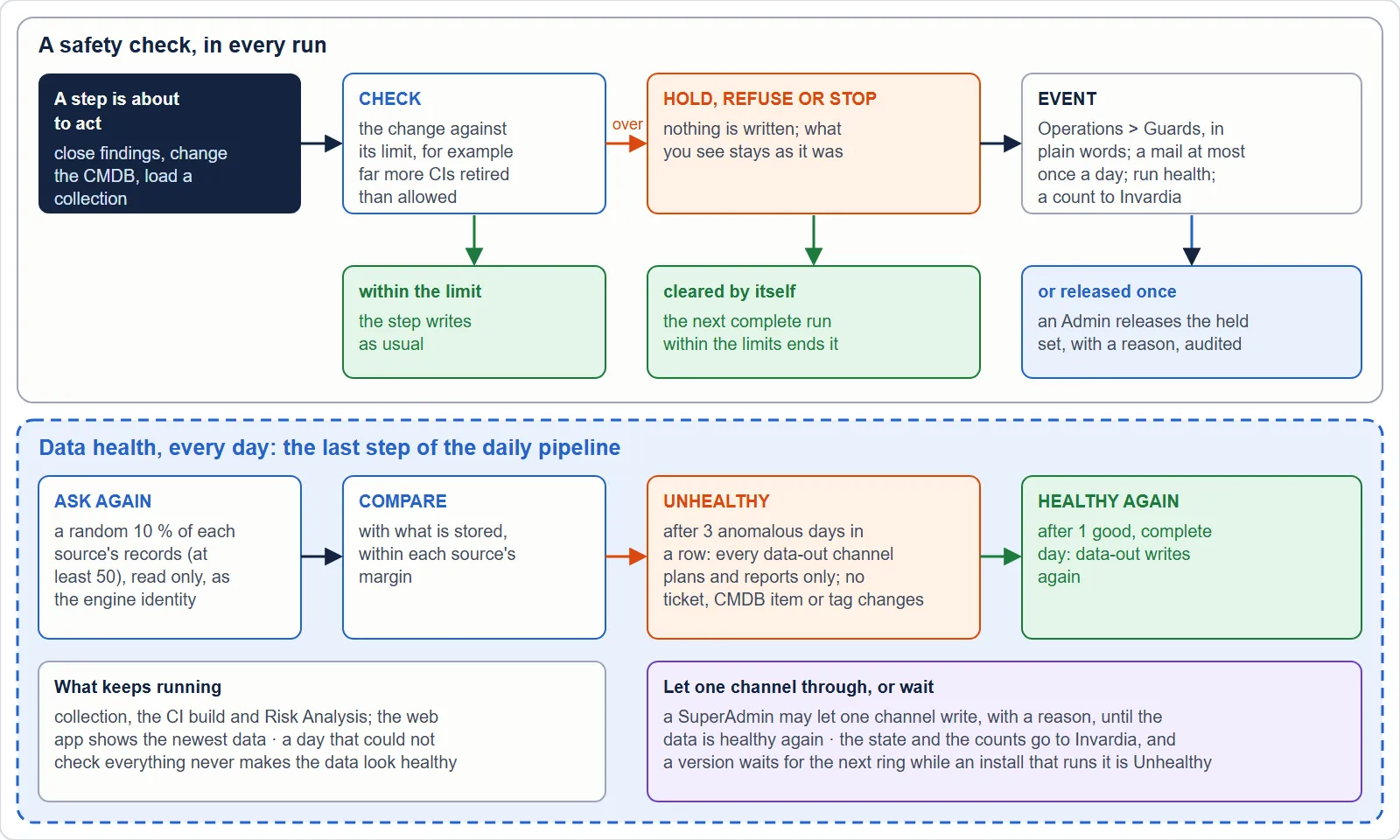
SecurityInsight checks its own data every day. It asks the sources again for a random sample of what it collected and compares the answers with what it stored. While the data is not healthy, nothing leaves SecurityInsight: no ticket is closed, nothing is handed to your CMDB or ServiceNow, no tag is written. Releases to other customers wait as well.
What is checked
Every day, inside the verification job, as the engine identity and read only:
| Source | Asked again | Compared in the newest collection | Default margin |
|---|---|---|---|
| Entra users and groups | Microsoft Graph | Present; sign-in name and enabled state | 1 % |
| Entra applications and service principals | Microsoft Graph | Present; application id and enabled state | 1 % |
| Defender devices | Defender for Endpoint | Present; Entra device id | 2 % |
| Azure resources | Azure Resource Graph, the resource types that become assets | Present; type and location | 3 % |
| Defender for Cloud recommendations | Azure Resource Graph | The unhealthy count per resource | 5 % |
| Vulnerabilities | Defender for Endpoint, for the sampled devices | Present in the newest complete Risk Analysis | 5 % |
| Risk Analysis, per report with vulnerability findings | The same answers | Matched, missing and extra findings | 3 % |
The sample. 10 % of a source’s records, at least 50, all of them when there are 50 or fewer, picked at random every day, so it is never the same records. A record the source created after the newest collection is not asked about. A source that could not be read in full counts as not checked, never as healthy.
The margin. A source or report is anomalous when more records differ than its margin allows:
allowed = max(minimum, floor(checked x percent / 100)), with a minimum of 5. An Admin can change every margin in
Settings.
The states
| State | Meaning | How it changes |
|---|---|---|
| Healthy | The data matches its sources within the margins | Turns Unhealthy after three anomalous daily cycles in a row |
| Unhealthy | Something has been wrong for three days | Turns Healthy again after one good cycle |
A cycle that could not check everything and found nothing anomalous changes nothing: an unreadable source never makes the data look healthy. A new install starts Healthy, so a release never holds data-out on its first day.
What Unhealthy does
Data-out is held, per channel. Every channel that writes outside SecurityInsight asks the state before it writes:
| Channel | While Unhealthy |
|---|---|
| Vulnerability connectors (SQL, REST, ServiceNow) | Plan and report only: nothing is opened or closed |
| ServiceNow CMDB | Plan only |
| SQL CMDB hand-off | Nothing handed over, nothing retired |
| Asset tagging | Report only |
| Every data-out output | Held; what it sent last stays |
The calculation goes on: collections, the CI build and Risk Analysis still run, and the web app shows the newest data.
Letting one channel through. A SuperAdmin can let one channel through on Configuration > Connectors > Data-health hold, with a reason of at least 10 characters. It is recorded on the audit trail and lasts until the data is Healthy again; then it ends by itself. An override from an earlier Unhealthy period never counts.
Releases wait. When an install turned Unhealthy after it took a new version, that version is not promoted to the next ring while that install stays Unhealthy or stops reporting. Only the vendor’s release owner can override that, with a reason, recorded. A channel override at your install never lifts that hold. See Releases, rings and waves.
Where you see it
- The header shows Data health: Healthy or Unhealthy, linked to the page, once a cycle has run.
- Configuration > Connectors > Data-health hold shows the state, the channels held or let through, the result per source and per report for any of the last 30 cycles, and the records that did not match.
- Invardia receives the state and the counts per source and per report, at the end of every cycle and at once when the state changes. Counts only: never a record’s name, id or value, never a person. An install that sends nothing for 48 hours is shown as Unknown at Invardia and counted as not healthy.
Settings
| Setting | Default | What it does |
|---|---|---|
SI_DataHealth_Margin_EntraUsers, _EntraApps, _Devices, _Azure, _DefenderForCloud, _Vulnerabilities, _RiskAnalysis |
1, 1, 2, 3, 5, 5, 3 (%) | The margin per source |
SI_DataHealth_MarginMinimum |
5 | The fewest differing records any margin allows |
Verified against SecurityInsight 3.0.79 on Nov 9, 2026Download PDF