

SecurityInsight documentation · Verified against SecurityInsight 3.0.79 on Nov 9, 2026
Support access
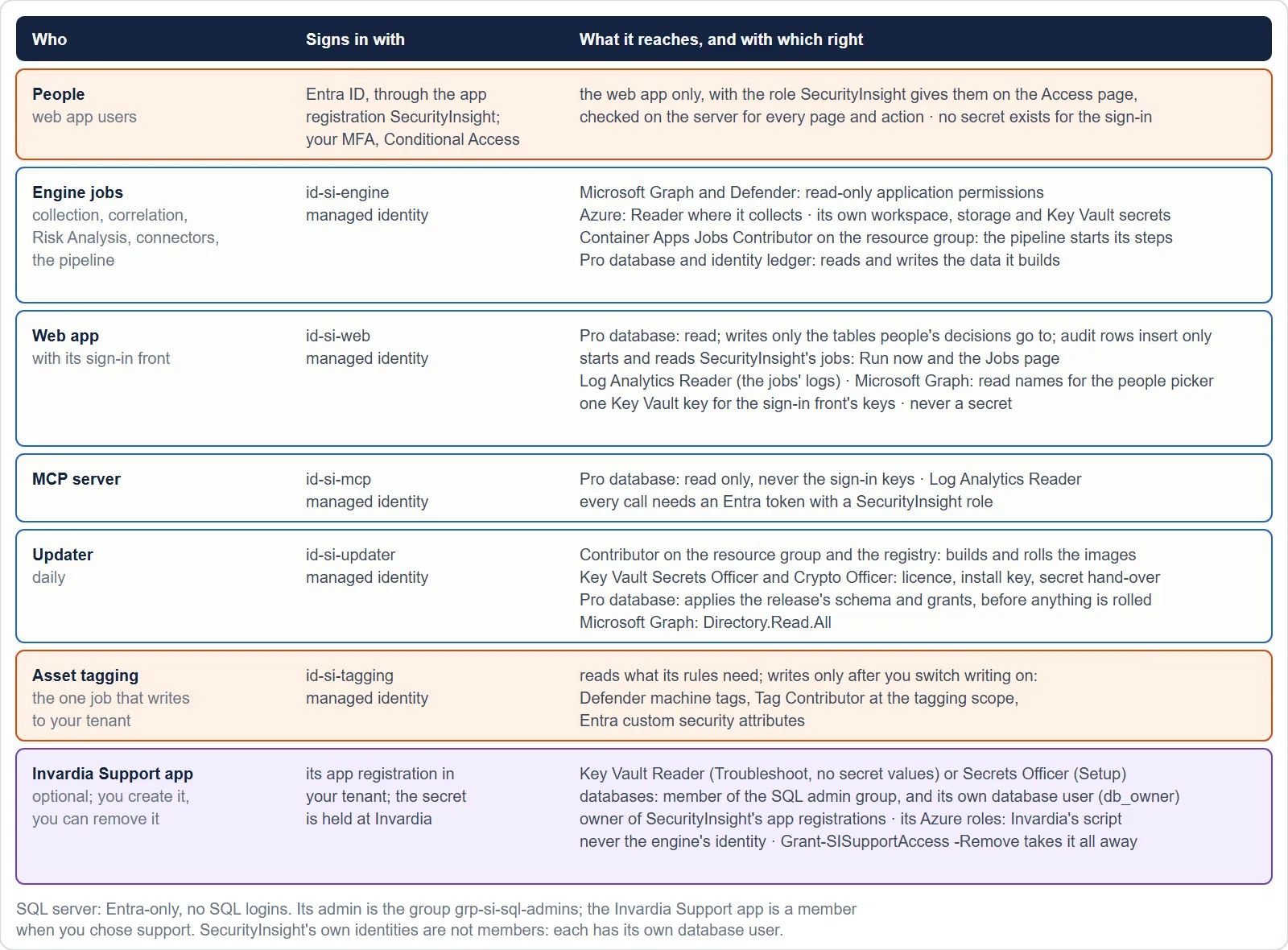
Invardia can help you with SecurityInsight only through the Invardia Support app: an app registration that you create in your own tenant, at the level you choose, and that you can disable or remove at any time. Without it, Invardia has no access to your install at all. Most installs never need it: SecurityInsight updates and repairs itself without any contact.
The two levels
| Troubleshoot | Setup | |
|---|---|---|
| Purpose | Read what is wrong | Read, and run SecurityInsight’s setup scripts to install, repair and upgrade |
| Microsoft Graph | Read-only application permissions | The read permissions, plus what the setup scripts need to create and repair SecurityInsight’s own app registrations and groups |
| SecurityInsight’s resource group | Reader and Log Analytics Reader | Contributor, and role assignment limited to the roles SecurityInsight’s own identities use, to service principals only |
| SecurityInsight’s Key Vault | Key Vault Reader: the vault’s metadata, never a secret value | Key Vault Secrets Officer: can repair a secret |
| SecurityInsight’s databases | Its own database user in a read-only role (metadata and health, no data); read access to data only just in time | Its own database user in a read-only role; database admin only just in time |
| SecurityInsight’s sign-in app registration | None | None: the install’s own updater owns it |
The exact list of the Support app’s permissions per level is on the page of Invardia’s script that creates it (below). SecurityInsight adds only its own part: the Key Vault role and the database access.
The Support app has no standing admin in SecurityInsight’s databases. It keeps only its own database user in a read-only role (metadata and health, no data). When a support session you asked for needs more, SecurityInsight’s support grant opens it just in time: at most the level you chose, for at most 8 hours, recorded, and closed again by three independent checks. An install that still gives the Support app standing admin from an earlier release loses it through its updates and one recorded support step; your own administrators keep the database admin group. See SQL access. The Support app is never the engine’s identity and never runs your pipeline.
How you give and remove it
- Create the Invardia Support app with Invardia’s script; its page is https://invardia.com/docs/invardia/scripts/New-InvardiaSupportApp/.
- Choose Troubleshoot or Setup in the guided install, or give it later with SecurityInsight’s
Grant-SISupportAccessscript (https://invardia.com/docs/si/scripts/Grant-SISupportAccess/). - Take it away with
Grant-SISupportAccess -Remove: every grant, its database user and your consent go. Or delete the app registration, or disable it in Invardia’s customer portal.
Its secret, under your control
The Support app signs in with a client secret that is stored at Invardia, never in your install. Invardia’s script also creates a Conditional Access policy for this app only that blocks its sign-in from anywhere but Invardia’s support address; it is created switched off, and you decide when to switch it on. In Invardia’s customer portal you control the secret per environment:
| Control | Choices |
|---|---|
| State | Enabled or Disabled |
| Lifetime | 1 to 730 days |
| Renewal | Automatic (the default on rings 0-2), Approval required (the default for ring 3 customers) or Off |
- Automatic: 7 days before expiry Invardia adds a new secret with your lifetime, proves a sign-in with it, and only then removes the old one. A failure keeps the old secret, and you are told. Every renewal is recorded.
- Approval required: your portal administrators approve each renewal by link: weekly from 30 days before expiry, daily from 14 days.
- A secret with a lifetime under 7 days is never renewed: it closes by itself, for example after one task.
- Every week Invardia checks that the app can still sign in and reads its own credential dates. The portal shows the expiry, disabled by the customer or cannot sign in. A disabled or removed app is never renewed.
Every support action is recorded
- A support session starts with a stated reason or ticket, recorded before anything is read or changed.
- Every database statement goes through Invardia’s audited call: the audit row (server, database, the statement’s SHA-256, the purpose) is written before it runs, then its outcome.
- Changes to an existing install are made with SecurityInsight’s own published scripts, never by hand, each with a plan first, a rollback record, and a check of the next runs afterwards.
- What support did is shown in your activity log at Invardia, and the database’s own audit goes to your Log Analytics workspace.
Release spot checks
On rings 0-2, for a short period after a new release, Invardia’s support may read counts through the Support app to judge the release: read only, recorded before each read, counts and verdicts only. Your environment’s switch “release spot checks allowed” turns this off without leaving the ring. See Releases, rings and waves.
What Invardia cannot do
- Reach your install without the Support app, or after you disabled or removed it.
- Read a secret value at the Troubleshoot level.
- Use the engine identity, or change SecurityInsight’s code outside a signed release.
- Keep anything it read: spot checks store counts and verdicts only.
Verified against SecurityInsight 3.0.79 on Nov 9, 2026Download PDF