

SecurityInsight documentation · Verified against SecurityInsight 3.0.79 on Nov 9, 2026
SQL access
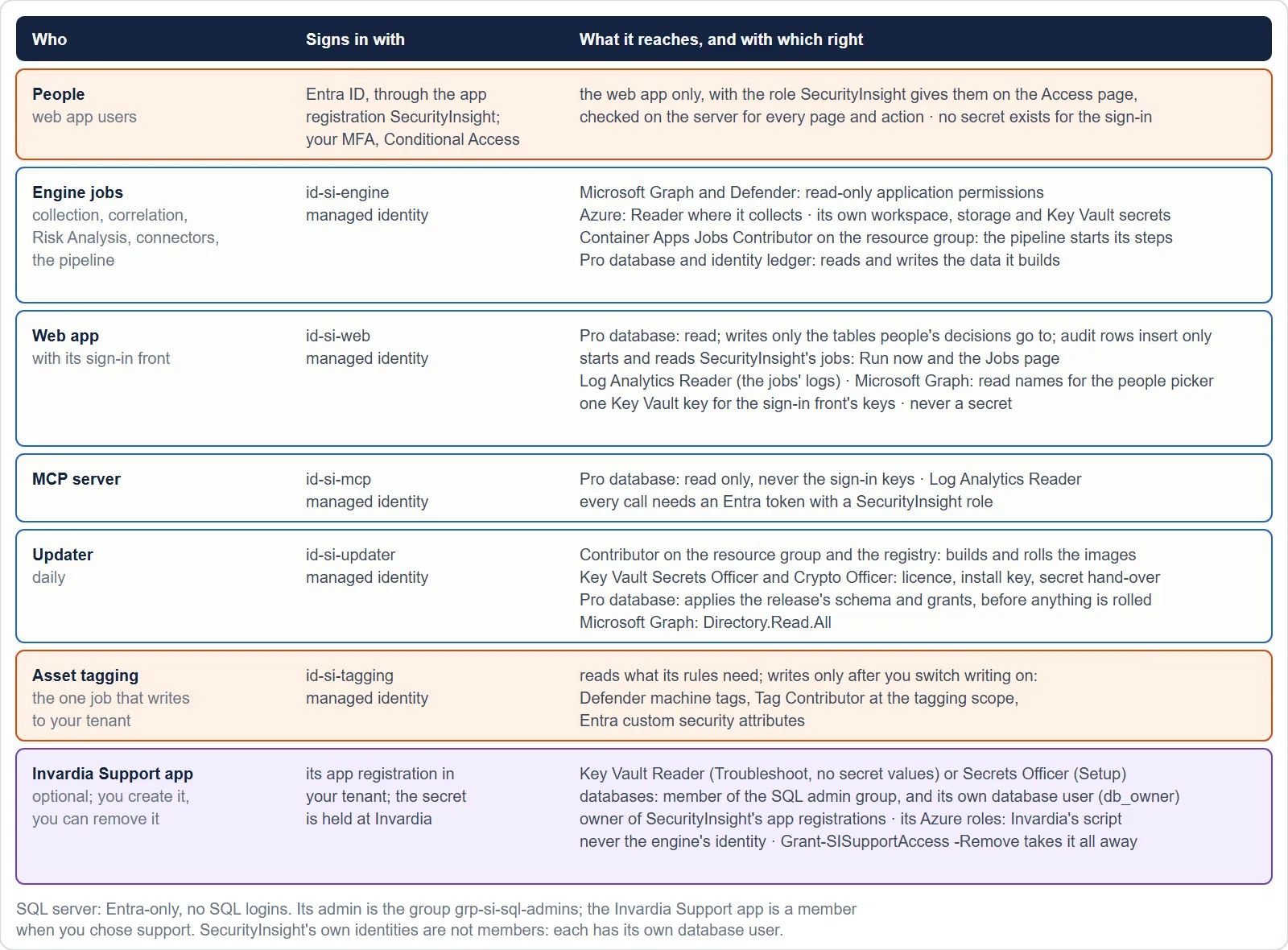
SecurityInsight keeps its settings, decisions, audit trail and the copies of findings the web app reads in Azure SQL, in your subscription: the SecurityInsight database and the identity ledger (the object identifiers that tie records to one asset). This page describes who can reach them and with which rights. The model is the same in every Invardia product.
The rules
- Entra-only authentication. The server has no SQL logins and no passwords.
- One contained database user per component, mapped from that component’s own managed identity. No identity is shared between components with different jobs; an identity that only pulls images has no database access at all.
- One custom role per component, never
db_datareader,db_datawriterordb_owneron the whole database. Grants are schema-level where the component owns the data and object-level everywhere else, with no DELETE where the component never deletes. - No standing security or DDL right on a runtime identity, except the updater’s right to apply a release’s schema. Grants after a release go through one certificate-signed procedure (below).
- The Invardia Support app has no standing admin. When you create it, it gets its own database user in a read-only
role (metadata and health, no data) in each database; more comes only just in time, through the signed support grant,
at most at the level you chose and for at most 8 hours.
Grant-SISupportAccess -Removetakes it away. An install that still has the Support app in the admin group from an earlier release loses that through its updates and one recorded support step, which keeps the group as the server’s administrator with your own members. The updater is not a member. People get in just in time, for example through Privileged Identity Management for Groups with approval and a time limit. The person who installs is a member only for the length of the install. - SQL auditing on the server, to the install’s own Log Analytics workspace, kept 90 days.
- A static test per release fails when the product’s code touches a table outside its role’s grant list.
The roles
| Role | Component | What it may do |
|---|---|---|
si_engine |
Every engine job | SELECT, INSERT, UPDATE, DELETE on the schema of the data it builds (sidata); SELECT, INSERT, UPDATE on the vulnerability loop, the CMDB sync and the ServiceNow hand-off schemas (DELETE only on their staging and batch tables); SELECT on the settings, templates, departments and the decisions people make in the web app; writes only on the few settings tables it keeps state in. A DENY keeps it from writing an Admin’s manual CI override. No DDL, no security right, no fixed role. |
si_web |
The web app | Read the views it shows; write only the tables people’s decisions go to (settings, documents, exemptions, access, change history). It may only add rows to the audit trail. |
si_mcp |
The MCP server | Read what its tools serve. Never the web app’s sign-in keys. |
si_updater |
The updater | DDL to apply a release’s schema, and EXECUTE on the signed grant procedure. Nothing else. |
si_audit_writer |
The web app | INSERT and SELECT on the audit trail |
The templates job has its own identity and role, so the engine role carries no write on the template tables.
The audit trail cannot be changed
The audit trail and the change history it is built from refuse UPDATE and DELETE to every database user, enforced by
the database (DENY ... TO public). Because no runtime identity holds DDL or ownership, the DENY binds all of them,
including an identity added later under any name. The one way rows leave the trail is the retention procedure, which
refuses anything younger than 13 months and records itself. The honest limit: a database owner (the admin group, and the
Support app while a just-in-time grant is open) is not bound by a DENY, which is why the group holds only setup identities,
why the Support app holds admin only just in time, and why it exists only when you create it. Every statement it runs goes through Invardia’s audited
SQL call.
Grants after a release: the signed grant procedure
A release can add tables, and the components need rights on them. These are applied by one certificate-signed
procedure in the SecurityInsight database, cfg.ApplyComponentGrants, which the updater may only EXECUTE:
- It applies only the release’s shipped grant list, under fixed rules: the grantee is one of SecurityInsight’s own
roles; the permission is SELECT, INSERT, UPDATE, DELETE or EXECUTE; the object is in SecurityInsight’s own schemas;
never a fixed
db_*role. - It may create a contained database user only for a component name compiled into it, and only into that component’s own role. A component added years later needs no administrator.
- Its rules are general enough for every future release and are never changed by an update: changing the procedure would need an administrator.
- It is signed with an in-database certificate created once by setup, with its private key removed afterwards. Nothing is stored outside the database, and nothing is rotated: the certificate’s expiry date is set far in the future.
Five years without contact
Most installs run for years with no Support app and no contact with Invardia. The design makes that safe:
- Nothing routine needs the admin group. After setup the group may stay empty for years. Every update, schema and grants, is applied by the updater’s own database user and the signed grant procedure. No step of an update needs an administrator, a person or the Support app.
- Recovery always exists. The admin group is an Entra group: a Global Administrator or Privileged Role Administrator adds a member, with no SQL access needed. If the group itself is gone, an Owner of the SQL server points the server’s Entra administrator to a new group.
New installs and existing installs
- New installs get the full model from the guided install on day one: the roles, the signed procedure, the contained users and SQL auditing.
- Existing installs move by a scripted cut-over per environment, run by Invardia support through the Invardia
Support app with the customer told beforehand: every SQL statement goes through Invardia’s audited SQL call, a
rollback record is kept, the new role is added first and the broad roles are removed only in a second run, after a
complete pipeline run proved the new role. The scripts are
Move-SIEngineToLeastPrivilegeandInstall-SIGrantProcedure(pages at https://invardia.com/docs/si/scripts/). - The updater never changes security on its own. On every update it checks the components’ rights against the release’s list and warns on drift; it never grants beyond the shipped list.
Your own access
| You want to … | How |
|---|---|
| Query the database as a person | Become a member of the SQL admin group for the time you need, through PIM for Groups, or ask an administrator to add you |
| See who did what | The SQL audit in your Log Analytics workspace (SQLSecurityAuditEvents) and the product’s own audit trail in the web app |
| Allow Invardia to help | Create the Invardia Support app; it gets its own database user in a read-only role in each database, and admin only just in time. See Support access. |
Verified against SecurityInsight 3.0.79 on Nov 9, 2026Download PDF