

SecurityInsight documentation · Verified against SecurityInsight 3.0.79 on Nov 9, 2026
Security
How SecurityInsight is secured, in one page. The detail is on the pages linked from each section. A full security review pack for your CISO is published at https://invardia.com/products/securityinsight/security/.
Principles
- Everything runs in your tenant and subscription. Invardia hosts nothing of yours: no data, no database, no runtime. Nothing connects in to your environment; the install only calls out.
- Read only towards your tenant. The engine reads Microsoft Graph, Defender and Azure with read-only permissions. The one exception is asset tagging, which has its own identity and writes tags only after you switch writing on.
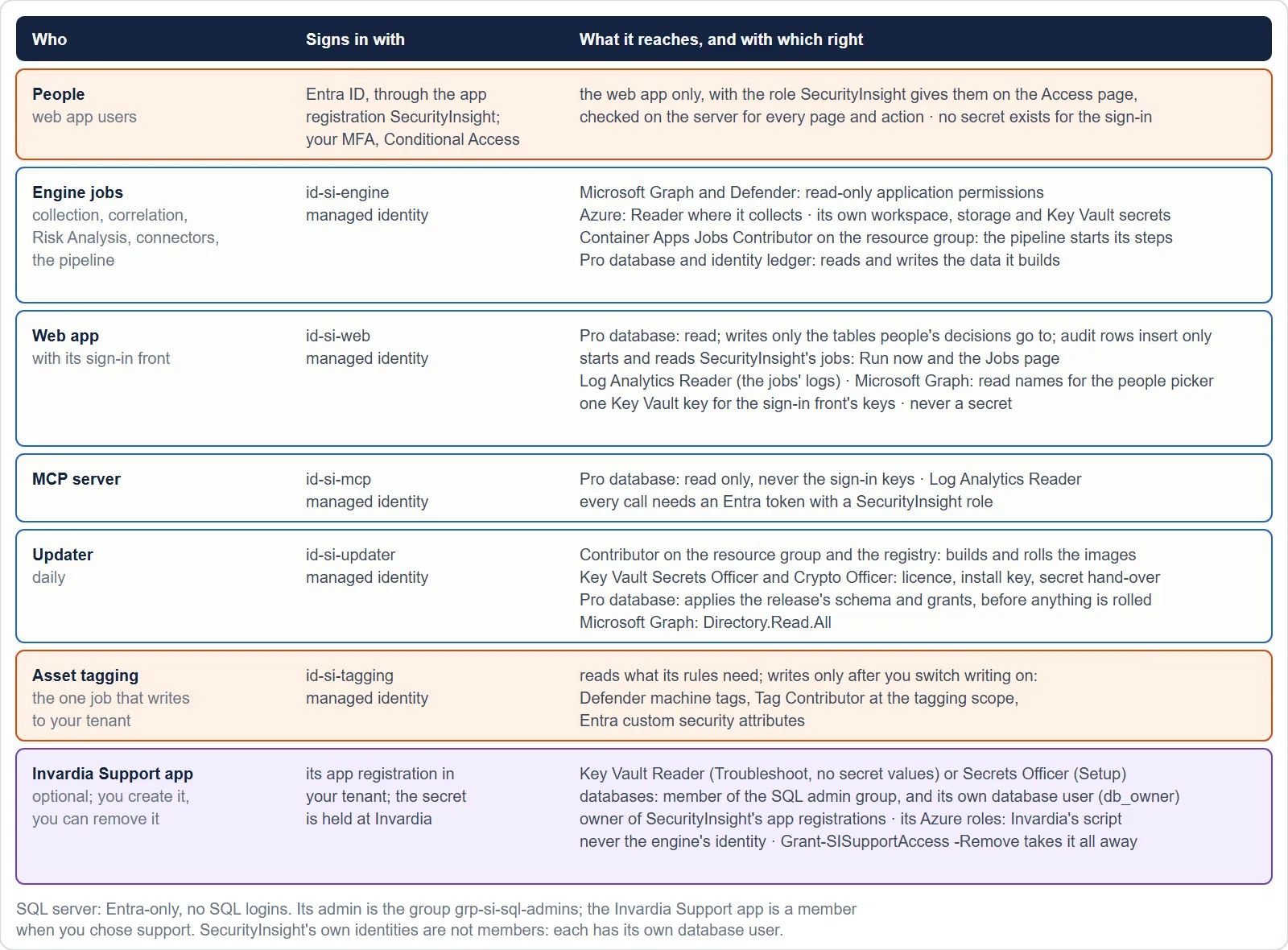
- One identity per role, each with only what its job needs. See Identities and permissions.
- The engine is one-way. The web app writes requests and decisions; the engine pulls them and acts. The web app can start named jobs but can never change the engine, its image or its database schema.
- No secrets in settings. Every job and app signs in with its managed identity. A secret you supply (an SMTP password, an API key) lives only in the install’s Key Vault and reaches a job as a Key Vault reference.
- Damage is stopped, not cleaned up afterwards. Safety checks hold large or sudden changes before they reach your CMDB, ServiceNow or tickets. See Guards and guard modes and Data health.
Sign-in and roles
- Every user signs in with Entra ID: single sign-on, your MFA and your Conditional Access apply. The enterprise application does not require assignment: SecurityInsight decides who has access. Anyone in your directory can sign in, and the web app refuses every page to a person it gives no role until a SuperAdmin adds them on the Access page. To limit who can sign in at all, add a Conditional Access policy for the SecurityInsight enterprise application.
- The sign-in uses the authorisation code flow with PKCE and the web app’s managed identity as a federated credential: no client secret and no certificate exist to steal or renew. Sessions last at most 8 hours. Every page except a health probe requires a signed-in user.
- Four roles, checked on the server for every page and every action: Reader (every view, no changes), Delegated (decisions only inside assigned scopes), Admin (everything except roles, licence, updates and support access) and SuperAdmin (all of it). A kiosk Wallboard role sees only the wall board.
- Browser hardening: a strict Content Security Policy, HSTS, framing refused, no referrer, anti-forgery tokens on every change.
- Magic links in mails are off by default (they bypass Conditional Access by design).
Signed requests
A decision that leads to a change outside SecurityInsight (connector settings, exemptions, asset tagging, data-out decisions) carries the signed Entra token of the person who made it, stored with the time it was verified. Before it acts, the engine checks the token’s signature, issuer, audience, lifetime, the user and the role, for the requester and for the approver. A request that cannot be verified is refused. Safety checks, approvals and limits stay on top.
Network
- The web app is reachable either from the internet behind Entra sign-in (add Conditional Access) or from your network only. Your choice at install.
- No virtual network is created by default; adding one with private endpoints is supported and recommended for strict networks.
- Storage, Key Vault and SQL are reached with managed identities. The storage account has shared-key access off. The database accepts Entra identities only.
The database
Entra-only authentication, one contained database user per component, one least-privilege role per component, no standing DDL or security right on any runtime identity, and SQL auditing to your own workspace for 90 days. The audit trail cannot be changed or deleted, enforced by the database itself. See SQL access.
Secrets and keys
| What | Where |
|---|---|
| Licence, install key, connector secrets, optional keys (Azure OpenAI, Shodan, SMTP) | The install’s Key Vault, purge protection on |
| A secret you paste in the web app | Handed encrypted to the updater, which stores it in the Key Vault. The web app itself never writes a secret. |
| The container registry | Admin user off; every job pulls with its own identity |
Updates and integrity
- Releases are signed by Invardia and verified by the install against public keys that ship inside SecurityInsight, then checked by size and SHA-256. Images are built from the verified source inside your own registry.
- A release reaches rings in order: 0 Dev, 1 Test, 2 Design partners, 3 Broad. A release to rings 2 and 3 needs the vendor’s release owner’s explicit approval, and is held while installs that took it report unhealthy data. See Releases, rings and waves.
- For 24 hours after a release that changed engine code, every numbered safety check is twice as strict.
- The licence is signed and verified offline, bound to the tenant of the identity’s own token. A licence copied to another tenant does not unlock Pro.
Change control and audit
- Changes in the web app are staged and written only on Review & commit, each in one transaction with an audit row.
- A change a job carries out names the person who asked for it, and the approver.
- Exemptions are requested, approved by the domain’s owners, reviewed monthly and ended, never deleted.
- One deviation report lists every override, exemption, exclusion, disabled detection and changed setting.
Vendor access
Invardia can reach your install only through the Invardia Support app, which exists only if you create it, at the level you choose, and which you can disable or remove at any time. Every support action is recorded. See Support access.
Scripts
Every script a person runs has a documentation page at https://invardia.com/docs/si/scripts/ (purpose, the rights it
needs, every change it makes, how to undo it), supports -WhatIf or plans by default, keeps a transcript, carries
everything it runs (no second download) and is listed with its SHA-256 in SHA256SUMS.txt.
Verified against SecurityInsight 3.0.79 on Nov 9, 2026Download PDF