

SecurityInsight documentation · Verified against SecurityInsight 3.0.79 on Nov 9, 2026
Operations
What runs in a SecurityInsight install, where you watch it, and what it does by itself when something goes wrong. SecurityInsight is built to run for years without anyone touching it: updates, sizing and recovery are automatic, and anything that needs a person says so in plain words.
What runs
| Component | What it does | When |
|---|---|---|
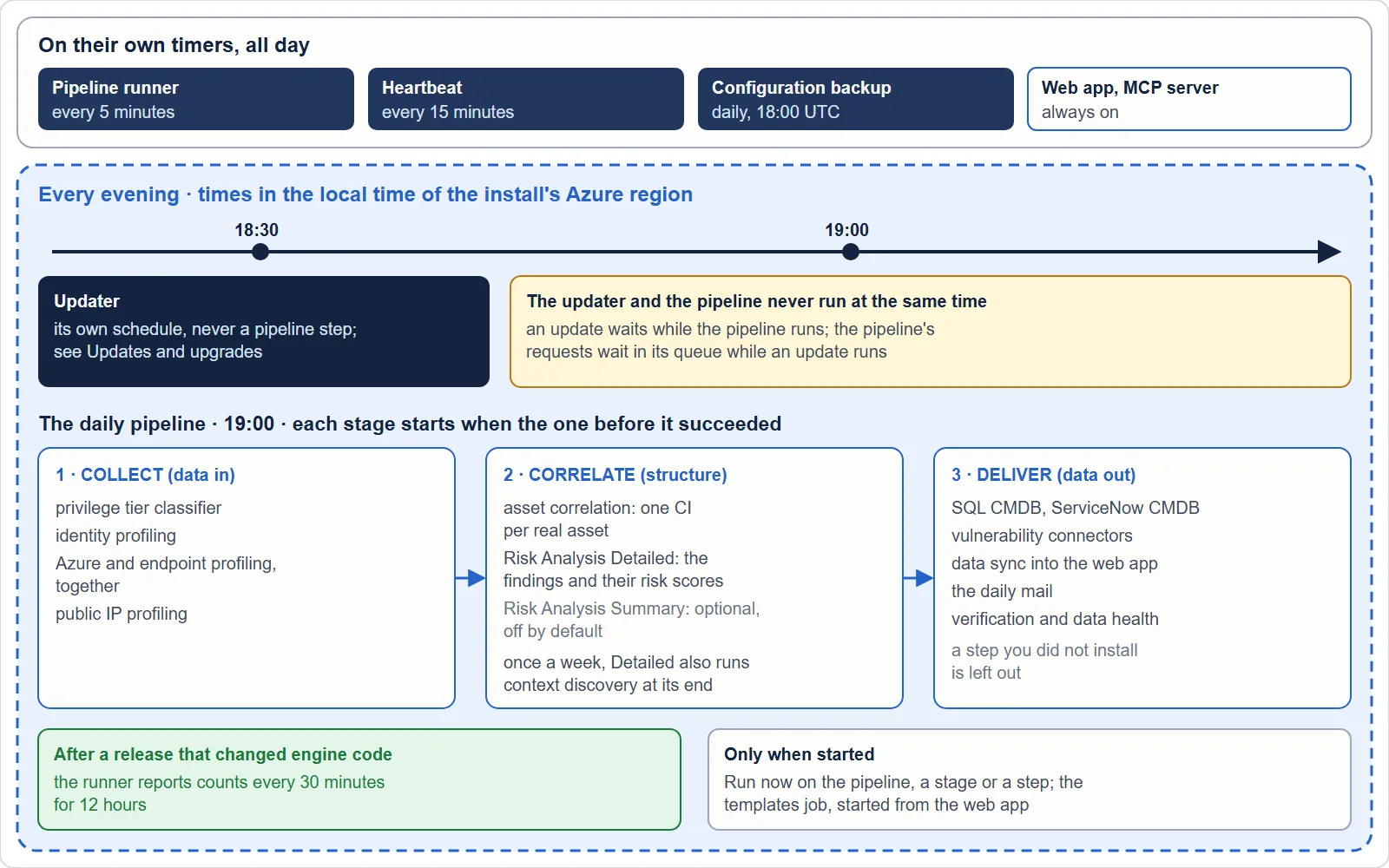
| The pipeline job | Starts the daily run and follows each step to its end: Collect, Correlate, Deliver. See The daily pipeline. | Daily at the time you chose (default 19:00 in the local time of the install’s Azure region; Danish time when the region is not known) |
| Collection jobs | Read Defender XDR, Entra ID, Azure and (optionally) Shodan, read only, and profile every asset. Large tenants are collected in parts by queue workers. | Steps of the pipeline |
| Correlation (the CI build) | Merges the records of every source into one configuration item (CI) per real asset, in the SecurityInsight database. | Step of the pipeline |
| Risk Analysis | Scores every finding and writes the reports to the database, Log Analytics, Excel and mail. | Step of the pipeline |
| Data sync | Loads complete collections into the web app’s views. | Step of the pipeline |
| Connectors | Hand findings and assets to your CMDB, ServiceNow and ticketing, with their safety checks. | Steps of the pipeline, after a complete run only |
| Verification and data health | Read-only checks of SecurityInsight’s own data against the sources. See Data health. | Daily |
| The pipeline runner | Starts the daily pipeline at its time and each step when it is due; follows a running step. | Every 5 minutes |
| The heartbeat job | Tells Invardia every half hour that the install is alive. See Status reports to Invardia. | Every 15 minutes |
| Configuration backup | A daily backup of every configuration record you made, in the SecurityInsight database; kept 90 days by default. | Daily, 18:00 UTC |
| The updater | Keeps the install on its update ring. See Updates and upgrades. | Daily, 18:30 in the local time of the install’s Azure region (Danish time when the region is not known) |
| The web app and MCP server | Views, settings, approvals; the MCP server answers read-only questions from MCP clients. | Always on (the web app scales to zero) |
Where you watch it
| Page in the web app | What it shows |
|---|---|
| Operations > Jobs | Every job, its last executions, Run now, the pipeline and its steps |
| Operations > Jobs > Run health | Every run of every engine: outcome, duration, counts, the failed stage and the reason |
| Operations > Guards (safety checks) | Every held, refused or stopped step, in plain words. See Guards and guard modes. |
| Configuration > Connectors > Data-health hold | The daily check of SecurityInsight’s own data and the data-out it holds. See Data health. |
| The header | Environment, tenant, update ring (with a pre-release wave when there is one), data health and, for SuperAdmins, the guard mode |
Every page of the web app carries one line per source that is running on an older collection, with the time that data is from. Excel exports and data mails carry the same sentence.
Mails
Every mail SecurityInsight sends has one subject format:
[<Environment>] <Failed | Warning | Action needed, when relevant> <what happened> [<ticket number, if any>] [SecurityInsight]
The environment is the name in the web app’s header. Normal reports carry no severity word. Subjects are at most 120 characters; only the what happened part is shortened. Mail is sent from a shared mailbox that SecurityInsight’s identities may send from and nothing else, or through your own SMTP relay.
What SecurityInsight does by itself
- Sizing. Every job is sized for your tenant (2 CPU / 4 GiB, from 5,000 objects 4 CPU / 8 GiB) at install and again on every update. A job that ran out of memory goes up one size on the next update.
- Run limits. SecurityInsight chooses no run limit: every engine job gets the longest one Azure accepts (7 days). A step that runs long is reported once (“no sign of progress for 2 hours”) and keeps running; a step stopped at its limit is given the longest limit and started again once in the same run.
- A source that fails. The run goes on without it. That source’s data stays exactly as its last good collection left it, nothing of it is shown as gone or fixed, and every page says how old it is. After 7 days without a good collection of a source, delivery waits until it collects again.
- A collection with far fewer assets. It is not taken as the truth at once: what it no longer lists is kept, and the drop is accepted only when the next complete collection shows the same level.
- One CI build at a time, one pipeline run at a time. A second start waits; a job that is already running is followed, never started twice.
- A failed step costs only what depends on it. Steps that work on stored data still run; nothing is closed, no ticket changed and no mail sent because a step failed.
- The first run of a new install shows nothing before the assets are built whole, then the merged assets, then the findings. A failed step is started again up to two times.
Logs and records
| Record | Where | Kept |
|---|---|---|
| Run health (every engine run, start and end) | Log Analytics, SI_RunHealth_CL |
Your workspace’s retention |
| Run transcripts | Blob storage in the install | 30 days (SI_LogRetentionDays) |
| Container logs | Your Log Analytics workspace | Your workspace’s retention |
| Audit trail and change history | the SecurityInsight database; the database refuses any change or deletion | Forever by default; at least 13 months when you set a retention |
| SQL audit | Your Log Analytics workspace (SQLSecurityAuditEvents) |
90 days |
| Script runs | A transcript on the machine the script ran on | Until you delete it |
Status reports to Invardia
On by default; SI_Telemetry_Enabled = false turns every report off. Counts and states only, never the content of
your data:
| Report | When | Carries |
|---|---|---|
| Heartbeat | A Pro install: every half hour, from its own heartbeat job (it runs every 15 minutes and sends at most once per half hour), whether or not the pipeline runs. A Community install: once a day, with its engine runs. | That the install is alive, and its edition, version, update ring, hosting, the kind of sign-in identity and licence state; how many users, guests and devices the tenant has; the guard mode, the pre-release wave and release mode when they apply |
| Run | Every engine run | Job, outcome, duration, failed stage, an error class, a count |
| Guard | A safety check trips | Which check, the numbers against the limit, what was held |
| Health | Each data health cycle and at once on a change | The state and per-source counts; never a record’s name, id or value |
A Pro install’s reports are identified by its install key and include the tenant and a shortened, redacted error text. Invardia uses them to see a problem before you report it, and to decide whether a release may go to the next ring.
Verified against SecurityInsight 3.0.79 on Nov 9, 2026Download PDF