

Policy templates you choose, changed only with approval
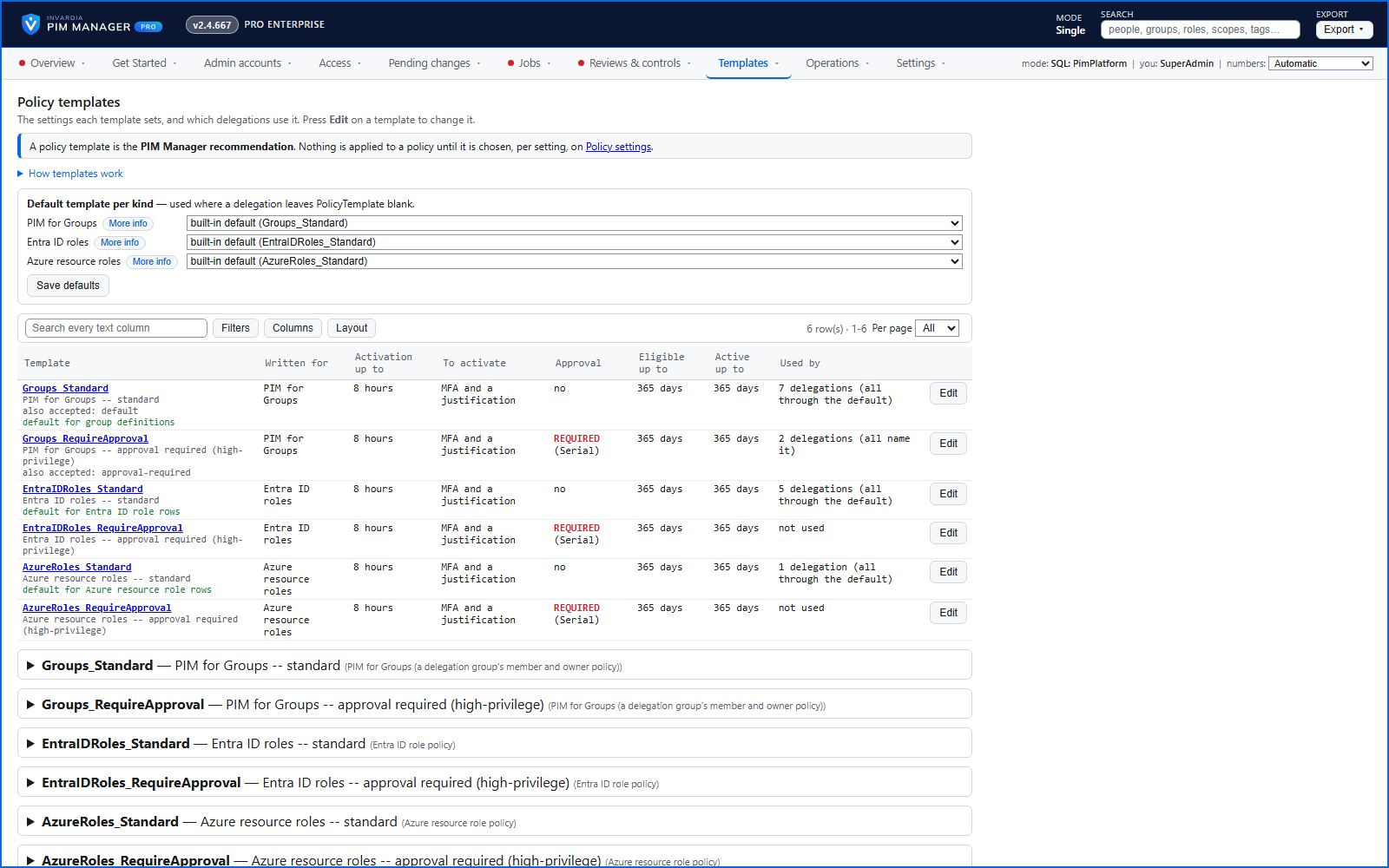
A Standard and a RequireApproval template per kind - PIM for Groups, Entra ID roles and Azure roles - shown in plain words with the delegations that use them.
Purpose
PIM policies - activation length, MFA, justification, approval, notifications - are set per role in the portal and quietly changed over time.
Design
Policy templates come as a Standard and a RequireApproval template for PIM for Groups, Entra ID roles and Azure roles, each with a fixed id, a name you can change and one default per kind. When you create a permission group you choose the activation policy it uses, including one that needs approval. The Policy templates page lists each template in plain words - duration, MFA, approval and expiry - and the delegations that use it.
On each policy run the engine reads the policy back and compares it with the values you chose. When a setting differs, the run plans the correction and holds it until a SuperAdmin approves that change set under Approvals; a setting you did not choose is left as it is.
Business opportunities
Policy hardening that stays hardened under your approval, and a policy set you can explain to an auditor in one page.
Related features
Access map: your delegation model on one board
Pick a person or a permission and see every path in your delegation model - people, their groups, what those groups include and the roles and scopes they grant.
Look up a role: find the least-privileged role for the job
See what an Entra ID role can do in plain words, find the roles that grant an action ranked least-privileged first, see who can activate a role, or compare two roles.
PIM Activator: activate the access you need, together
A browser extension for Edge and Chrome: tick the groups and roles you need, give one justification and activate them together - three clicks for a typical activation.
An engine that keeps your tenant matching your model
You describe the access you want; the engine creates the groups, owners, policies, assignments and access passes your data defines, and keeps them that way.