

Naming that matches your organization
Admin, group and resource names follow patterns you set in Settings, with a preview of the names they produce.
Purpose
Each organization has its own naming standard, and a tool that imposes another one creates a second, parallel world.
Design
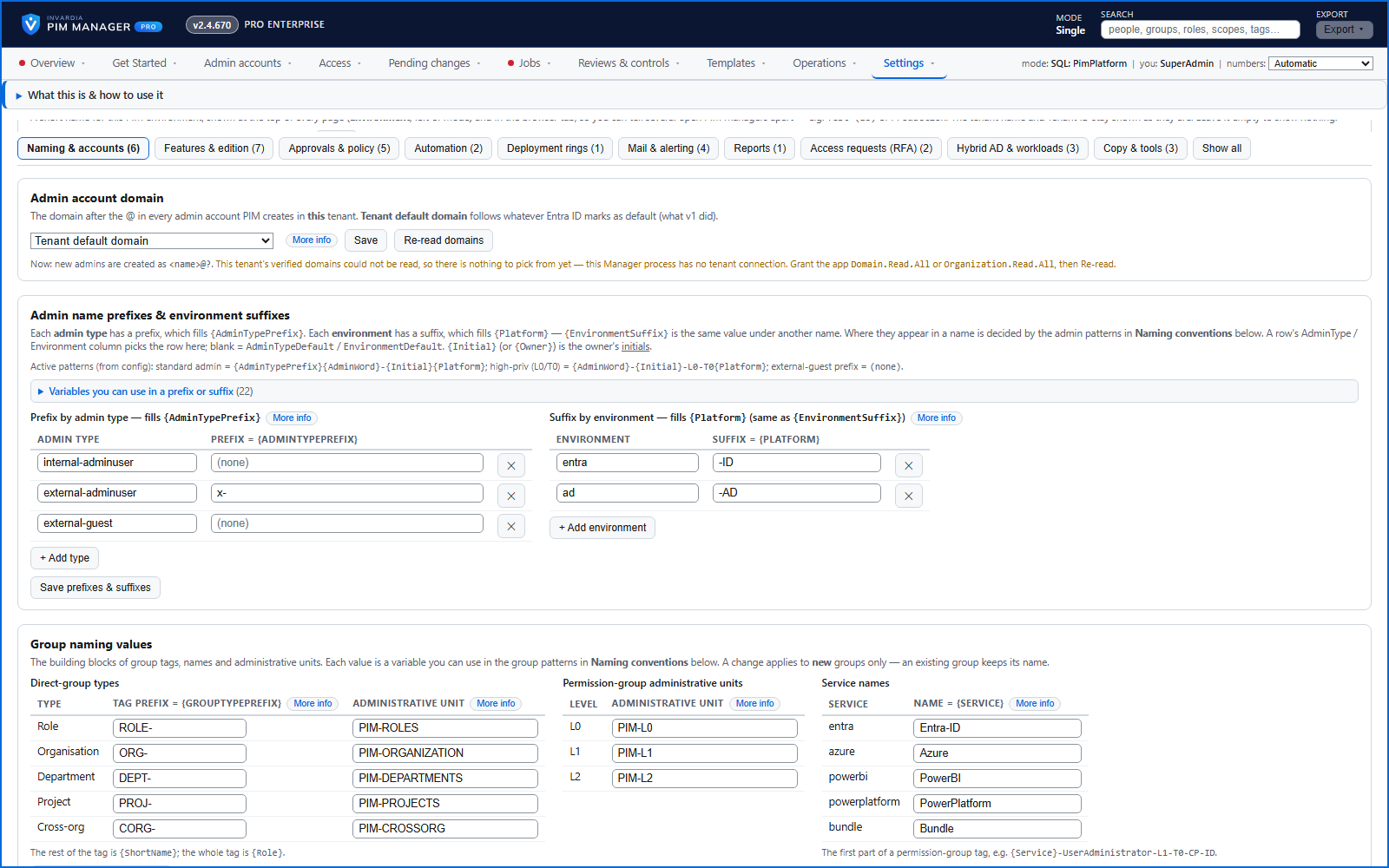
Naming patterns are settings, not code, with tokens for initials, level, tier and platform. Settings > Naming & accounts previews what each pattern produces before you save, and sets the admin account domain, the name prefix for each admin type and the suffix for each environment. The engine finds a group or an administrative unit by the name stored on its definition.
Business opportunities
PIM Manager fits into your existing standards and directory instead of the other way round.
Related features
PIM Activator: activate the access you need, together
A browser extension for Edge and Chrome: tick the groups and roles you need, give one justification and activate them together - three clicks for a typical activation.
Roll out the PIM Activator from one guided page
One page takes you through deploying the browser extension: the sign-in apps, the settings, the Intune remediation, Edge for Business and PCs and servers without Intune.
An engine that keeps your tenant matching your model
You describe the access you want; the engine creates the groups, owners, policies, assignments and access passes your data defines, and keeps them that way.
Get Started: the steps to a working environment
A guided list of the steps that make an environment work - each marked done or still open from your own data.