

Access reviews per department, carried out by PIM Manager
Department owners decide Keep or Remove for each admin on a cadence you set; decisions pass through an approval or a commit and are recorded as evidence.
Purpose
Recertification campaigns stall in mailboxes, and a "remove" decision often does not turn into removed access.
Design
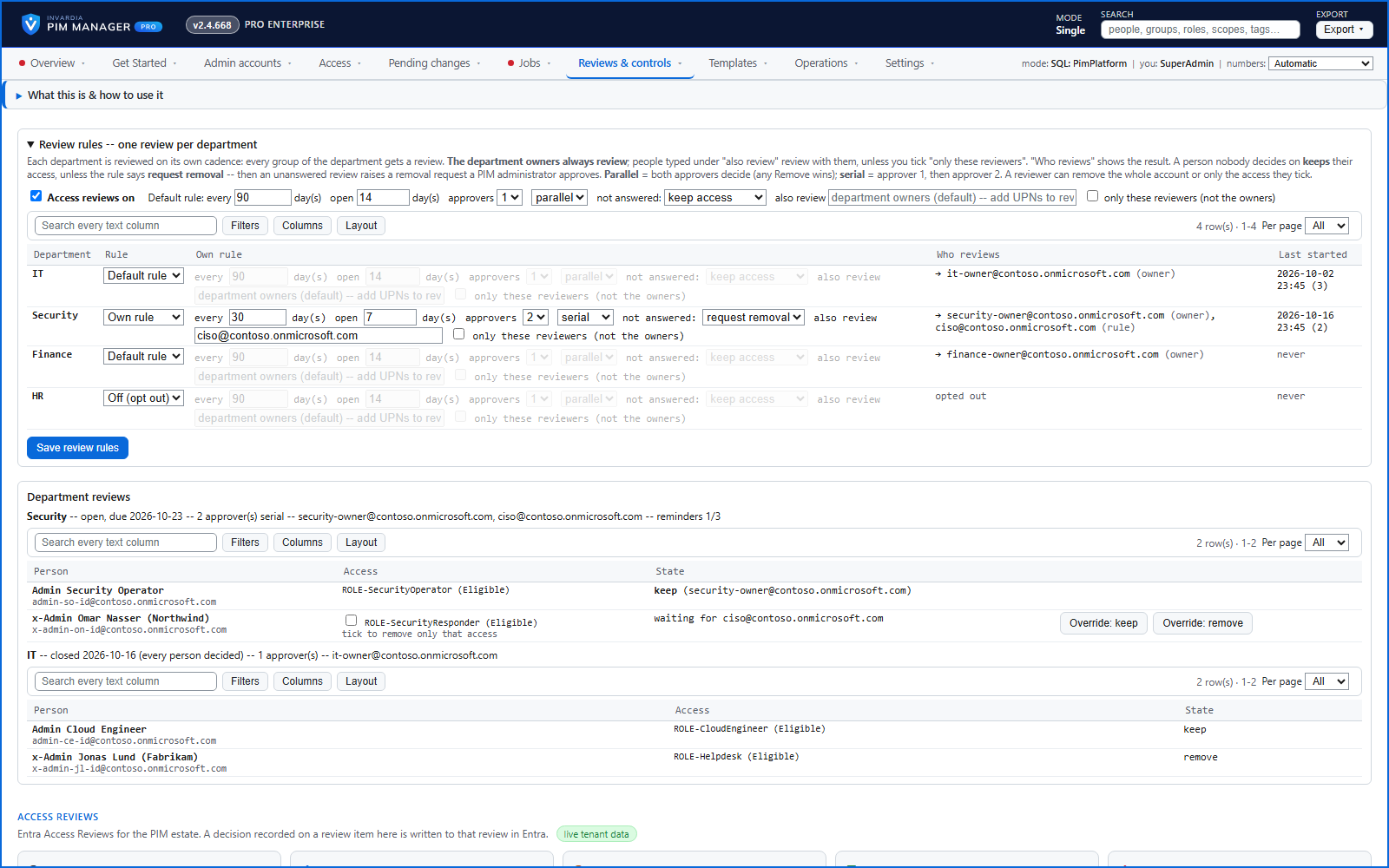
PIM Manager runs one review per department itself; it does not need Microsoft Entra access reviews. Review rules set a default and, per department, Off or its own rule: how often, how long a round stays open, extra reviewers (the department owners by default) and one or two approvers, in parallel or in series. Reviewers decide Keep or Remove per person on My people, and nobody reviews their own account. Remove with access ticked stages the removal of only those memberships for a commit; Remove with nothing ticked raises an offboarding approval request, which an administrator can approve only when a SuperAdmin has switched on Approval-gated offboarding + revoke (off by default). Overdue reviews are chased weekly, three times, and the rule decides whether an unanswered person keeps access (the default) or gets an offboarding request.
The same page shows the Microsoft Entra access reviews in your tenant in their own panel; a decision recorded there is written to that review in Entra. Every decision, reminder and override is in the audit trail.
Business opportunities
Recertification that finishes, with removed access removed and an evidence trail auditors accept.
Related features
Access map: your delegation model on one board
Pick a person or a permission and see every path in your delegation model - people, their groups, what those groups include and the roles and scopes they grant.
Who can do what - and who can activate this role
Pick a person to see the targets they can reach, or pick a role to see who can activate it - each with the exact path that grants it.
Look up a role: find the least-privileged role for the job
See what an Entra ID role can do in plain words, find the roles that grant an action ranked least-privileged first, see who can activate a role, or compare two roles.
PIM Activator: activate the access you need, together
A browser extension for Edge and Chrome: tick the groups and roles you need, give one justification and activate them together - three clicks for a typical activation.