

Runs in your own Azure, on managed identities
Manager, engine and database run in your own subscription on Azure Container Apps and Azure SQL - each component on its own managed identity, with no PowerShell modules.
Purpose
Privileged-access data is the last thing you want to hand to someone else's cloud.
Design
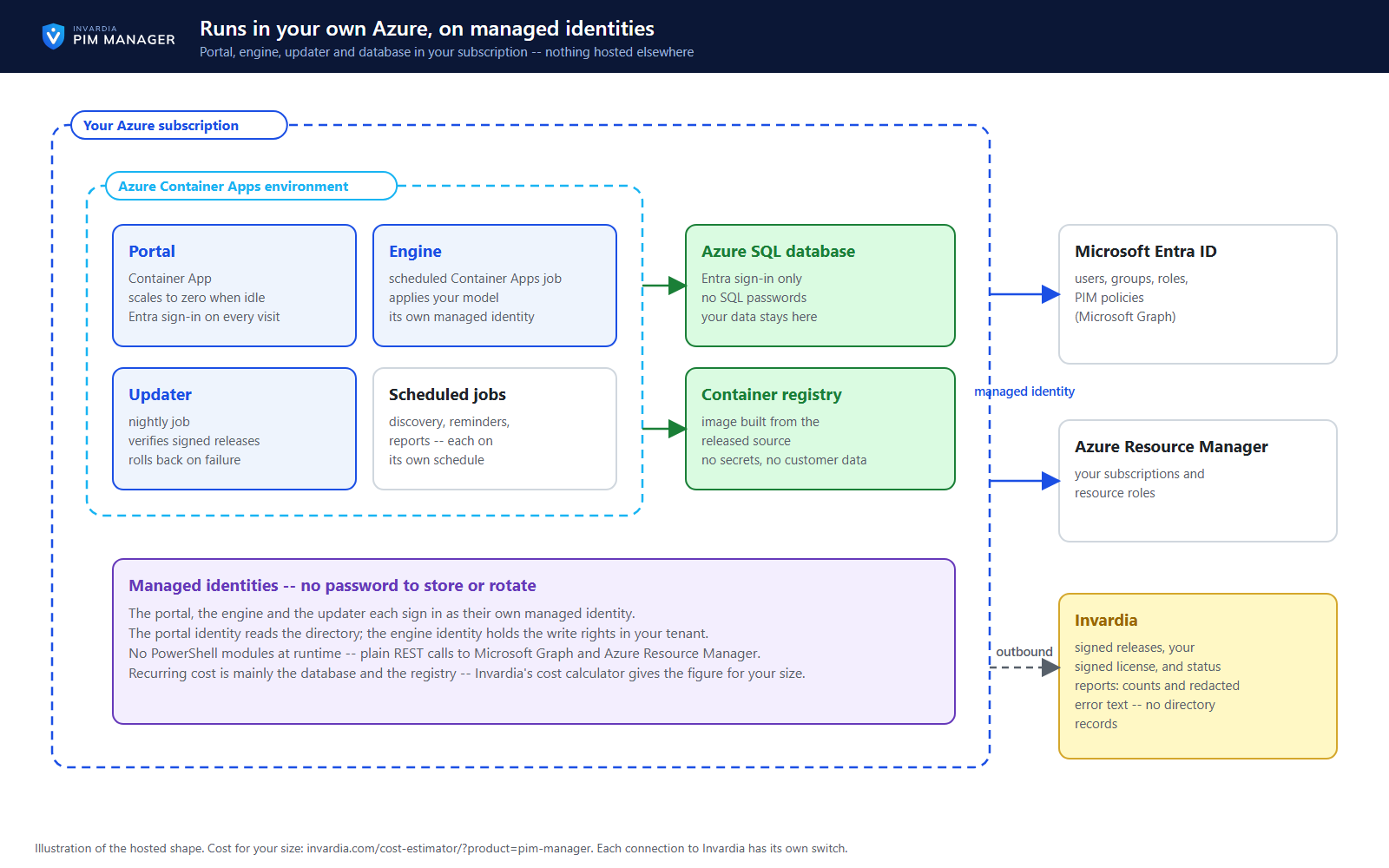
The Manager is a Container App that scales to zero when nobody uses it, and the engine is a scheduled Container Apps job next to an Azure SQL database that accepts Entra sign-in only. The Manager, the engine and the updater sign in as their own managed identities, so the runtime holds no password to store or rotate. The image is built in your own registry from the released source and carries no secrets and no customer data. Your directory data and your database stay in your subscription; what the product sends to Invardia, and how to switch it off, is listed in the security design.
The recurring cost is mainly the database and the registry; Invardia's cost calculator (invardia.com/cost-estimator/?product=pim-manager) shows the license and the Azure cost for your size.
Business opportunities
Your directory records and your database stay in your subscription, your security team controls each component, and you see the cost for your size before you install.
Related features
PIM policy changes wait for a SuperAdmin
A policy run plans its changes and holds them until a SuperAdmin approves that exact change set, with the setting that weakens protection marked.
Changes only what you define - deleting an account is a person's decision
The engine changes groups, roles and admins only when your data defines them, does not disable, revoke or offboard your break-glass accounts, and does not delete a user account on its own.
Emergency access: break-glass accounts and a time-boxed override
Your break-glass accounts are protected from PIM Manager's revoke, disable and offboard paths, and in an emergency a SuperAdmin can lift the approval requirement for a bounded time.
Scripts and services on the Manager API, on your list only
Scripts and services use the Manager API only with an Entra application that a SuperAdmin lists and a second SuperAdmin approves, as Reader or Admin.