

No vendor access by default - remote support only on your request
Invardia has no access to your installation by default. For a troubleshooting case you can create the Invardia Support app yourself, choose its level and its secret, and remove it when the case is done.
Purpose
Remote support should not mean standing vendor access to your privileged-access tool.
Design
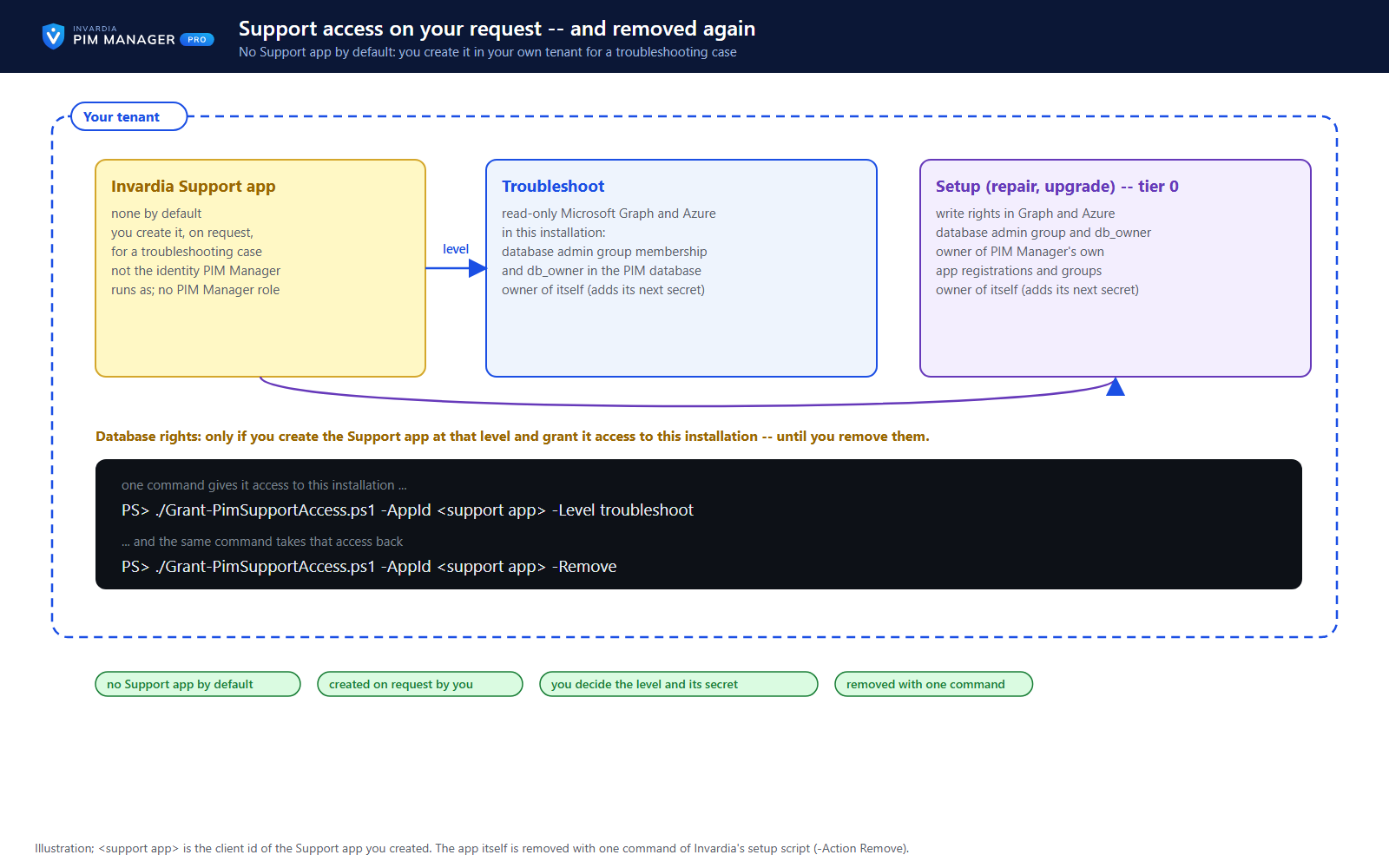
A PIM Manager installation has no Invardia Support app: it gives Invardia no identity, no credential and no network path into your tenant or your subscription. When you open a support case and want Invardia to look inside your installation, you create the app in your own tenant with Invardia's setup script and decide its level (Troubleshoot or Setup), its client secret (1 to 730 days, shown to you once and uploaded by you in the customer portal under Remote support) and how it is renewed - by default only with your approval. No PIM Manager component runs as the app, and it is not given a PIM Manager role.
Troubleshoot has read-only Microsoft Graph and Azure rights; Setup adds write rights in Graph and Azure and is tier-0 equivalent. At both levels the app owns itself and holds Application.ReadWrite.OwnedBy, so it can add its own next secret. If you also give it access to this installation with Grant-PimSupportAccess, it becomes, at either level, a member of the database admin group and gets its own database user in the database owner role (db_owner) - Troubleshoot is read-only in Graph and Azure, but not in the PIM database. These database rights exist only if you create the Support app at that level and grant it access, and they last until you take them back. Its sign-ins and changes appear in your Entra and Azure logs; statements it runs directly against the database are recorded only if you switch on Azure SQL auditing.
When the case is done, one command takes back its access to the installation and one command removes the app. The steps are on invardia.com/support/remote-access.
Business opportunities
Help with a hard case when you ask for it, under your control from start to finish - and no standing vendor access the rest of the time.
Related features
PIM policy changes wait for a SuperAdmin
A policy run plans its changes and holds them until a SuperAdmin approves that exact change set, with the setting that weakens protection marked.
Changes only what you define - deleting an account is a person's decision
The engine changes groups, roles and admins only when your data defines them, does not disable, revoke or offboard your break-glass accounts, and does not delete a user account on its own.
Emergency access: break-glass accounts and a time-boxed override
Your break-glass accounts are protected from PIM Manager's revoke, disable and offboard paths, and in an emergency a SuperAdmin can lift the approval requirement for a bounded time.
Scripts and services on the Manager API, on your list only
Scripts and services use the Manager API only with an Entra application that a SuperAdmin lists and a second SuperAdmin approves, as Reader or Admin.