

Tamper monitor
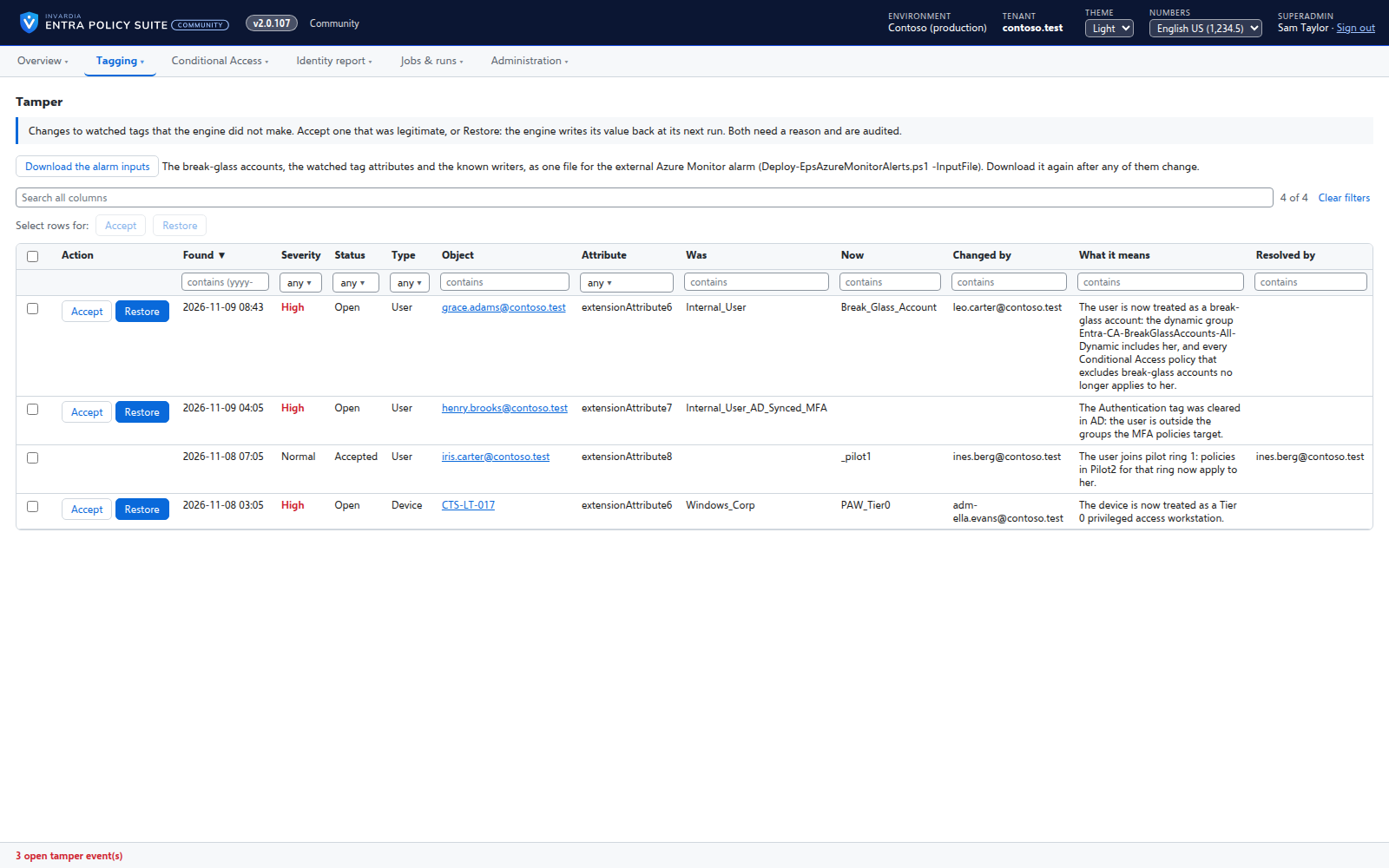
Reports every change to a watched tag that Entra Policy Suite did not make, with who made it and what it means.
Purpose
Setting a user's tag to a break-glass value, or clearing an Authentication tag, takes that user out of the MFA policies - and no Conditional Access policy changes, so nobody notices.
Design
The monitor watches exactly the attributes the enabled tag types use, on users and devices. A change the engine did not make is recorded with the object, the old and the new value, who made it when the Entra audit log says so, and what it means; a change to or from a high-severity value is High. One alert mail goes out for the new findings. An admin accepts the change or restores the engine's value, with a reason; nothing is overwritten silently.
Business opportunities
An attacker or a well-meaning admin cannot quietly move an account out of your policies by editing a tag.
Related features
Alert mail from one mailbox only
Alerts are sent from a shared mailbox that the engine may send as - and no other mailbox in the tenant.
Conditional Access you move stage by stage
Adopt the Conditional Access policies you already have, move each one to Pilot or Prod with a button, and see when a policy drifts or loses its break-glass exclusion.